ChatGPT vs Gemini vs Claude: Which AI Actually Helps Students Study Better 2026?
It’s 11 p.m. You have an exam tomorrow.
You’ve got three AI tabs open. Each one is half-explaining the same topic. None of them agree.
Sound familiar?
A lot of us now open a chatbot before we open a textbook. Or before we message a classmate. Or before we even think about it. But most people didn’t actually choose their AI. They just used whichever one they downloaded first.
So let’s fix that.
ChatGPT, Gemini, and Claude are all decent study tools. But they’re not built the same way, and that difference shows up fast — in how well they explain things, how much they remember, and how often they get stuff wrong. There’s no single best AI for studying that wins at everything. It depends on what you’re studying and how your brain likes to learn.
I’m not going to pretend I’m some AI expert with a lab coat and a research grant. I’m 19. I test these tools a lot, I read the documentation, and I write down what I actually find. This post comes from that — plus some official sources I’ve linked along the way so you can double-check me.
Let’s get into it. this guide best ai for studying.
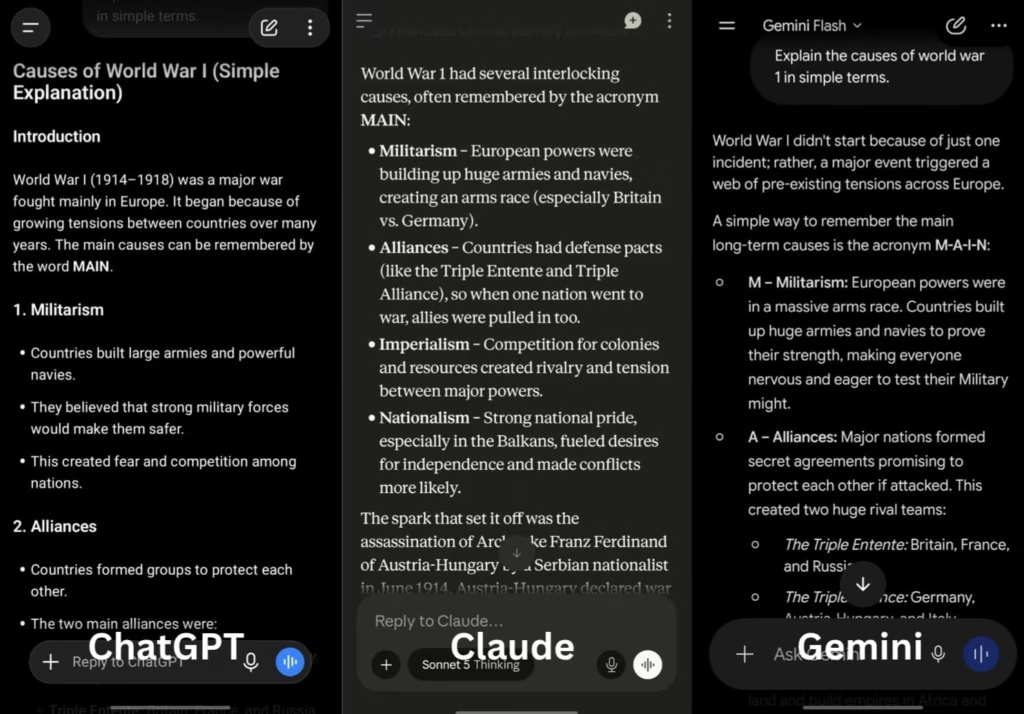
Table of Contents
- What Do We Even Mean by “Best AI for Studying”?
- ChatGPT for Studying: What’s Good, What’s Not
- Gemini for Studying: What’s Good, What’s Not
- Claude for Studying: What’s Good, What’s Not
- Side-by-Side Comparison Table
- A Quick Way to Decide Which One to Use
- Where All Three Still Let You Down
- Frequently Asked Questions
- Final Thoughts
What Do We Even Mean by “Best AI for Studying”?
Before we compare anything, let’s agree on what “good for studying” actually means.
It’s not “whichever one writes the longest answer.” That’s a trap. Long doesn’t mean useful.
Here’s what actually matters, at least to me:
It should explain things simply. Break the idea down. Don’t dump a wall of text and call it teaching.
It should be accurate. If you memorize something wrong the night before an exam, that’s on the AI. Not fully your fault.
It should handle your files. PDFs of lecture notes. Scanned textbook pages. Past exam papers. You shouldn’t have to retype everything.
It should remember what you told it. Ten minutes into a study session, it shouldn’t forget the question you asked two messages ago.
It should be affordable. Most of us are students. We’re not made of money. Free tiers matter.
Keep these five in your head. I’ll keep coming back to them.
ChatGPT for Studying: What’s Good, What’s Not
ChatGPT, from OpenAI, is probably the one you’ve already opened. It’s the household name at this point.
For studying, its biggest strength is honestly just range. It’s good at a lot of things at once — math proofs, history summaries, flashcard-style quizzes, and talking you through a concept out loud, like an actual tutor would.
What works well:
Voice mode is genuinely impressive. It sounds natural. If you learn better by talking things through instead of typing, this matters more than you’d think.
Custom GPTs let you build (or find) a study bot trained on one narrow thing — say, organic chemistry reactions. That kind of specificity helps.
There’s also just a lot of people using it. OpenAI says ChatGPT has grown to around 900 million weekly active users. That massive user base means there are countless free guides, prompt ideas, study tips, and tutorials already out there. If you’re stuck, you’re rarely the first person to run into that problem.
The free tier is genuinely usable too. Image uploads, file uploads, web browsing — you get real functionality without paying.
Worth knowing: ChatGPT’s context window (how much text it can “remember” at once) depends on the model and plan you’re using. The current free plan offers a 27,000-token window, while higher-tier plans unlock larger windows on supported models.
Where it falls short:
OpenAI started showing sponsored suggestions on the free tier. It can feel a little distracting when you’re trying to focus on, say, thermodynamics.
Also — and this matters — ChatGPT sometimes sounds more confident than it should. On long, detailed explanations, it can slip in something that’s just wrong. Not maliciously. Just confidently wrong. Double-check dates, formulas, and citations before you trust them fully. OpenAI’s own help center covers how the model works and what it’s built for, if you want to dig deeper.
Best for: quick explanations, brainstorming, voice-based revision, and general help across almost any subject.
Gemini for Studying: What’s Good, What’s Not
Gemini is Google’s AI. Its biggest advantage isn’t really the model itself — it’s where it lives.
If your school already runs on Google Docs, Sheets, and Slides (and a lot of schools do), Gemini is just there. Built in. No copy-pasting required.
What works well:
It’s strong with images. Upload a photo of your messy handwritten diagram, or a screenshot of a textbook page, and it can actually work with that. <mark>
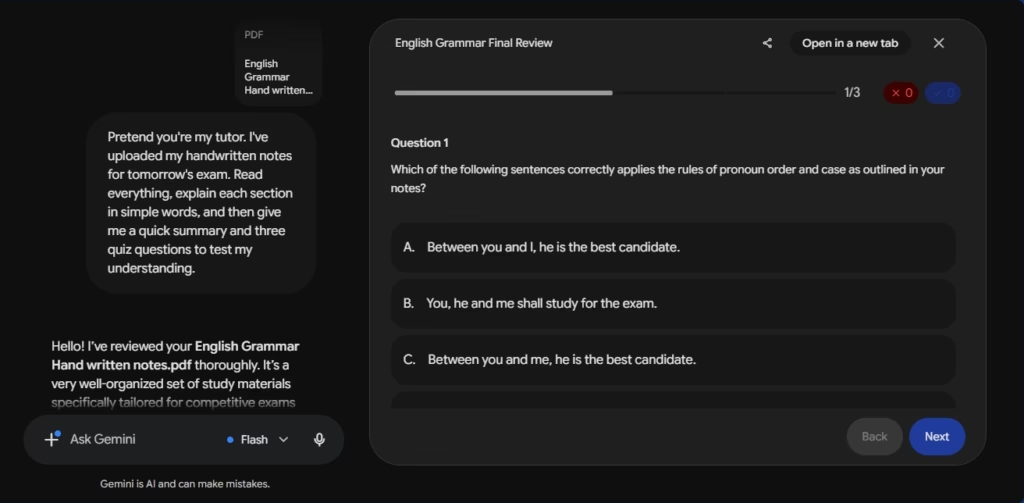
One of Gemini’s biggest strengths is its context window — basically, how much information it can hold in mind during a conversation. Depending on your plan, that ranges from 32,000 tokens on the free tier up to 1 million tokens on Google’s paid AI Pro and Ultra plans. In plain terms: it can work with entire textbooks, large codebases, or long lecture transcripts without losing track of earlier details.
Deep Google integration means it can pull straight from your Drive files. No exporting. No re-uploading.
Google has also run free or discounted access programs for students in the past. Worth checking gemini.google.com/students directly, since eligibility and offers change often and third-party blogs aren’t always accurate about the current terms.
Where it falls short:
Quality is a bit uneven. Some answers are excellent. Others are noticeably weaker than what ChatGPT or Claude would give you on the exact same question.
Long-form writing also isn’t its strongest area. If you’re drafting an essay, expect to do more editing afterward.
Best for: students living inside Google Docs and Sheets, visual learners working with diagrams or photos, and anyone dealing with long source material.
Claude for Studying: What’s Good, What’s Not
Claude is made by Anthropic. It’s the least “hyped” of the three, if we’re being honest. No flashy ad campaigns. No huge cultural moment like ChatGPT had.
But people who care about accuracy over flash tend to end up here.
What works well:
Claude has earned a reputation for strong factual consistency. Independent benchmarks, such as Vectara’s Hallucination Leaderboard, often rank Claude models among the better performers for grounded summarization — meaning they’re less likely to introduce unsupported facts than many competing models. That doesn’t mean Claude is always correct; every AI model can hallucinate, especially on complex or niche topics. But it’s generally regarded as one of the more reliable options when accuracy matters. For studying, that’s a big deal — a confidently wrong answer is worse than one that admits uncertainty.
Its long-form writing is strong. Ask it to summarize a dense research paper or structure an essay step by step, and the output tends to be cleaner and more organized than what you’d get elsewhere.
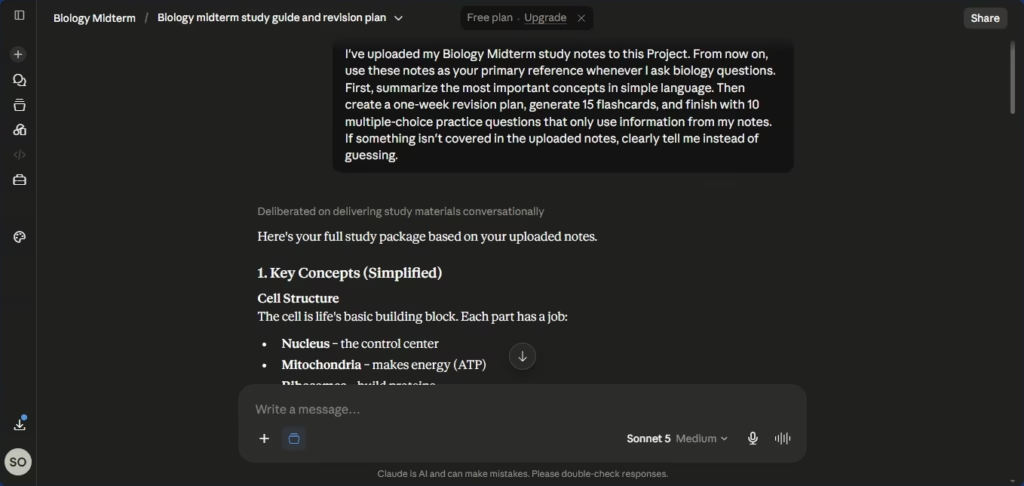
There’s also a Projects feature that lets you keep context around. Upload your semester’s notes once, then come back to them across multiple sessions — no re-uploading every time you open a new chat. Claude also supports large context windows: most paid plans provide 200,000 tokens, while some of Anthropic’s newest models support up to 1 million tokens through the API. That makes it well suited for working with long research papers, books, or large collections of notes. <mark>
The free tier includes a capable model, but usage is limited. Anthropic doesn’t publish a fixed daily message count — your limit depends on factors like demand, conversation length, and which features you’re using. If you hit your limit, you’ll need to wait for it to reset or upgrade to a paid plan. Check Anthropic’s official support site for the latest details.
Where it falls short:
No built-in image generation, and its handling of audio and video is more limited than Gemini’s.
It also has fewer built-in integrations — no huge plugin ecosystem like ChatGPT’s, no deep Google Workspace tie-in like Gemini’s.
The interface itself is minimal. Some people love that. Others find it a bit bare.
Best for: accurate, well-explained answers, essay writing, research summaries, tricky subjects like coding or science, and anyone who’d rather hear “I’m not sure” than a confident guess.
Side-by-Side Comparison Table
| Feature | ChatGPT | Gemini | Claude |
|---|---|---|---|
| Best for | General help, voice-based studying | Google Docs/Sheets users, visual tasks | Accurate, well-structured explanations |
| Accuracy | Good, occasionally overconfident | Inconsistent | Generally the most reliable |
| File handling | Strong | Excellent with Google Drive | Strong, plus Projects |
| Voice mode | Best of the three | Available, less natural | More limited |
| Long context memory | Solid | Very large | Solid, plus persistent Projects |
| Free tier | Good, includes ads | Good for Google users | Good, with usage limits |
| Ecosystem | Largest (plugins, Custom GPTs) | Deep Google integration | Smaller, more focused |
Two things worth keeping in mind about this table. First, AI companies often promote benchmark scores like MMLU, GPQA, or SWE-bench — but those measure narrow technical skills, not which chatbot explains things most clearly or makes the best study partner. Testing the same task across all three is a better way to judge fit. Second, this table will age. These tools update constantly, so check each company’s own site before quoting any of this a year from now.
A Quick Way to Decide Which One to Use
If you don’t want to reread all of that every time, here’s a simple mental shortcut.
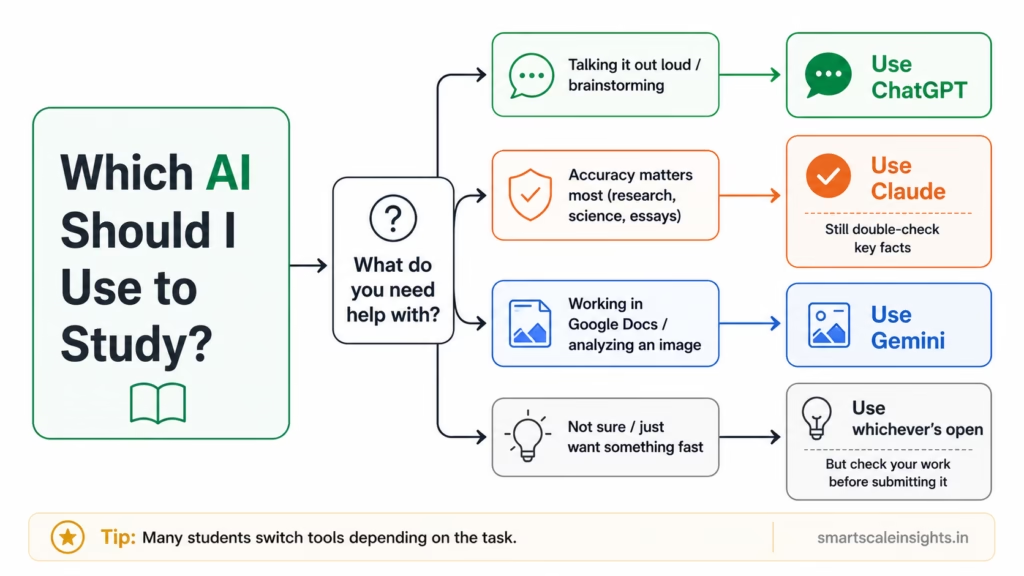
Not a strict rule. Just a starting point. A lot of students end up bouncing between two of the three depending on the task, and honestly, that’s fine.
Where All Three Still Let You Down
I don’t want to oversell any of this. Let’s be real for a second.
None of these tools should replace actual studying. All three have real limits.
They can all be wrong, especially on niche topics, recent events, or exact numbers. Never trust a date or citation without checking it somewhere else.
They don’t know your syllabus. Unless you tell them, or upload it, they’re guessing at how your specific professor defined a term.
Relying on them too much can hurt you later. If you ask for the final answer instead of the reasoning, you might finish the homework fine — and then completely freeze in the actual exam. Ask for the steps, not just the result.
AI policies are still evolving and may differ between universities, departments, courses, or even individual instructors. Always check both your institution’s academic integrity policy and your instructor’s course-specific guidelines before using AI for graded work.
Frequently Asked Questions
Is ChatGPT, Gemini, or Claude free for students?
Yes, all three have usable free plans, though each comes with usage limits that can change over time. Paid plans typically start around US$20/month (or the regional equivalent) at the time of writing, unlocking higher usage limits, stronger models, and extra features. Google has also occasionally offered discounted or free access for verified students — check the official Gemini for Students page directly, since third-party sites often list outdated terms.
Which one’s best for math and science homework?
ChatGPT and Claude both do well here, especially if you specifically ask for the reasoning behind each step instead of just the final number. Gemini is a solid pick if you’re working from a photo of handwritten work, since it reads images well. Note that benchmark scores like GPQA or SWE-bench measure specific technical skills and don’t always predict which chatbot explains a concept most clearly — testing the same homework problem across all three is a better way to find your fit.
Can I actually trust AI-written essays or summaries?
Treat anything an AI gives you as a rough draft, not a finished product. All three can sound completely confident while being factually wrong. Always check dates, quotes, and citations against a real source, and check whether your school even allows this kind of help.
Which one’s easiest for a total beginner?
ChatGPT, probably. Simple interface. Everyone’s heard of it. There are more free tutorials for it than the other two combined.
Do I need to pay to study effectively with AI?
No. The free versions of all three are enough for everyday studying — summarizing notes, explaining tricky concepts, practicing questions. Paying only really helps once you’re hitting usage limits, or you need heavier reasoning for something advanced, like research-level analysis or complex code.
Final Thoughts
There’s no single best AI for studying that wins in every category. If someone tells you otherwise, they’re probably trying to sell you something.
What actually matters is matching the tool to the task. Claude, when you need accuracy and clean explanations. Gemini, when you’re deep in Google Docs or working with images. ChatGPT, when you want range, voice, or just a bigger toolbox.
If you’re just starting out, here’s my honest suggestion: try the free version of all three on the same topic this week. See which explanation actually clicks for you. That fifteen-minute test will teach you more than this entire post did.
If this was useful, stick around. I’m documenting more of these — real, tested, no exaggeration — as I keep learning. I’d rather be accurate than sound like I already know everything.