You’ve got three AI tabs open. Each one is half-explaining the same topic. None of them agree.
Sound familiar?
A lot of us now open a chatbot before we open a textbook. Or before we message a classmate. Or before we even think about it. But most people didn’t actually choose their AI. They just used whichever one they downloaded first.
So let’s fix that.
ChatGPT, Gemini, and Claude are all decent study tools. But they’re not built the same way, and that difference shows up fast — in how well they explain things, how much they remember, and how often they get stuff wrong. There’s no single best AI for studying that wins at everything. It depends on what you’re studying and how your brain likes to learn.
I’m not going to pretend I’m some AI expert with a lab coat and a research grant. I’m 19. I test these tools a lot, I read the documentation, and I write down what I actually find. This post comes from that — plus some official sources I’ve linked along the way so you can double-check me.
Let’s get into it. this guide best ai for studying.
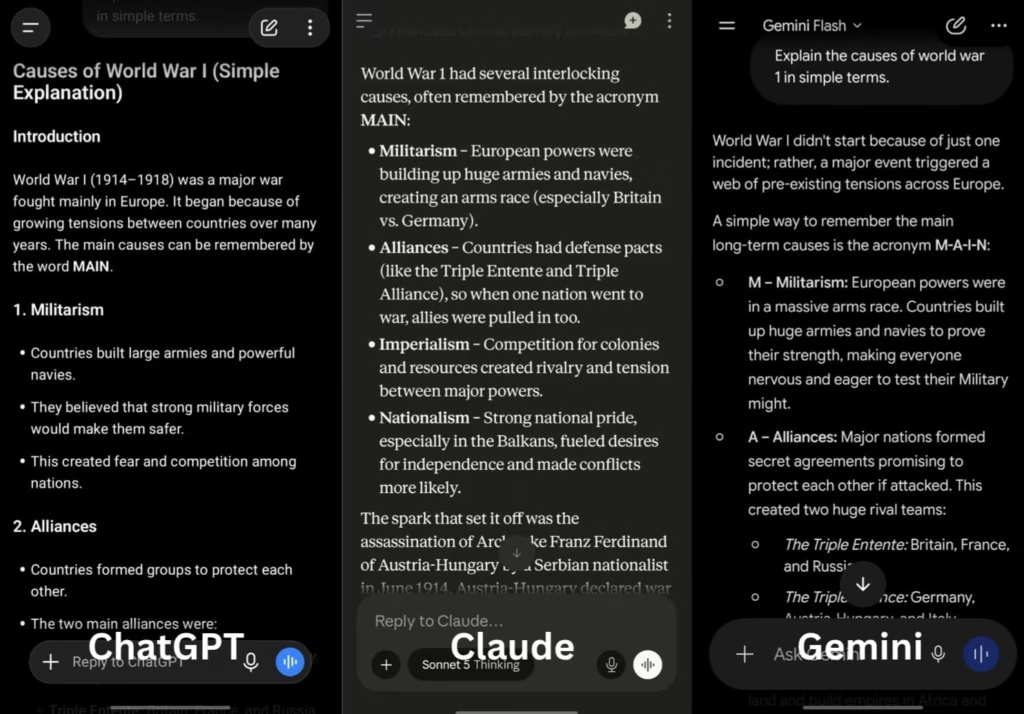
Same question, three different answers — here’s how ChatGPT, Gemini, and Claude actually compare.
Before we compare anything, let’s agree on what “good for studying” actually means.
It’s not “whichever one writes the longest answer.” That’s a trap. Long doesn’t mean useful.
Here’s what actually matters, at least to me:
It should explain things simply. Break the idea down. Don’t dump a wall of text and call it teaching.
It should be accurate. If you memorize something wrong the night before an exam, that’s on the AI. Not fully your fault.
It should handle your files. PDFs of lecture notes. Scanned textbook pages. Past exam papers. You shouldn’t have to retype everything.
It should remember what you told it. Ten minutes into a study session, it shouldn’t forget the question you asked two messages ago.
It should be affordable. Most of us are students. We’re not made of money. Free tiers matter.
Keep these five in your head. I’ll keep coming back to them.
ChatGPT for Studying: What’s Good, What’s Not
ChatGPT, from OpenAI, is probably the one you’ve already opened. It’s the household name at this point.
For studying, its biggest strength is honestly just range. It’s good at a lot of things at once — math proofs, history summaries, flashcard-style quizzes, and talking you through a concept out loud, like an actual tutor would.
What works well:
Voice mode is genuinely impressive. It sounds natural. If you learn better by talking things through instead of typing, this matters more than you’d think.

Prefer talking over typing? ChatGPT’s voice mode turns revision into a conversation.
Custom GPTs let you build (or find) a study bot trained on one narrow thing — say, organic chemistry reactions. That kind of specificity helps.
There’s also just a lot of people using it. OpenAI says ChatGPT has grown to around 900 million weekly active users. That massive user base means there are countless free guides, prompt ideas, study tips, and tutorials already out there. If you’re stuck, you’re rarely the first person to run into that problem.
The free tier is genuinely usable too. Image uploads, file uploads, web browsing — you get real functionality without paying.
Worth knowing: ChatGPT’s context window (how much text it can “remember” at once) depends on the model and plan you’re using. The current free plan offers a 27,000-token window, while higher-tier plans unlock larger windows on supported models.
Where it falls short:
OpenAI started showing sponsored suggestions on the free tier. It can feel a little distracting when you’re trying to focus on, say, thermodynamics.
Also — and this matters — ChatGPT sometimes sounds more confident than it should. On long, detailed explanations, it can slip in something that’s just wrong. Not maliciously. Just confidently wrong. Double-check dates, formulas, and citations before you trust them fully. OpenAI’s own help center covers how the model works and what it’s built for, if you want to dig deeper.
Best for: quick explanations, brainstorming, voice-based revision, and general help across almost any subject.
Gemini for Studying: What’s Good, What’s Not
Gemini is Google’s AI. Its biggest advantage isn’t really the model itself — it’s where it lives.
If your school already runs on Google Docs, Sheets, and Slides (and a lot of schools do), Gemini is just there. Built in. No copy-pasting required.
What works well:
It’s strong with images. Upload a photo of your messy handwritten diagram, or a screenshot of a textbook page, and it can actually work with that. <mark>
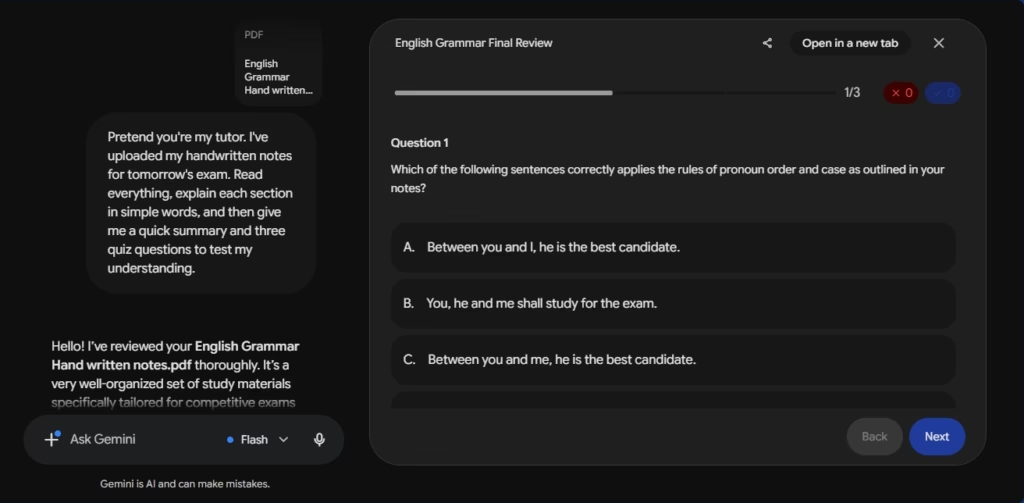
Snap a photo of your notes — Gemini can actually read and explain them.
One of Gemini’s biggest strengths is its context window — basically, how much information it can hold in mind during a conversation. Depending on your plan, that ranges from 32,000 tokens on the free tier up to 1 million tokens on Google’s paid AI Pro and Ultra plans. In plain terms: it can work with entire textbooks, large codebases, or long lecture transcripts without losing track of earlier details.
Deep Google integration means it can pull straight from your Drive files. No exporting. No re-uploading.
Google has also run free or discounted access programs for students in the past. Worth checking gemini.google.com/students directly, since eligibility and offers change often and third-party blogs aren’t always accurate about the current terms.
Where it falls short:
Quality is a bit uneven. Some answers are excellent. Others are noticeably weaker than what ChatGPT or Claude would give you on the exact same question.
Long-form writing also isn’t its strongest area. If you’re drafting an essay, expect to do more editing afterward.
Best for: students living inside Google Docs and Sheets, visual learners working with diagrams or photos, and anyone dealing with long source material.
Claude for Studying: What’s Good, What’s Not
Claude is made by Anthropic. It’s the least “hyped” of the three, if we’re being honest. No flashy ad campaigns. No huge cultural moment like ChatGPT had.
But people who care about accuracy over flash tend to end up here.
What works well:
Claude has earned a reputation for strong factual consistency. Independent benchmarks, such as Vectara’s Hallucination Leaderboard, often rank Claude models among the better performers for grounded summarization — meaning they’re less likely to introduce unsupported facts than many competing models. That doesn’t mean Claude is always correct; every AI model can hallucinate, especially on complex or niche topics. But it’s generally regarded as one of the more reliable options when accuracy matters. For studying, that’s a big deal — a confidently wrong answer is worse than one that admits uncertainty.
Its long-form writing is strong. Ask it to summarize a dense research paper or structure an essay step by step, and the output tends to be cleaner and more organized than what you’d get elsewhere.
There’s also a Projects feature that lets you keep context around. Upload your semester’s notes once, then come back to them across multiple sessions — no re-uploading every time you open a new chat. Claude also supports large context windows: most paid plans provide 200,000 tokens, while some of Anthropic’s newest models support up to 1 million tokens through the API. That makes it well suited for working with long research papers, books, or large collections of notes. <mark>
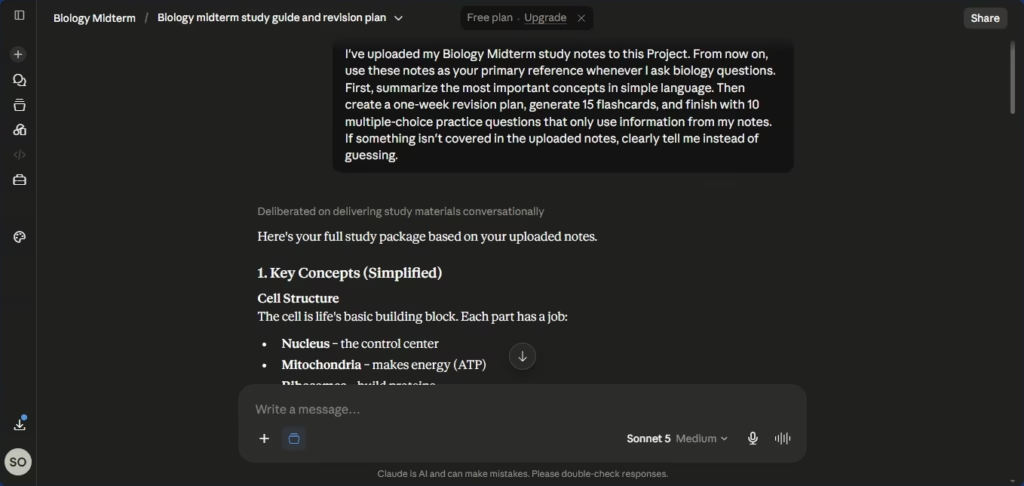
Upload your notes once, and Claude remembers them across every session.
The free tier includes a capable model, but usage is limited. Anthropic doesn’t publish a fixed daily message count — your limit depends on factors like demand, conversation length, and which features you’re using. If you hit your limit, you’ll need to wait for it to reset or upgrade to a paid plan. Check Anthropic’s official support site for the latest details.
Where it falls short:
No built-in image generation, and its handling of audio and video is more limited than Gemini’s.
It also has fewer built-in integrations — no huge plugin ecosystem like ChatGPT’s, no deep Google Workspace tie-in like Gemini’s.
The interface itself is minimal. Some people love that. Others find it a bit bare.
Best for: accurate, well-explained answers, essay writing, research summaries, tricky subjects like coding or science, and anyone who’d rather hear “I’m not sure” than a confident guess.
Side-by-Side Comparison Table
Feature
ChatGPT
Gemini
Claude
Best for
General help, voice-based studying
Google Docs/Sheets users, visual tasks
Accurate, well-structured explanations
Accuracy
Good, occasionally overconfident
Inconsistent
Generally the most reliable
File handling
Strong
Excellent with Google Drive
Strong, plus Projects
Voice mode
Best of the three
Available, less natural
More limited
Long context memory
Solid
Very large
Solid, plus persistent Projects
Free tier
Good, includes ads
Good for Google users
Good, with usage limits
Ecosystem
Largest (plugins, Custom GPTs)
Deep Google integration
Smaller, more focused
Two things worth keeping in mind about this table. First, AI companies often promote benchmark scores like MMLU, GPQA, or SWE-bench — but those measure narrow technical skills, not which chatbot explains things most clearly or makes the best study partner. Testing the same task across all three is a better way to judge fit. Second, this table will age. These tools update constantly, so check each company’s own site before quoting any of this a year from now.
A Quick Way to Decide Which One to Use
If you don’t want to reread all of that every time, here’s a simple mental shortcut.
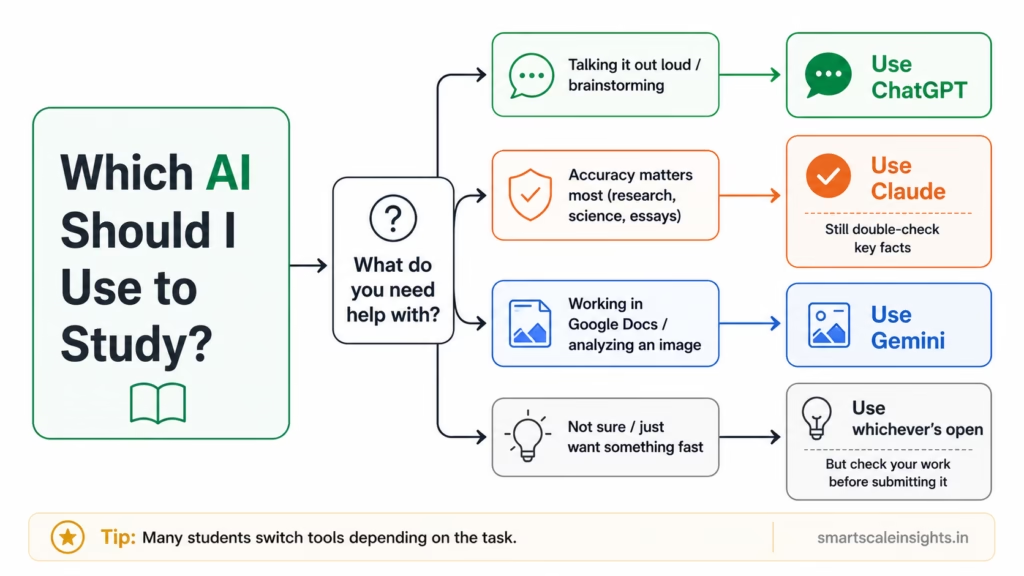
Not sure which one to open? This flowchart breaks it down in a few seconds.
Not a strict rule. Just a starting point. A lot of students end up bouncing between two of the three depending on the task, and honestly, that’s fine.
Where All Three Still Let You Down
I don’t want to oversell any of this. Let’s be real for a second.
None of these tools should replace actual studying. All three have real limits.
They can all be wrong, especially on niche topics, recent events, or exact numbers. Never trust a date or citation without checking it somewhere else.
They don’t know your syllabus. Unless you tell them, or upload it, they’re guessing at how your specific professor defined a term.
Relying on them too much can hurt you later. If you ask for the final answer instead of the reasoning, you might finish the homework fine — and then completely freeze in the actual exam. Ask for the steps, not just the result.
AI policies are still evolving and may differ between universities, departments, courses, or even individual instructors. Always check both your institution’s academic integrity policy and your instructor’s course-specific guidelines before using AI for graded work.
Frequently Asked Questions
Is ChatGPT, Gemini, or Claude free for students?
Yes, all three have usable free plans, though each comes with usage limits that can change over time. Paid plans typically start around US$20/month (or the regional equivalent) at the time of writing, unlocking higher usage limits, stronger models, and extra features. Google has also occasionally offered discounted or free access for verified students — check the official Gemini for Students page directly, since third-party sites often list outdated terms.
Which one’s best for math and science homework?
ChatGPT and Claude both do well here, especially if you specifically ask for the reasoning behind each step instead of just the final number. Gemini is a solid pick if you’re working from a photo of handwritten work, since it reads images well. Note that benchmark scores like GPQA or SWE-bench measure specific technical skills and don’t always predict which chatbot explains a concept most clearly — testing the same homework problem across all three is a better way to find your fit.
Can I actually trust AI-written essays or summaries?
Treat anything an AI gives you as a rough draft, not a finished product. All three can sound completely confident while being factually wrong. Always check dates, quotes, and citations against a real source, and check whether your school even allows this kind of help.
Which one’s easiest for a total beginner?
ChatGPT, probably. Simple interface. Everyone’s heard of it. There are more free tutorials for it than the other two combined.
No. The free versions of all three are enough for everyday studying — summarizing notes, explaining tricky concepts, practicing questions. Paying only really helps once you’re hitting usage limits, or you need heavier reasoning for something advanced, like research-level analysis or complex code.
Final Thoughts
There’s no single best AI for studying that wins in every category. If someone tells you otherwise, they’re probably trying to sell you something.
What actually matters is matching the tool to the task. Claude, when you need accuracy and clean explanations. Gemini, when you’re deep in Google Docs or working with images. ChatGPT, when you want range, voice, or just a bigger toolbox.
If you’re just starting out, here’s my honest suggestion: try the free version of all three on the same topic this week. See which explanation actually clicks for you. That fifteen-minute test will teach you more than this entire post did.
If this was useful, stick around. I’m documenting more of these — real, tested, no exaggeration — as I keep learning. I’d rather be accurate than sound like I already know everything.
It’s Sunday night. I have a biology test in five days, and a stack of notes I haven’t touched.
Normally this is where I’d panic and hand-make flashcards until midnight. This time I tried something different: I let an AI flashcard generator do the card-making for me, and I wrote down what happened every day for a week.
An AI flashcard generator reads your notes and turns them into question-and-answer cards automatically, then schedules your reviews using spaced repetition so you see each card right before you’re likely to forget it. That’s the whole concept. Everything below is what it actually looked like to use one for seven straight days — not a sales pitch, not a “top 10 tools” roundup.
If you want to try this yourself, here’s what you need:
Your existing notes — typed, PDF, or even a photo of handwritten pages works with most tools
An AI flashcard generator (I used RemNote, though the process is similar across most tools)
About 10–15 minutes a day for review once your cards exist
I’m building an online presence around research and learning right now, so I document things as I go. AI flashcard generators kept coming up in conversations I was reading, and I’d rather test something myself than trust someone else’s review. I also genuinely needed to study. Two problems, one experiment.
What Is an AI Flashcard Generator?
A regular flashcard is simple: question on one side, answer on the other. You’ve probably made these with index cards at some point.
An AI flashcard generator does the same job, faster. You give it your notes — a textbook chapter, a PDF, a paragraph you typed out — and it reads through the material and generates the cards itself. No typing required on your end.
Most of these tools also build in spaced repetition, which isn’t new. It traces back over a century to Hermann Ebbinghaus, a researcher who mapped out how memory fades on a predictable curve. Review something right before you’re about to forget it, and it sticks far better than cramming it all in one sitting.
This isn’t a fringe theory. A meta-analysis covering more than 800 experiments found the same result consistently: spaced review beats cramming, almost without exception (you can read the full study on PubMed).
So an AI flashcard generator is really two things bundled together:
Automatic card creation
Automatic review scheduling
That’s the entire pitch.
How I Set Up the Test
I wanted this to be fair — not set up to make the tool look good or bad.
So I picked two subjects that couldn’t be more different. First, biology: dense, definition-heavy, full of process names I still can’t pronounce. Second, basic SEO concepts I’m learning for my own content work — less black-and-white, more judgment call.
I fed both sets of notes into the AI flashcard generator and kept a notebook next to my laptop, writing down what I noticed each day.
I used RemNote for the whole experiment — a note-taking app that generates flashcards from your documents and runs them through spaced repetition. I’m linking their help center so you can see the real feature set instead of taking my word for it. Other tools work similarly, but the screenshots and steps below are specifically from RemNote.
Biology notes uploaded into RemNote — the Cellular Respiration PDF at the input stage. Place here so readers see the starting point before the walkthrough below.
What Actually Happens When You Feed It Notes
Here’s the part most posts about these tools skip — the actual mechanics.
You paste in your notes, or upload a file.
The tool scans the text and pulls out key facts, terms, and concepts.
It generates a batch of question-and-answer pairs.
You review the batch — keep what’s good, edit or delete what isn’t.
The app schedules your reviews, resurfacing each card right before you’re likely to forget it.
The logic behind that last step, roughly, looks like this:
if (student_recalled_card_correctly):
increase_review_interval(card)
else:
decrease_review_interval(card)
show_card_again_sooner
Nothing magical — it’s essentially an if-else statement wrapped around your memory. But it works, because it’s built on decades of research into how forgetting actually happens.
A sample of flashcards created automatically by an AI flashcard generator from uploaded study notes.A visual overview of how an AI flashcard generator converts study notes into ready-to-review flashcards.
Day by Day: What Worked and What Didn’t
Day 1–2. I pasted in about three pages of biology notes. Within two minutes I had 40 flashcards — something that would’ve taken me close to an hour by hand. Not every card was great, though. A few were oddly worded, and some tested tiny, irrelevant details instead of the concepts that actually mattered. I deleted around 15% of them.
Day 3–4. This is where it got interesting. Instead of reviewing all 40 cards every day, the app only surfaced the ones I was close to forgetting. Fewer cards per session, same or better retention. I wasn’t expecting that.
he spaced repetition review screen with “Forgot” / “Remembered” buttons, showing the scheduling in action.
Day 5.SEO notes went in, and this is where things got shaky. The AI handled straightforward facts fine, but nuance tripped it up. A point about keyword placement — something that depends heavily on context — got flattened into an oversimplified true/false statement. The nuance disappeared, and so did the actual lesson.
Day 6–7. I compared both approaches side by side: one topic studied with hand-made cards, the other with AI-generated cards plus spaced repetition. Results below.
Anything requiring nuance, opinion, or personal framing
Neither one wins outright. They’re just built for different jobs.
A visual overview of how an AI flashcard generator converts study notes into ready-to-review flashcards.
Where It Struggled
I want to be straight about this part, since a lot of AI tool write-ups skip it.
The generator was genuinely weak at anything requiring judgment. Nuanced, opinion-based, or strategy-heavy material got flattened into oversimplified facts. It wasn’t wrong exactly — it was just thin, missing the “why” behind the “what.”
That tracks with something the cognitive scientists at Retrieval Practice point out: retrieval-based tools work best for information with a clear right answer, not for open-ended reasoning.
Great for facts. Not great for arguments.
Tips If You Want to Try This
A few things I wish someone had told me on day one:
Check every card before you trust it. The AI gets things mostly right, not perfectly right — skim the batch and delete anything vague or wrong.
Feed it clean notes. Messy input makes messy flashcards. Garbage in, garbage out.
Save it for facts, not opinions. Definitions, vocabulary, formulas, dates, and processes are fair game. Nuanced arguments or subjective strategy need extra scrutiny.
Actually use the spaced repetition feature. Don’t just generate cards and cram them in one sitting — the real value is in the scheduling, not just the card-making.
Remember it’s a memory tool, not an understanding tool. Flashcards test recall; they don’t replace actually thinking through why something works. Research in medical education found that students who combined self-testing with spaced repetition performed better on licensing exams — but they still had to understand the material first (full study on PMC/NCBI).
FAQ
Does an AI flashcard generator actually save time compared to making cards by hand?
Yes, for the card-creation step. In my test, generating 40 cards took under two minutes versus close to an hour manually. You still need time to review and edit afterward, so it’s not zero effort — just a lot less.
Can an AI flashcard generator replace studying entirely?
No. It speeds up card creation and handles review scheduling, but it doesn’t understand the material for you. You still have to read, think, and make sense of it yourself.
Is it good for subjects like history, math, or vocabulary?
Generally yes, especially for vocabulary, formulas, dates, and definitions — anything fact-based is where it performs best.
Is it good for essay-based or opinion-based subjects?
Less so. In my test it oversimplified nuanced points into flat facts, stripping out the context that actually mattered.
What is spaced repetition, and why does it matter for flashcards?
It’s a review method where you see information again right before you’re likely to forget it, instead of on a fixed daily schedule. Research going back to the 1880s, confirmed repeatedly since, shows it beats cramming for long-term retention.
Final Thoughts
One week isn’t a scientific study, and I want to be upfront about that. This is one person’s honest experience, not a peer-reviewed conclusion.
But here’s what I actually took away from it: the AI flashcard generator didn’t make me smarter, and it didn’t make studying effortless. What it did was remove the boring part — the manual card-making — so I had more time left for the part that actually matters: reviewing and understanding the material.
If you’re a student, a self-taught learner, or someone building a skill on the side, that trade-off is probably worth testing for yourself. Not because it’s a breakthrough — just because it saves time on the tedious part and hands that time back to you.
Try it for a few days and track your own results before you judge it either way. That’s really the only fair test.
A practical, no-fluff guide for PhD students, analysts, academics, and knowledge workers who want to use AI without embarrassing themselves — or their institutions.
Six citations. Zero real cases. A courtroom full of silence.
In 2023, a New York law firm submitted a court brief citing six legal precedents. The citations looked impeccable — real-sounding case names, plausible courts, plausible years, formatted correctly. The opposing counsel flagged something odd. The judge looked them up.
Every single citation was fabricated. A lawyer had used ChatGPT to help build the brief and never verified a single output. The firm faced sanctions. The story made international news.
And then it kept happening.
To researchers. To journalists. To PhD students submitting dissertations. To analysts at firms whose clients trusted their work. The settings changed. The mistake stayed identical.
That is the world we are in. Knowing how to use AI for research is now one of the most consequential professional skills of this decade — and most people are doing it wrong. Not because the tools are bad. Because they are using powerful tools without understanding where those tools break down.
This guide fixes that. Practically. Specifically. Without the usual enthusiasm that quietly skips over the parts that get people into trouble.
We cover the AI-assisted research workflow from start to finish: how to fact-check with AI without being misled by it, how to use AI to summarize research papers without losing the nuance that makes a summary honest, how to build outlines that actually reflect the literature, and how to verify citations so you never find yourself in a courtroom — or a thesis defense — defending something that does not exist.
We also cover what most guides skip: the systematic bias in AI training data, real hallucination rates across current tools, how researchers in non-English-speaking countries can use AI to access global scholarship, and what responsible AI use in academia actually demands in 2026.
Stanford HAI’s ongoing research into AI in knowledge work has consistently documented that even high-performing models introduce factual slippage when synthesizing across multiple documents. This is not a fringe concern. It is the norm. And it is exactly why this guide exists.
What Does It Actually Mean to Use AI in Academic Research?
People use the phrase constantly. But it covers a huge range of things, and the range matters enormously.
Asking ChatGPT a question is not AI-assisted research. Pasting an abstract and asking for a summary is not either. Those are uses of AI. They are not research workflows.
Real AI-assisted research is a structured process where AI tools handle specific, bounded tasks within a workflow that a human expert controls from start to finish. The AI accelerates. The researcher directs, evaluates, and validates.
What AI genuinely does well in a research context:
Processing large volumes of text at a speed no human can match at scale
Identifying recurring themes or contradictions across multiple documents
Rewriting dense academic prose into plain language without losing the core meaning
Helping non-native English speakers engage with global scholarship in other languages
Generating structured outlines and literature maps to orient a new research project
Flagging where an argument has logical gaps or missing counterarguments
What AI cannot do reliably — regardless of which model you use:
Verify that a cited paper actually exists in any real academic database
Guarantee that a reproduced statistic is accurate and contextually correct
Know about research published after its training cutoff date
Understand the political or cultural nuance of research it was not trained on
Tell you clearly when it is confidently, completely wrong
That last point is the dangerous one. When a model hallucinates, it does not pause and flag uncertainty. It continues with exactly the same confident tone it uses when it is completely right. There is no signal. The text just flows. And it looks exactly like the truth.
The mindset shift you need from the start: AI-assisted research means using AI to move faster, not to move without checking.
7 Research Mistakes People Make With AI (And How to Avoid Every Single One)
Before the workflow, let’s clear the field. These are the mistakes that damage careers.
Mistake 1 — Trusting AI citations blindly.AI models fabricate citations regularly. They look real. They are not. Verify every single one in an original academic database before it touches your draft. No exceptions, ever.
Mistake 2 — Summarizing a paper by title only. Asking AI to summarize a paper without providing the actual text produces confident, plausible fabrication. Always paste the content you want analyzed. A title is not enough.
Mistake 3 — Ignoring the training cutoff. Most models are 12 to 18 months behind the current date. Any paper, dataset, or development published after that cutoff is invisible to the model — and it will not always tell you this. Check the recency of whatever you need, independently.
Mistake 4 — Skipping the methodology check.AI summaries make findings sound cleaner and more definitive than the authors actually claimed. For anything you plan to cite directly, read the methodology section yourself. No shortcut replaces this.
Mistake 5 — Using AI before forming your own hypothesis. If AI shapes your research question before you have engaged with the field yourself, you end up with a question framed by the model’s training biases — not by your expertise. Form your own angle first. Use AI to stress-test it.
Mistake 6 — Over-automating the literature review.AI can help you map and screen literature at scale. It cannot assess study quality, resolve methodological ambiguity, or catch the significance of a subtle inconsistency across papers. Over-automation means missing what matters most.
Mistake 7 — Not disclosing AI use. As of 2026, most major journals require explicit disclosure of AI tool use in submitted work. Many institutions go further. Not disclosing is an integrity issue, not a technicality. Know your institution’s current rules and follow them.
How to Use AI for Research: The Step-by-Step Workflow
Each stage of the research process has a different risk profile. Here is how to handle each one with the right tools and the right level of caution.
Stage One: Fact-Checking with AI — Use It as a Direction-Finder, Not a Source
Here is a mistake that costs researchers their credibility: asking AI whether something is true.
“Is it true that global plastic recycling rates hover around 9%?” The model confirms this confidently. But where did that number come from? A blend of sources, compressed into training weights, with no audit trail you can follow. It might be accurate. It might also be slightly off, or right about the number but wrong about the specific baseline year or methodology used to calculate it.
The correct approach is to use AI as a direction-finder — not as the fact itself.
Picture this scenario. You are writing a public health paper on child malnutrition rates in Sub-Saharan Africa. You find a statistic: 45% of child deaths in the region are linked to undernutrition. You paste it to ChatGPT and ask whether it is accurate. The model says yes, confidently, with context that sounds authoritative. But what you actually needed was: which organization published this figure, in which year, using which methodology, and whether more recent data has revised it. Those questions are fundamentally different from “is this true” — and AI handles them very differently.
The prompt that changes everything:
"I've come across this claim: [PASTE CLAIM].
Rather than confirming whether it is accurate, I want you to:
1. Tell me which field or domain this falls under
2. Name the most authoritative sources or institutions
that publish data on this topic
3. Suggest 3 specific search terms I should use in
Google Scholar, PubMed, or WHO databases to verify this
4. Flag any part of this claim where your confidence is low
or where definitions might vary significantly."
That reframes the AI from fact-checker to research navigator. It is a much more honest relationship with the tool — and a dramatically safer one.
Then take those suggested paths and go to the primary sources yourself. WHO reports. UN datasets. Peer-reviewed journals. Government statistical offices. Read the original. Do not trust AI’s description of what a source says; read the source itself.
Tools like Perplexity AI make initial navigation somewhat easier because they include clickable citation links alongside responses. Even then — click through every time. Do not assume the quote is accurate or in context.
Stage Two: Using AI to Summarize Research Papers Without Losing the Truth
AI is very good at summaries. Almost too good. That is part of the problem.
Research papers are deliberately uncertain. They hedge claims, acknowledge limitations, and contain contradictions that survive in the original but disappear in compression. When a model summarizes a paper, it tends to make findings sound cleaner, more conclusive, and more universal than the authors actually intended.
A 2023 study published in PLOS ONE examining AI-generated biomedical summaries found that over 60% contained at least one meaningful inaccuracy — not outright fabrication, but distortions of emphasis, scope, or certainty. The model was not lying. It was averaging. And averaging research findings is itself a form of distortion. Nature has raised similar concerns about multi-paper AI synthesis, noting that small misrepresentations at the individual summary level compound across sources until the final output is technically sentence-level accurate but contextually misleading as a whole.
Here is what that looks like in practice. Imagine you are researching the effectiveness of community health workers in rural Kenya. You ask AI to summarize three relevant papers. The first found strong effects in one district. The second found mixed results in a different region with different infrastructure. The third raised methodological concerns about outcome measurement. AI synthesizes all three into: “Community health workers have shown strong effectiveness in rural Kenya.” Technically supported by paper one. Misleading as a description of what the three papers actually show together.
The fix: always feed the model the actual text, not just the title.
Asking AI to summarize a paper it has not read produces plausible fabrication. Paste the full text every single time.
Use a structured summary prompt:
"I am going to paste the full text of a research paper.
Please summarize it using this exact structure:
1. Core research question (one sentence)
2. Study design and methodology (3-4 sentences maximum)
3. Key findings — bullet points, quoting specific numbers
exactly as they appear in the paper
4. Limitations explicitly acknowledged by the authors
5. What the authors say their findings do NOT prove
6. One paragraph on how this connects to: [YOUR SPECIFIC TOPIC]
Do not add information that is not in the paper.
If you are uncertain about any section, say so explicitly.
Here is the paper: [PASTE FULL TEXT]"
Point five is the most important one people skip. Asking the model to articulate what the paper does not prove forces it to represent the authors’ caveats honestly rather than defaulting to the most confident reading of the findings.
The bias problem that deserves more attention.
Most large language models are trained predominantly on English-language text, with heavy overrepresentation of North American and European academic sources. Research from South Asia, sub-Saharan Africa, Southeast Asia, and Latin America is systematically underrepresented in training corpora.
In practice, when AI summarizes “the literature” on a topic, it may be drawing on a geographically narrow slice of global scholarship — without flagging this. For a researcher in Nigeria, India, or Brazil, the AI’s framing of debates may not reflect the most relevant evidence for their context. For anyone studying global or cross-cultural topics, this framing bias is a meaningful methodological concern, not a footnote.
The response is not to stop using AI summaries. It is to supplement them with targeted searches in regional databases, and to read the original source for anything you plan to cite directly.
Stage Three: Building Research Outlines That Are Actually Useful
This is where AI adds the most reliable value with the lowest hallucination risk. Outlines are generative, not factual. The model is helping you structure thinking and map terrain — tasks where its broad training is an asset rather than a liability.
Start broad. Get the landscape.
"I am starting a research project on [TOPIC].
Before I read anything, I want to understand the landscape.
Please give me:
- The 5-6 major sub-themes within this field
- 3 ongoing debates or unresolved questions scholars are actively working through
- Names of 4-5 researchers or groups considered influential right now
- 2-3 areas that appear under-researched or genuinely contested
Be specific. Avoid generic summaries."
Review what the AI produces. Add your own instincts. Remove anything that does not fit your angle. This output is not your research — it is your orientation before you begin reading.
Then get a working structure.
"Given this research question: [YOUR SPECIFIC QUESTION],
help me draft a detailed outline for a literature review.
Each section should include:
- A clear focus for that section
- 2-3 questions that section needs to answer
- A note on the type of sources most relevant
(systematic reviews, empirical studies, meta-analyses, etc.)
Format this as a working document, not a finished structure."
The phrase “working document, not a finished structure” matters more than it looks. It signals that you want exploratory scaffolding, not a polished plan. The outputs are consistently more honest and more useful as a result.
After two weeks of actual reading, come back. Paste your notes. Ask: “Here is what I have covered so far. What angles or counterarguments am I missing?” This iterative use — making AI identify your own blind spots — is where the AI workflow for research writing truly earns its place.
Stage Four: Source Verification and AI Citation Checking — The Part That Can End Careers
We need to be completely direct about this.
AI fabricates citations. Not occasionally. Regularly. And they look convincing.
A hallucinated citation will have a plausible author name, a real-sounding journal, a reasonable title, and a year that fits the context. It will not exist in any database. And if you submit it — in a thesis, a paper, a grant application, a report — you are responsible for that error. Not the AI. You.
The documented cases extend far beyond law. Academic papers have been retracted. Journalists have issued formal corrections. Researchers have had to post public retractions on institutional websites. All because they used AI for citations and never verified the output.
The verification workflow that actually holds up:
Every citation the AI mentions goes into Google Scholar, PubMed, or Semantic Scholar as an exact title search — every single one, no exceptions
If the paper appears, verify that the journal, year, and authors exactly match what the AI said
Click through to the abstract and confirm the AI’s description of the findings accurately reflects what the paper actually claims
If the paper does not appear after multiple search variations, treat it as fabricated and remove it immediately
Scite.ai is the most sophisticated purpose-built tool currently available. It does not just confirm a paper exists — it shows you how subsequent research has engaged with it. Supporting citations, contrasting citations, mentioning citations. A paper cited 200 times with 40% contrasting citations tells a fundamentally different story than citation count alone suggests.
Elicit is built specifically for the AI literature review process. Submit a research question and receive structured summaries grounded in actual indexed papers. It has coverage gaps — particularly for recent preprints and non-English sources — but it is designed around research integrity in a way that general-purpose models are not.
Stage Five: Understanding and Reducing AI Hallucinations in Research
Hallucination is not a bug waiting to be patched. It is a fundamental characteristic of how these models generate text.
Large language models predict the most plausible next token given everything that came before. When they do not have reliable training data for something, they do not stop. They generate the most plausible continuation. Which can sound, very often, exactly like the truth.
Hallucination rates vary across tools and are heavily context-dependent. A 2024 benchmarking analysis examining GPT-4, Claude, and Gemini across structured research tasks — conducted by researchers at the AI2 Institute — found that models performed significantly better when given source text to work from compared to open recall tasks. The gap was largest on niche, technical, or recent topics: precisely where researchers most need accuracy.
How to build hallucination resistance into every research task:
Feed the model text, not titles. Always paste what you want analyzed
Ask explicitly for uncertainty flags in every prompt: “If you are not confident in any part of this, say so and explain why”
Use RAG-enabled tools where available — they retrieve actual documents before generating responses, dramatically reducing fabrication rates
Never carry specific numbers, dates, or proper nouns from AI output into your draft without independent verification
Treat citations, statistics, and named researchers with particular suspicion — these are the most common fabrication zones
A non-negotiable pre-submission checklist:
[ ] Every citation verified in an original academic database?
[ ] Every statistic traced to a primary published source?
[ ] AI summaries compared against original paper text for key claims?
[ ] Geographic and cultural bias in AI’s framing of the topic considered?
[ ] AI use disclosed in accordance with institutional and journal policy?
If any of those are unchecked — the work is not ready.
The AI Research Workflow: 5-Stage Visual Guide
A practical 5-stage framework showing exactly how to use AI for research—without compromising accuracy, citations, or credibility. This AI-augmented workflow walks through mapping topics, summarizing papers, fact-checking claims, verifying citations, and auditing bias to keep humans in control of the process.
The same workflow as pseudocode:
AI_RESEARCH_WORKFLOW(topic, research_question):
// Stage 1 — Landscape mapping
terrain = AI.prompt("Major themes, debates, gaps in: " + topic)
outline = AI.prompt("Lit review structure for: " + research_question)
// Stage 2 — Paper summarization
FOR each section IN outline:
papers = Scholar.search(section.focus_keywords)
FOR each paper IN papers:
text = PDF.extract(paper)
summary= AI.summarize(text, structured_prompt)
human.verify(summary, text) // non-negotiable
// Stage 3 — Fact-checking
FOR each claim IN draft:
paths = AI.suggest_verification_sources(claim)
confirmed= human.check_primary_sources(paths)
IF NOT confirmed: flag_claim(claim)
// Stage 4 — Citation validation
FOR each citation IN draft:
exists = Scite.lookup(citation) OR Scholar.exact_title(citation)
IF NOT exists: REMOVE(citation) + LOG("fabricated")
// Stage 5 — Bias + disclosure audit
human.review(geographic_diversity, source_language_mix)
human.complete_disclosure_requirements()
RETURN verified_draft
AI Tool Comparison: Which One Is Right for Your Research Task?
No single tool dominates everything. Here is an honest breakdown of where each earns its place — and where each falls short.
Weaker at deep synthesis; surface-level on complex academic topics
Scite.ai
Citation verification and evidence weight
Shows supporting vs. contrasting citations; peer-review aware
Subscription required for full access; some field coverage gaps
Elicit
Systematic literature reviews, evidence mapping
Purpose-built for research; grounded in indexed papers
Coverage gaps for recent preprints and non-English-language sources
How to Use AI for Research in Systematic Reviews
Systematic reviews are the most rigorous form of evidence synthesis in academia. They demand exhaustive database searches, strict eligibility screening, data extraction, quality assessment, and bias analysis across every included study. A single well-conducted review can take a research team two to three years.
AI is beginning to make genuine inroads — but in specific, bounded parts of the process.
Abstract screening at scale is the clearest win. AI tools can process thousands of abstracts against eligibility criteria and produce a shortlist for human review. What once took months can now take days. For resource-limited research teams running reviews on tight timelines, this is a real and meaningful gain.
Data extraction from standardized reporting formats is another area of emerging reliability. When studies follow consistent structures — as in clinical trial reporting — AI can extract key variables with reasonable accuracy, reducing manual workload significantly.
Assessing study quality requires expert judgment about methodological adequacy, risk of bias, and generalizability — none of which current models evaluate reliably. Handling ambiguous eligibility criteria produces inconsistent and sometimes contradictory AI outputs. Resolving heterogeneity across study designs requires domain expertise that cannot be compressed into a prompt.
The Cochrane Collaboration — the global standard-setter for systematic review methodology — has been actively developing formal guidelines for responsible AI integration in systematic reviews. These guidelines are specifically addressing where AI assistance is permissible, what oversight is required at each decision point, and how AI-assisted screening should be documented. Until those standards are finalized and validated at scale, human oversight at every key decision point remains non-negotiable.
A practical entry point: Use AI for a second-pass abstract screening after your own first pass — not as a replacement for it. Compare where AI and human screener decisions diverge. That divergence is itself useful data about where your eligibility criteria may be ambiguous or underspecified.
How to Use AI for Research Without Violating Academic Integrity
Academic integrity in the age of AI is not a simple checklist. It is a set of principles that require ongoing judgment — because the technology is moving faster than the policy frameworks designed to govern it.
Here is what responsible AI use in academic research actually looks like across five non-negotiable principles.
Principle 1 — Verify everything you cannot independently defend.
If a citation, statistic, or factual claim in your submitted work came from AI output and you have not personally verified it in a primary source, it should not be there. You are responsible for every claim in your work. AI cannot share that accountability.
Principle 2 — Disclose AI use specifically and accurately.
“AI tools were used in this research” is not adequate disclosure in most institutional and journal contexts in 2026. Be specific: which tools, for which tasks, at which stages. This is the only honest position — and it is increasingly the required one.
Principle 3 — Do not let AI generate your intellectual contribution.
Using AI to organize literature, translate sources, or draft structural scaffolding is one thing. Using AI to generate your research question, your analysis, your conclusions, or the core of your argument is a different matter entirely. It substitutes pattern-matching for expertise. The value of research lies in what you bring that AI cannot.
Principle 4 — Know where the fabrication risk is highest.
Citations. Specific statistics. Proper nouns. Recent developments. Niche or specialized topics. These are where hallucination is most common and where the consequences of error are most serious. Apply your most rigorous verification precisely at these points.
Principle 5 — Check your institution’s current policy — not last year’s version.
AI policies in academia are changing faster than institutional handbooks are being updated. What was ambiguous six months ago may be explicitly prohibited or explicitly permitted today. Check the current version of your institution’s policy and your target journal’s author guidelines before every submission.
Risk Type
When It Happens Most
How to Prevent It
Fabricated citations
AI asked to recall or generate references from training memory
Verify every citation with exact title search in Scholar/PubMed
Distorted summaries
AI summarizes without being given the actual paper text
Always paste full text; read original for anything cited directly
Training bias in framing
AI defaults to Western/English academic perspectives as baseline
Supplement with regional databases; read originals for context-specific topics
Outdated information
AI training cutoff is 12–18 months behind the current date
Check publication dates; search current databases for recent work
Document every tool used; disclose specifically per submission requirements
Ethical Risks, Bias in Training Data, and What Integrity Actually Demands
The Fabricated Citation Problem Is Bigger Than the Headlines Suggest
Most conversations about AI ethics in research focus on plagiarism. That is a real concern. But fabricated citations are, right now, a more immediate and more consequential problem — and they are far more common than most researchers realize.
When a researcher submits work with a hallucinated citation, they are asserting that evidence exists that does not. In a clinical context, that could influence treatment decisions based on studies that never happened. In policy research, it could shape legislation built on phantom evidence. In education, it models to students that submitting unverified citations is acceptable academic practice.
The responsibility is unambiguous. You cannot outsource citation verification to any AI tool. You have to do it yourself. Every time.
Bias in Training Corpora: The Invisible Filter on Every Output
When a language model is trained on text, its outputs reflect the biases embedded in that text. If training data skews toward certain journals, institutions, and geographic regions, the model will subtly center those perspectives in every response it generates — without flagging that it is doing so.
What this means in practice:
A model asked to summarize “the literature” on a public health topic may draw almost entirely from US, UK, and European studies — even when equally rigorous work exists in Hindi, Swahili, Portuguese, or Mandarin.
A model assessing whether a methodology is “standard practice” may apply North American or European disciplinary norms without acknowledging that alternative methodological traditions exist and are well-established in their own contexts.
A model helping a researcher in Kenya frame a research question may push them toward Western academic conventions that serve neither their research context nor their community’s actual needs.
This is documented across fields — from medicine to economics to education research. It is not theoretical. It is the current state of these systems.
The Deskilling Risk Nobody Talks About Enough
There is a slower, less visible risk that does not generate headlines: what happens to research expertise when AI does more and more of the reading?
Deep reading — sitting with a complex paper, wrestling with its methodology, noticing what it claims and what it quietly assumes — is how researchers build genuine judgment. It is slow. It is sometimes uncomfortable. AI makes it possible to skip most of it.
The researchers who build the strongest expertise are still the ones who read deeply. Use AI to handle the volume. Read the things that matter most yourself. That distinction is not trivial — it is the difference between knowing how to research and knowing how to use a research tool.
How Researchers in Non-English-Speaking Countries Can Use AI to Close the Access Gap
This is one of the most important and consistently underdiscussed opportunities in the conversation about AI in academic research.
For decades, global scholarship has been structured around English. Journals, conferences, funding bodies, citation networks — all of it dominated by a handful of languages and a small number of geographic regions. Researchers who do not read fluent English, or who publish in other languages, have faced a systematic disadvantage that has nothing to do with the quality of their work and everything to do with the structure of the global knowledge system.
AI translation and multilingual models are beginning to change this. Not perfectly. But in ways that genuinely matter.
A researcher in Vietnam can now access a paper published in German and get a working understanding within minutes. A scientist in Brazil studying agricultural crop disease can engage with Chinese-language research at a speed that would have been unthinkable a decade ago. A PhD student in Egypt can engage with Japanese-language water management studies without waiting years for a commissioned translation to be published.
A practical multilingual research access workflow:
Use a multilingual AI — Claude, GPT-4o, or Gemini — to translate the abstract and key results section first. Assess relevance before investing time in the full paper.
If the paper is directly relevant, translate the full methodology and findings sections. Have a domain expert review the translation for terminology accuracy where possible.
Use AI to clarify field-specific terminology that may not translate cleanly, noting explicitly where translation confidence is uncertain.
When publishing your own work, consider using AI to create structured summaries in additional languages — widening your paper’s accessibility to other researchers facing the same barrier you just overcame.
The caveat matters: machine translation of technical academic content still introduces errors, especially around specialized terminology and culturally embedded concepts. Note when you are working from AI translation in your research process notes. For any paper that is central to your argument, find a domain expert who can verify the translation accuracy before you cite it.
This is not a perfect solution. But it is a genuinely transformative shift in who gets to access global scholarship — and AI-assisted research workflows are making it possible right now.
Where AI-Powered Research Is Actually Heading
RAG Architecture: The Most Important Development for Research Accuracy
Retrieval-Augmented Generation is not a technical buzzword. It is the architectural shift that most meaningfully addresses the hallucination problem in research contexts.
Standard language models generate responses based entirely on patterns encoded during training. They cannot access new information at query time. They cannot verify their own claims against current sources. RAG changes this by adding a retrieval layer: the model queries a document database at runtime, retrieves relevant content, and generates responses grounded in that retrieved material rather than training memory.
For academic research, this means you can configure AI systems to answer only from a curated corpus — your department’s papers, a specific journal’s archives, a regulatory database, a proprietary dataset. Hallucination rates drop substantially when the model is constrained to work from retrieved text. The responses are traceable. The sources are auditable.
Several institutional AI deployments in 2025-2026 are moving in exactly this direction. If you work within a research institution, ask whether a RAG-enabled document assistant is available to your team or in development.
Citation Network Analysis: Mapping How Ideas Actually Travel
One of the more sophisticated capabilities emerging in academic AI is citation network analysis — mapping how ideas flow through the literature over time, not just whether a paper exists.
This approach surfaces which papers influenced which, where paradigm shifts originated, and where a widely-cited finding has been quietly contradicted by subsequent research but never formally retracted. It makes the intellectual genealogy of a claim visible, not just its presence in a database.
arXiv’s preprint ecosystem has become one of the most important early-warning systems for emerging research directions, and AI-assisted citation mapping is increasingly being used to track how ideas move from preprint to peer-reviewed consensus. Scite already does a version of this with its supporting/contrasting citation framework. The next generation will go significantly further.
AI in Systematic Reviews: Compressing Time, Not Replacing Judgment
The most immediate impact of AI on systematic reviews is time compression in the screening phase. What once took months can now take days.
But AI cannot assess study quality, resolve ambiguous eligibility decisions, or handle methodological heterogeneity across study designs. These require expert human judgment. The Cochrane Collaboration’s developing AI guidelines will become the baseline for what is methodologically acceptable in AI-assisted reviews — follow them as they are released.
Autonomous Research Agents: Impressive in Bounded Domains
The trajectory is clearly toward greater autonomy. Research agents that can formulate queries, retrieve papers, synthesize findings, identify gaps, and draft reports with minimal human input at each step are in active development. Early versions exist in enterprise contexts.
They are impressive for bounded, well-defined tasks with clear success criteria. They are unreliable outside those bounds.
For the foreseeable future, the human researcher’s role in directing, evaluating, and taking full responsibility for research outputs is not optional. It is what makes the research valid.
Use AI as the engine. Stay in the driver’s seat. That is not a temporary compromise — it is the responsible position.
No. And not in any timeframe that should concern working researchers today. The aspects of research that matter most — generating genuinely novel hypotheses, exercising ethical judgment, interpreting ambiguous findings in context, understanding cultural and political nuance, and taking full accountability for published claims — are not things AI can do reliably or be held responsible for. AI makes researchers significantly faster and better equipped. It does not make their judgment, expertise, or accountability redundant.
It varies significantly by topic, tool, and how you use the tool. On well-documented topics with dense training data, accuracy can be reasonably high. On niche topics, recent developments, or specific quantitative claims, error rates are substantial — and the errors are often not obvious from the output. Treat AI as a navigation tool for fact-checking: use it to identify where to look, then verify in primary sources. Never use it as the final word on any factual claim.
Is using AI for academic research considered plagiarism?
This depends on how you are using it and what your institution’s current policy says. Using AI to organize your thinking, generate structural outlines, translate sources, or process background reading is generally not plagiarism. Submitting AI-generated text as your original intellectual contribution, or using AI-generated citations without verification, crosses a serious line. Most academic institutions now require explicit disclosure of AI tool use. Check your institution’s current policy — not last year’s version.
What are the best AI tools for academic research in 2026?
The honest answer: it depends entirely on what you are doing. For systematic literature reviews, Elicit is the most purpose-built option. For citation verification and understanding the evidentiary weight behind a claim, Scite.ai is currently unmatched. For source-linked, rapid fact-checking, Perplexity AI is the most practical option. For long document analysis with explicit uncertainty flagging, Claude handles very large texts and tends to flag the limits of its knowledge more explicitly. For brainstorming, outline generation, and drafting, ChatGPT remains effective for those tasks specifically.
How do you verify AI-generated citations without losing your mind?
Systematically, with a hard rule that applies to every citation without exception. Every citation goes into Google Scholar, PubMed, or Semantic Scholar as an exact title search before it appears in your draft. If the paper does not appear, remove it immediately. If it does appear, verify that the author list, year, and journal match exactly what the AI said. Then check the abstract to confirm the AI’s description of the findings actually reflects what the paper claims. Build this into your workflow as a mandatory step. It is the single most important habit in AI-assisted research.
Conclusion: How to Use AI for Research Without Letting It Use You
Let’s end where this should always end — with the researcher, not the tool.
Knowing how to use AI for research is now a legitimate and genuinely valuable professional skill. It is also one of the most misunderstood skills in practice, because the surface level looks deceptively simple. Type a question. Get an answer. Move on.
But you have seen how complicated the reality underneath actually is. The hallucinations that look exactly like facts. The citations that feel real and do not exist anywhere. The summaries that compress nuance until a carefully hedged finding becomes a confident, universal claim. The training biases that center certain perspectives and quietly marginalize entire bodies of scholarship. The institutional policies still being written in real time while researchers are already submitting AI-assisted work.
None of this means AI is not worth using in research. It absolutely is.
A researcher who builds a disciplined AI-assisted research workflow can engage with more literature, verify more claims, access more global scholarship, and produce more organized work in less time than one who does not. That advantage is real. It compounds over time. And it is worth developing carefully and deliberately.
But it requires staying in control. Verifying what the tool produces. Reading deeply where it matters. Maintaining the kind of rigorous intellectual honesty that is the actual point of research in the first place.
Start small. Pick one stage of your current research process. Apply one workflow from this guide. Notice where AI genuinely helps and where it introduces noise or risk. Build your judgment around real experience with the tools — not around enthusiasm for what they promise to do.
AI is a better shovel. You still have to know where to dig.
The researchers who will thrive in this decade are the ones who master AI without surrendering their judgment.
The first time I tried generating a 3,000-word article in a single prompt, it looked impressive.
Until I read it carefully.
The structure was there. The headings looked professional. The language sounded confident. But something was deeply off. Every paragraph had the same rhythm. Every section built logically into the next. There was no friction, no personality, no moment where you felt like a real person was behind the words.
I published it anyway. Didn’t even run a full read-through. I figured the AI had covered everything — why second-guess it?
The article cited a study claiming “72% of marketers say long-form content outperforms short-form in lead generation.” Sounded authoritative. Specific number. Perfect for backing up my argument.
Didn’t exist.
A reader called it out in the comments three days after publish. I spent an embarrassing twenty minutes trying to find the original source before accepting it was simply made up. The AI had generated a statistic that fit the narrative perfectly. And I had published it without checking.
That moment changed how I approach every piece. Not because I’m paranoid — but because I understood, finally, what AI tools actually are. They’re pattern matchers. Incredible ones. But they don’t know what’s true. They know what sounds true.
That article still lives in my drafts folder. I keep it there on purpose.
Here’s the uncomfortable truth most AI content guides won’t say out loud: most AI-generated long-form content currently on the internet is garbage. Not because AI is bad. Because people are using it wrong — hitting generate, skimming the output, clicking publish. Treating a thinking assistant like a vending machine.
And most AI content workflows are completely backwards. People generate first, then think about what they actually needed. That’s like building a house and then drawing the blueprint.
Creating high-quality long-form content using AI tools requires flipping that entirely. Strategy first. Architecture second. Generation third. Then — and this is the part everyone skips — a ruthless human editing pass that makes the content actually worth reading.
Anthropic’s research on large language model capabilities makes something clear that most content creators miss: these models perform best when given precise structure and constraints. The quality of your output is almost entirely determined by the quality of your input. Garbage prompt, garbage article.
This guide is the system I wish I’d had before I published that first embarrassing draft. No generic tool lists. No surface-level tips. Just the workflow, the prompting architecture, the SEO layer, the real risks, and where this space is actually heading.
Let’s get into it.
Who This Guide Is For
Before diving in — a quick check.
This guide is for people who are done with generic AI content advice and ready to build something that actually works. Specifically:
Bloggers scaling content production who want to publish more without sacrificing the voice and quality that built their audience
SaaS and B2B content teams trying to build genuine topical authority without hiring three more writers
Agencies managing AI workflows across multiple clients who need a repeatable, defensible system
Solo creators and consultants who want AI leverage but refuse to publish content that sounds like everyone else
If you’re looking for a tool list and a “5 steps to use ChatGPT” breakdown — this isn’t that. If you want the actual strategic framework that separates content that ranks from content that disappears, keep reading.
What Is Creating High-Quality Long-Form Content Using AI Tools?
Let’s define this properly. Not the polished marketing version — the real one.
Creating high-quality long-form content using AI tools means using AI as a collaborator, not a ghostwriter. You bring the strategy, the expertise, the perspective, and the editorial judgment. AI brings speed, breadth, and the ability to generate structured prose without staring at a blank page for two hours.
Long-form typically means anything over 1,500 words. But competitive content — the stuff that actually ranks and earns backlinks — usually sits between 2,500 and 5,000 words depending on the topic. A Backlinko analysis of over 11 million Google search results found that the average first-page result contained around 1,447 words. For genuinely competitive informational topics, that number goes higher. Longer, deeper content simply wins more of the signals search engines care about: backlinks, time-on-page, topical coverage, return visits.
The problem: they’re expensive and slow to produce without help.
A skilled writer with the right AI workflow can produce a research-backed, well-structured 3,500-word draft in three to four hours. The same piece, done manually from scratch, might take a full day or more. That compression is real — especially for content teams working at scale.
But that three-to-four hour timeline only works if you have an actual system.
Without one, you’ll spend three hours generating content and four more hours trying to fix it.
Why Long-Form Content Still Wins
The HubSpot State of Marketing Report shows consistently that companies prioritizing long-form content generate significantly more organic leads than those focused on shorter formats. The SEO math is straightforward — longer content covers more semantic ground, earns more backlinks, and gives Google more signals to work with.
If you’re wondering how to create long-form blog posts using AI that actually compete in search — the answer starts here. The length isn’t the strategy. The depth is. Long-form is just the format that makes genuine depth possible.
But it only works if the content is actually good.
That’s the entire point of this guide.
Why Most AI Content Workflows Are Completely Backwards
Type something like “write me a blog post about X”
Copy the output
Maybe run it through Grammarly
Publish
And then wonder why the content doesn’t rank. Why readers bounce. Why it feels hollow.
The problem isn’t the AI. The problem is skipping all the steps that actually matter.
Here’s a side-by-side look at what separates a content team that ranks from one that wonders why nothing works:
╔══════════════════════════════════╦══════════════════════════════════╗
║ ❌ BAD AI WORKFLOW ║ ✅ GOOD AI WORKFLOW ║
╠══════════════════════════════════╬══════════════════════════════════╣
║ "Write me a blog post about X" ║ Research brief first. Always. ║
║ One massive prompt ║ Section-by-section generation ║
║ Copy → Grammarly → Publish ║ Depth injection pass ║
║ No fact-checking ║ Fact-verify every claim ║
║ Generic, neutral tone ║ Human voice layered in ║
║ No SEO review ║ Semantic gap analysis ║
║ Isolated article ║ Fits inside a content cluster ║
║ AI is the author ║ AI is the tool. You're the author║
╚══════════════════════════════════╩══════════════════════════════════╝
The right side takes more time upfront. It produces content that actually earns traffic. The left side is faster to publish and slower to rank — if it ranks at all.
Here’s what a professional workflow looks like:
Strategize → Architect → Research → Generate (section by section) → Deepen → Optimize → Humanize
Notice that “Generate” is step four. Not step one.
Most people start at step four. Then skip five through seven entirely.
That’s why their content looks AI-generated. Because it is — and it’s been left that way.
The framework later in this guide — I call it the H.A.L.O. Method — fixes this by making the human intelligence layer non-optional at every stage. Not just at the end. Not just for editing. At every stage.
Technical Breakdown: How AI Actually Generates Content
You don’t need a PhD to understand this. But you do need a mental model. Without it, you’re just hoping the model does what you want instead of directing it precisely.
Token Prediction — The Actual Mechanism
Large language models like GPT-4, Claude, or Gemini don’t “think” the way humans do. They generate text through token prediction. Given a sequence of input words and sub-words, the model calculates the most statistically probable next token. Then the next. Then the next.
Repeat 3,000 times.
That’s your article.
This is why vague prompts produce generic output. If your input is average, the model defaults to the most average response in its training distribution. Specific input pushes the model toward specific, non-generic territory.
And specific is what you want.
Transformer architecture — introduced in the 2017 paper “Attention Is All You Need” — allows modern LLMs to maintain context across thousands of tokens simultaneously. In plain terms: they can remember what the article was about when they’re writing paragraph thirty-seven. As long as you prompt them correctly.
Context Windows Matter More Than People Think
Every LLM has a context window — the maximum number of tokens it can process in a single session.
GPT-4 Turbo: up to 128,000 tokens. Claude: up to 200,000 tokens. This is significant for long-form content — it means the model can theoretically hold an entire 5,000-word article in active memory.
But here’s where it gets tricky.
Approaching that limit causes the model to lose coherence with earlier sections. You’ll notice this when section five contradicts something established in section two. The fix: generate section by section, feeding the model a running summary of what’s already been written before each pass. It keeps everything contextually grounded.
AI Tool Categories — What Actually Does What
Most people don’t realize there are distinct categories of AI tools for content creation. They all serve different functions. Using only one is like trying to cook a full meal with just a knife.
The key insight: these tools don’t replace each other. They each cover a different gap in your workflow. The best AI writing tools for bloggers are the ones that fit together into a coherent system — not the ones with the most impressive feature list.
What a Good Prompt Actually Looks Like
Here’s the logical structure behind a well-engineered content prompt. Think of this as pseudocode for your prompting approach:
This isn’t code you run anywhere. It’s the thinking behind a prompt that consistently produces better output.
The difference between prompting like this and typing “write me a section about X” is not subtle. It’s often the difference between a publishable draft and noise you’ll need to rewrite from scratch.
This is what AIprompt engineering for SEO content actually looks like at the operational level — not a theoretical concept, but a repeatable input structure that shapes every output you get from the model.
The H.A.L.O. Method: Step-by-Step Framework for Creating High-Quality Long-Form Content Using AI Tools
H.A.L.O. stands for Human-Anchored Layered Output.
It’s the system that prevents AI from doing what it naturally wants to do: produce smooth, comprehensive, emotionally neutral content that says nothing new.
Here’s the full workflow at a glance:
╔══════════════════════════════════════════════════════════════╗
║ THE H.A.L.O. METHOD — AT A GLANCE ║
╠══════════════╦═══════════════════════════════════════════════╣
║ [H] HUMAN ║ Research Brief → Strategy → Unique Angle ║
║ ║ (No AI yet. This is YOUR thinking.) ║
╠══════════════╬═══════════════════════════════════════════════╣
║ [A] ARCHITECT║ AI-Assisted Outline → Human Revision ║
║ ║ (AI drafts. You restructure.) ║
╠══════════════╬═══════════════════════════════════════════════╣
║ GENERATE ║ Section-by-Section Drafting ║
║ ║ (Never full article in one prompt.) ║
╠══════════════╬═══════════════════════════════════════════════╣
║ [L] LAYER ║ Depth Injection → Examples → Opinions ║
║ ║ (Human intelligence poured in.) ║
╠══════════════╬═══════════════════════════════════════════════╣
║ [O] OPTIMIZE ║ SEO Signals → Semantic Terms → Schema ║
║ ║ (Tools inform. Humans decide.) ║
╠══════════════╬═══════════════════════════════════════════════╣
║ AUTHORITY ║ Fact-Check → Voice → EEAT Signals ║
║ PASS ║ (The stage that makes it publishable.) ║
╚══════════════╩═══════════════════════════════════════════════╝
The H.A.L.O. Method breaks creating high-quality long-form content using AI tools into six human-anchored stages — from research brief to publish-ready authority pass. Skip any stage and the quality collapses.
Skip any stage and the quality collapses.
I tested that the hard way. Early on I skipped the research stage entirely — jumped straight to outline, then generation. The resulting draft looked fine on the surface. Covered the topic. Hit the word count. But when I ran it through competitor analysis, it was saying the exact same things as the three top-ranking articles, just in slightly different words. Nothing new. No angle. No reason for anyone to choose my version over the others.
That piece never ranked. Still hasn’t.
H.A.L.O. Quick-Reference Checklist:
[ ] Research brief completed (keywords, gaps, unique angle, sources)
[ ] SEO tool run, gaps identified, integrated naturally
[ ] Every specific fact verified against a primary source
[ ] Full read-aloud pass for voice and transitions
[ ] Internal links added manually
[ ] EEAT signals present (author expertise, citations, real examples)
Stage 1: Research and Strategy (Human-Led, No AI Yet)
Before AI touches anything, you need a research brief. This is the most important document in your workflow and it takes about thirty to forty-five minutes to produce.
Your research brief includes:
Your focus keyword and 5–8 secondary keywords
The top 3–5 ranking articles for your target keyword (analyzed for gaps, not copied)
Your unique angle — what does your article say that theirs doesn’t?
5–8 credible source links
Your audience profile (who they are, what they already know, what they’re trying to do)
Here’s what a concrete result looks like when this is done properly.
A SaaS content team I worked with was producing four long-form articles per month manually. Each one required two writers, an editor, and roughly nine hours of combined work from first brief to publish. After implementing the H.A.L.O. workflow, their average dropped to just under three hours per article — same quality bar, same editorial standards. Within ninety days, they were publishing eleven articles a month with the same team size. Their organic traffic grew 34% over that quarter. Not because the AI was magic. Because the brief gave the AI something to work with instead of nothing.
The brief is what made that possible. Not the tools. The structure.
Stage 2: Outline Architecture
Now bring in the LLM — but only to generate the first outline draft. Then revise it yourself.
Prompt pattern:
"Generate a detailed H2/H3 outline for a [word count]-word article titled [title].
Target audience: [description]. Core topics: [from your brief].
Unique angle: [your differentiation]. Format: markdown."
Review the output critically. Ask yourself: does this cover the content gaps I identified? Does the structure serve the reader’s actual needs, or just check boxes? Does the flow make logical sense?
Restructure wherever the answer is no.
The outline is your blueprint. A bad blueprint means a bad building no matter how good the materials are.
Stage 3: Section-by-Section Generation
This is where people make the biggest mistake. They ask AI to write the entire article in one go.
Don’t.
Quality degrades sharply as generation length increases. Coherence breaks. Facts wander. Sections start contradicting each other. For each section, prompt like this:
"You're writing Section [X] of an article titled [title].
Outline: [paste full outline].
Summary of what's been written: [paste brief summary].
Now write: [paste H2 and its H3 subheadings].
Requirements: [your specific constraints for this section]."
This keeps the model grounded. It knows where it is in the article, what came before, and what needs to come next.
Stage 4: Depth Injection
Once you have a complete rough draft, read through it honestly.
What’s thin? What’s generic? What could have been written by anyone about anything?
Those sections need human intelligence injected. Specific examples. Real data points. Your actual opinions. Analogies that didn’t come from a language model. Perspectives that reflect genuine expertise.
This is the stage that separates content from commodity.
Generate multiple variations of weak paragraphs. Mix and select the best elements. You’re acting as an editor, not a passive recipient.
Stage 5: SEO Optimization
After the content is solid, run it through Surfer SEO, Clearscope, or MarketMuse. These tools compare your content against top-ranking pages and surface semantic terms and related concepts that are under-represented.
Use the recommendations as signals. Fill genuine gaps. Ignore the rest.
Prompt engineering for long-form content at this stage means asking AI to naturally integrate missing terms — not stuff them.
None. Not even after five rounds of editing. There’s always something that needs a human layer.
Your authority pass covers:
Factual verification — every specific statistic, citation, named claim, and date gets traced to a primary source. AI hallucinations happen constantly and confidently. Remember my “72% of marketers” incident. Every number is suspect until proven otherwise.
Voice and edge — find every passage that sounds measured, balanced, and emotionally neutral. That’s the AI voice bleeding through. Rewrite in your actual voice. Add an opinion. Push back on something.
Transitions — AI-generated sections often feel like separate documents stitched together. Read the full piece aloud. Smooth every join.
Internal links — identify where your existing content is directly relevant. Add those links manually.
EEAT signals — author credentials, original observations, cited external sources, real-world examples. Google’s Search Quality Rater Guidelines are explicit: Experience, Expertise, Authoritativeness, and Trustworthiness are evaluated on content quality — not production method. AI content that shows no evidence of real expertise gets filtered out, regardless of keyword density.
What This Looks Like in Practice: A Real Walkthrough
Let me make this concrete. Abstract workflow descriptions are useful. Watching it applied is better.
After running keyword research, I identify “AI SEO tools” as the focus keyword. Secondary targets include “best AI tools for SEO,” “AI content optimization,” and “how to use AI for keyword research.” I scan the top five ranking articles. Four of them are tool lists with affiliate links and minimal editorial depth. The gap: nobody has published a strategic guide on how to actually use these tools inside a workflow. That’s my angle.
I pull five source links — two from SEJ, one from Google’s developer documentation, one case study from a SaaS company, one academic paper on AI-assisted content analysis.
Step 2 — Outline (20 minutes)
I prompt Claude to generate a detailed H2/H3 outline using my research brief. The output is solid structurally but includes two redundant sections and misses the “workflow integration” angle entirely. I restructure it manually — remove the redundancy, add a dedicated section on integration, reorder three H2s for better logical flow.
Step 3 — Generation (90 minutes across six sections)
Each section is generated individually. For Section 3 (Comparing AI SEO Tool Categories), I give the model the full outline, a 100-word summary of sections 1–2, and specific constraints: three sentences per paragraph max, include the comparison table, reference only tools mentioned in the research brief.
The output is 80% usable on first pass.
Step 4 — Depth Injection (60 minutes)
Three sections feel thin after reading aloud. One on “prompt engineering for SEO” has no real examples. I write two original example prompts from scratch, rewrite one full paragraph with a contrarian opinion on keyword density targets, and add a specific client example (anonymized) to the case study section.
Surfer SEO flags three missing semantic terms: “semantic search,” “content brief,” and “NLP optimization.” I integrate the first two naturally into existing paragraphs. The third doesn’t fit without forcing it. I leave it out.
Step 6 — Authority Pass (45 minutes)
I verify every statistic. One is wrong — the tool cited a study from 2019 as if it were current. I find a 2024 update and swap it. I rewrite the introduction in a stronger personal voice, add two internal links to related guides, and add FAQ schema markup to the FAQ section.
Total time: 4 hours 35 minutes. Publishable immediately.
That’s the H.A.L.O. Method working as designed.
SEO Optimization Layer for Creating High-Quality Long-Form Content Using AI Tools
Let’s be direct.
SEO optimization for AI-generated articles is both easier and harder than for manually written content. Easier because AI naturally generates comprehensive topical coverage. Harder because that same comprehensiveness can become shallow if depth signals aren’t intentionally built in.
Most people searching “how to humanize AI-generated articles” are actually asking a different question underneath: how do I make this content worth reading AND worth ranking? Those are the same problem. A piece that reads like a human wrote it is usually a piece that signals genuine expertise — which is exactly what Google is trying to reward.
And here’s the thing nobody says in SEO guides written by people who make money selling SEO tools:
If your entire SEO strategy is “hit green in Surfer,” you’re not doing SEO. You’re doing compliance theater. Optimizing for a tool’s scoring algorithm, not for a human who landed on your page with a real question.
Those two things overlap. They’re not the same thing.
Use the tools. Just don’t let them think for you.
Also — word count doesn’t win rankings. Structured depth does. A tightly organized 2,200-word article that completely answers a specific question will outrank a bloated 4,500-word piece that meanders. Most long-form content is long because it’s unfocused. Not because it’s thorough.
Semantic Clustering — The Right Way to Organize AI Content
The biggest SEO mistake content teams make with AI: publishing isolated articles that don’t connect to anything.
Modern search rewards topical authority. That means your AI content strategy needs to be built around semantic clusters — a pillar page supported by 8 to 12 related cluster posts, each targeting a long-tail variation of the core topic.
When generating each piece, give the LLM full cluster context. Prompt it to reference and link to related content naturally. Over time, this creates a topical web that signals genuine subject expertise — not just keyword coverage.
Supporting articles to build around this guide specifically:
Each of those should link back here. This guide becomes the hub.
Internal Linking — More Intentional Than It Sounds
Every long-form piece should include at least three to five internal links to related content.
Build a simple spreadsheet tracking which articles link to which. Update it every time you publish something new. AI can help identify opportunities if you give it your full content library as context — but the final decisions belong to a human who understands the site’s architecture.
Don’t automate this part.
Seriously. I’ve seen sites where someone automated internal linking with an AI plugin. The result was a dense web of links that looked logical to a machine and made zero sense to a reader. Unrelated articles linked together. Anchor text that had nothing to do with the destination page. It confused users and confused Google.
The linking patterns across your site are a strategic signal. Treat them accordingly.
On-Page Fundamentals
These still apply, unchanged:
Focus keyword in the H1
Focus keyword in the first 100 words
Focus keyword in at least two H2 headings
Natural keyword variations throughout (not exact repetition)
Meta description with focus keyword and a clear value hook
FAQ schema markup where relevant
One thing the SEO optimization for AI-generated articles conversation often misses: structured data. Adding FAQ schema or HowTo schema to eligible sections dramatically improves how Google reads and surfaces your content. Most AI content skips this entirely.
Don’t.
Content Depth Signals
Search engines infer depth from multiple signals beyond word count: number of subheadings, comparison tables, external citations, multimedia elements, and how thoroughly the content covers related semantic territory.
Build these signals deliberately. Not as an afterthought.
Should You Worry About AI Detection Tools?
Short answer: less than you think.
Longer answer: it’s complicated, and worth understanding properly.
What AI Detectors Actually Do (And Don’t Do)
AI detection tools like ZeroGPT, Copyleaks, or Winston AI work by analyzing statistical patterns in text — sentence rhythm, vocabulary distribution, “perplexity” scores (how unpredictable the word choices are). Content that follows highly predictable language patterns gets flagged as AI-generated.
Here’s the problem.
These tools produce a significant number of false positives. They’ve flagged academic papers written by humans, sections of classic literature, and text written by non-native English speakers who naturally write in more structured, formal patterns. A 90% AI score from ZeroGPT means “this text has predictable statistical patterns.” It doesn’t definitively mean AI wrote it.
More importantly: Google has explicitly stated it doesn’t use AI detection tools to evaluate content. People ask “does Google penalize AI content?” constantly — and the answer is no, not directly. Google penalizes low-quality content. The fact that AI produced it is incidental. Its systems evaluate quality signals — expertise, depth, originality, user engagement — not production method. A deeply human piece of writing that answers nothing will not outrank a well-structured AI-assisted piece that genuinely helps readers.
What Actually Matters for Detection (If You Care)
If your content is flagging high, it’s usually because:
Sentence rhythm is too uniform (every paragraph the same length and structure)
Vocabulary is too formal and consistent (no casual phrases, no imperfect transitions)
There are no personal opinions, contrarian takes, or emotionally loaded sentences
The writing is “correct” in a way real humans rarely are for 4,000 words straight
The techniques in this guide — depth injection, human authority pass, rhythm disruption, personal voice — are the same things that lower detection scores. Because they make the content actually more human. Not just less detectable.
Fix the content. The detection scores follow.
Limitations, Risks, and the Ethical Stuff Nobody Wants to Talk About
Here’s where I’m going to say some things that most AI content guides carefully avoid.
AI Hallucinations Are a Bigger Problem Than You Think
LLMs make things up. That’s not a bug being slowly patched — it’s a fundamental characteristic of how token prediction works. The model generates statistically probable text. Sometimes the most probable text is a fabricated statistic, a misattributed quote, or a study that doesn’t exist.
The dangerous part? It does this with exactly the same confidence it uses for accurate information. No hesitation. No qualifier. Just a clean, authoritative-sounding claim that may be entirely fictional.
I know this firsthand. Remember that “72% of marketers” stat from the intro?
That wasn’t a hypothetical. That was me. Three days post-publish. Comments section. Mortifying.
The model generated a number that fit the narrative perfectly. It had no idea the study didn’t exist. It wasn’t lying — it was predicting. And statistically, a specific-sounding percentage attached to a plausible marketing claim is exactly the kind of text that appears in content like this.
Every specific claim. Every named study. Every percentage. Check it against the primary source before it goes anywhere near a publish button.
If you’re building an AI content fact-checking process into your workflow — and you should be — the simplest version is a three-column spreadsheet: Claim | Source Found | Verified Yes/No. Run every AI draft through it before the authority pass. Takes fifteen minutes. Saves you from publishing fiction dressed as expertise.
Training Data Bias — The Global Content Problem
LLMs are trained predominantly on text from certain demographic groups, in certain languages, reflecting certain cultural assumptions. Western. English-dominant. Specific in ways the model doesn’t explicitly acknowledge.
Here’s a concrete example of how this plays out.
A US-based marketing agency used AI to generate a campaign brief for a client’s Indian market launch. The AI confidently described the target customer as someone who “researches products on desktop, prefers email communication, and responds to urgency-based messaging.” That profile describes a US buyer segment reasonably well. In India’s 2024 digital landscape — where mobile-first browsing dominates, WhatsApp is a primary business communication channel, and trust-based relationship selling often outperforms urgency tactics — it was nearly useless. The cultural assumptions were invisible in the text but baked into every recommendation.
In Germany, where AI content transparency regulations are advancing alongside EU AI Act requirements, the same undisclosed AI content could expose brands to legal risk — not just reputational damage.
If you’re publishing for global audiences without culturally-aware human review, you’re likely producing content that feels off to significant portions of your readership. You may not hear about it. That doesn’t mean it’s not happening.
The Internet Is Filling With the Same Content
When every content team uses the same AI tools with similar prompts, something predictable happens.
The internet fills up with the same article written a thousand different ways. Same structure. Same examples. Same measured tone. Different company logos on top.
Go search any competitive B2B topic right now. Look at the top five results. Count how many use a six-step framework. Count how many reference the same three statistics. Count how many have an FAQ section with five questions that all start with “How do you…”
That’s not coincidence. That’s everyone running the same playbooks through the same models.
The counter-strategy is deliberate differentiation. Original data from your own research or surveys. Genuine expert perspective that can’t be synthesized from existing text. Proprietary frameworks with real names. Authentic storytelling that only you could have written.
These things have to come from you. If they don’t, someone else’s AI-generated article is just as good as yours. And eventually, neither of you will rank.
Disclosure — An Uncomfortable But Necessary Conversation
The ethics of AI content disclosure are still evolving. But the direction is clear.
Audiences increasingly expect transparency — especially in health, finance, legal, and editorial contexts. Several major publications have already adopted formal AI disclosure policies. The EU AI Act is bringing regulatory teeth. Other regions will follow.
Publishing AI-assisted content without disclosure isn’t illegal in most places right now. The reputational risk of being caught, as AI detection continues improving, is growing fast.
Be ahead of this. Not behind it.
The Hard Truth: Why 80% of AI Content Will Disappear
This is the section I almost didn’t write. It’s not comfortable. But it’s directional and you deserve an honest read on it.
Most AI content currently being published will not survive the next three years of search algorithm evolution.
Here’s the one-sentence version, and it’s worth reading twice: The average AI-assisted article published today adds nothing new — and search engines are increasingly rewarding original perspective, not surface-level coverage.
That’s not a prediction. It’s the current trajectory made explicit.
Here’s why.
Content inflation is accelerating. The total volume of published web content is growing faster than at any point in internet history — largely because AI has removed the production bottleneck. More content competing for the same keyword real estate means the bar for what actually ranks keeps rising.
AI sameness is a ranking liability. Google’s systems are becoming increasingly sophisticated at identifying content that covers a topic without adding anything genuinely new. Content that’s topically comprehensive but perspective-empty. This is exactly what unedited AI output produces.
Brand authority concentration is happening. As commodity content gets filtered out, search real estate is consolidating around recognizable brands and individual experts with demonstrable credibility. Unknown sites publishing generic AI content will find it harder to earn clicks even when they rank, because users are learning to skip sources they don’t recognize.
Algorithm filtering is inevitable. Every major Google update of the past three years has targeted a version of the same problem: content that exists to capture search traffic rather than to genuinely serve readers. HCU. EEAT. Core updates. They’re all pointed at the same thing.
The 20% of AI content that survives will be the content built on this framework: real strategy, real expertise, real editorial judgment, AI used as a tool rather than a replacement. That content will actually be harder to produce than manual writing was before AI existed — because it requires a higher bar of everything.
That’s not pessimistic. It’s an opportunity.
The teams that build this workflow now will have a significant advantage when the filtering intensifies.
Where Long-Form AI Content Is Actually Heading
A few directions are clear enough to plan around.
AI Agents Are Coming For Repetitive Content Workflows
The current model — human prompts, AI generates, human edits — is already being replaced at the margins by agentic systems. AI agents that autonomously break down content tasks, execute multi-step workflows, and use external tools without manual prompting at each step.
Early versions exist now. Claude’s tool-use capabilities and OpenAI’s agent frameworks are early implementations. Production-ready content agents are probably 18 to 36 months away from mainstream adoption.
When they arrive, the competitive advantage won’t belong to people who use AI. It’ll belong to people who design intelligent AI workflows.
Multilingual Scalability — With Important Caveats
AI translation has improved dramatically. Teams that previously needed dedicated writers for each language market can now produce base content in one language and run localization workflows across multiple markets at a fraction of the prior cost.
But AI still struggles with idiomatic language, cultural nuance, and domain-specific terminology — especially in languages with less training data representation. Human review for localized content remains essential. That’s the quality gate separating professionally localized content from something that reads like it was run through a translator.
The global opportunity is real. It requires the same human-in-the-loop approach. Just applied across more languages.
The Only Model That Survives: Human-AI Co-Creation
The “AI replaces writers” narrative is losing credibility fast. The content that performs best is consistently the content where a sharp human was deeply involved in strategy, editorial direction, and voice.
And no — this doesn’t mean AI replaces writers. It means lazy workflows get replaced.
The skill that compounds over the next five years isn’t just writing. It’s the ability to direct AI output with precision, maintain a distinctive editorial voice, and apply genuine subject expertise at the right points in the process.
Prompt engineering for long-form content is a real professional skill. Build it now.
FAQ
How do you create long-form blog posts using AI without sounding robotic?
Treat every AI draft as raw material, not finished writing. Read it aloud — you’ll immediately identify the flat, rhythmically perfect passages that feel inhuman. Break long sentences into short ones. Add personal opinions. Use imperfect transitions. Ask rhetorical questions. Include at least one moment where you push back on conventional wisdom or share something that went wrong. The more distinctively you write in the final editing pass, the less robotic the piece feels — because it isn’t robotic anymore. The AI built the scaffolding. You built the building.
What are the best AI tools for long-form content writing?
No single tool handles everything well. A solid stack: Claude or GPT-4 for drafting, Perplexity AI for research with live citations, Surfer SEO or Clearscope for optimization signals, and Hemingway Editor for readability pressure-testing. For high-volume teams, platforms like Jasper or Copy.ai add integration layers. But the system matters more than any specific tool. A great workflow with average tools outperforms a poor workflow with premium ones every time.
Can AI-generated long-form content rank on Google?
Yes. But “AI-generated” is doing a lot of work in that sentence. Thin, unedited AI output that adds nothing new? No. AI-assisted content where a real expert added genuine perspective, verified facts, cited credible sources, and wrote for actual humans rather than search engines? Absolutely. Google has been explicit: it evaluates content quality, not how it was produced. EEAT signals are what actually determine ranking performance.
How do you ensure factual accuracy in AI content?
Build a verification checkpoint into every editing pass. Flag every specific claim — statistics, named citations, dates, product details — and trace each one to a primary source. Not a secondary article that mentions the stat. The original study. The official report. The direct publication. Never trust AI to accurately cite its own sources. It will hallucinate citations with total confidence. For content in health, legal, or financial categories, a subject-matter expert review is the minimum responsible standard.
Is prompt engineering necessary for long-form AI writing?
It’s not a nice-to-have. It’s the entire lever. Without structured prompting, LLMs generate the statistical average of their training data — generic, measured, forgettable. Prompt engineering for long-form content — specifying audience, structure, tone, constraints, prior context, and quality signals — is the mechanism that turns AI from a content generator into a strategic collaborator. The gap between a carefully engineered prompt and a casual one isn’t 10% better output. It’s often the difference between something publishable and something you throw away.
Conclusion: Stop Treating AI Like a Vending Machine
Here’s the honest summary.
Creating high-quality long-form content using AI tools is one of the most valuable skills in content marketing right now. And it’s being wasted by the majority of people attempting it.
The ones publishing generic AI output? They’re building nothing. Not authority, not backlinks, not trust. They’re filling the internet with more noise. And Google is getting better — fast — at identifying exactly that kind of content and pushing it down.
The ones using AI as a strategic collaborator — inside a real workflow, with real editorial judgment, with genuine expert perspective layered in at every stage — they’re winning. Publishing faster. Covering more ground. Building content assets that compound over time while everyone else chases their tails.
The H.A.L.O. Method in this guide isn’t magic. It’s discipline.
Strategize before you generate. Architect before you draft. Inject human depth at every stage, not just the end. Verify every fact like your credibility depends on it — because it does. Edit with genuine opinions. Build for readers first, algorithms second.
Here’s what happens to people who don’t adapt:
They keep producing content that sounds like everyone else’s. They watch traffic plateau. They wonder why their AI-assisted workflow isn’t outperforming their old manual process. The answer is always the same — they optimized the generation step and ignored everything around it.
The writers who learn to direct AI with precision, who develop sharp editorial judgment, who bring real expertise and perspective to every piece — those people have an advantage that compounds. Skills that make them harder to automate, not easier.
That’s the version of this you want to be.
Want to go deeper? The H.A.L.O. Method prompt library — with ready-to-use templates for every stage of this workflow — is available as a free download. Sign up for the newsletter below and it lands in your inbox immediately. No fluff. Just the prompts.
Start with one article. Run your first H.A.L.O. workflow end to end. Notice the difference in output quality. Then do it again.
The gap between where you are and where the best AI-assisted content producers operate is mostly workflow.
And workflow is fixable.
Go to Next Lesson: How to Use AI for Research: Fact-Checking, Summaries & Smart Outlines That Actually Hold Up
Now that you understand how to create high-quality long-form content using AI tools, the next important skill is research.
Great content doesn’t come only from good writing—it comes from accurate information, reliable sources, and strong research foundations. While AI can help summarize papers, organize ideas, and speed up information gathering, it can also introduce mistakes if its outputs aren’t verified properly.
In the next guide, you’ll learn how to use AI for research responsibly, including techniques for fact-checking AI outputs, summarizing research papers without losing accuracy, and building structured outlines that are backed by real sources.
I opened ChatGPT, typed “write a marketing email,” and hit enter. What came back? Pure garbage. Generic. Soulless. The kind of copy that makes you want to delete your account.
So I tried again. Same result.
Meanwhile, my friend Sarah—who’s never written a line of code in her life—asked the same AI a slightly different question. Her output? A polished, personalized email that sounded like it came from a seasoned copywriter with fifteen years of experience.
I was furious. What did she know that I didn’t?
That’s when I realized: AI isn’t about intelligence. It’s about instruction.
Here’s what I learned that changed everything: Prompt engineering for non-coders is the systematic practice of designing, structuring, and refining text instructions to maximize AI model performance—without writing a single line of code.
It’s not programming. It’s communication architecture.
According to research from OpenAI and Anthropic, the quality of AI outputs can vary by over 300% based solely on how you frame your request. Think about that. Same AI. Same question. 300% difference in quality.
This isn’t a technical skill reserved for developers. It’s the new professional leverage layer—a strategic communication skill that creators, marketers, founders, and knowledge workers can master right now.
And honestly? Non-coders often get better results than developers because they understand context and communication better than syntax.
This guide will introduce you to The Structured Prompt Stack—a five-layer framework for extracting expert-level results from AI. No fluff. No theory without practice. Just the AI prompting skills and generative AI best practices that actually work.
Prompt engineering is the art and science of asking AI the right questions in the right way.
But that definition undersells it massively.
Here’s the real deal: Prompt engineering for non-coders means understanding how large language models interpret instructions, then deliberately structuring your requests to guide the AI toward your desired outcome.
Think of it like this.
You wouldn’t walk into a restaurant and tell the chef “make me food.” You’d specify what you want, how you want it cooked, dietary restrictions, maybe even plating preferences.
AI is the same. Vague inputs get vague outputs. Structured inputs get magic.
The “non-coder” part is crucial here. Traditional software engineering requires you to understand syntax, data structures, logic flows. That stuff takes years to learn.
Prompt engineering? You just need to understand context, constraints, and communication patterns.
You’re not manipulating variables. You’re shaping meaning.
And if you’ve ever written a clear email, explained something complex to a colleague, or given detailed instructions to a team member, you already have the foundational skills for this structured prompting framework.
The Technical Foundation (Without the Technical Headache)
When you interact with AI models like GPT-4, Claude, or Gemini, you’re engaging with neural networks trained on billions of text examples.
These models don’t “understand” language the way humans do. They predict the most statistically probable next words based on patterns they’ve learned.
Here’s what actually happens:
YOUR PROMPT → Model processes context →
Activates relevant training patterns →
Generates probability distributions →
Selects most likely tokens → YOUR OUTPUT
According to Anthropic’s research on prompt engineering, models perform dramatically better when prompts include explicit context, role definitions, and output constraints.
None of which require coding knowledge.
The beauty of prompt engineering is that it operates entirely in natural language. You’re working in the same medium you use to send emails, write documents, and have conversations.
The difference is intentionality and structure.
I spent my first month using AI like everyone else. Typing whatever came to mind. Getting mediocre results. Blaming the technology.
Then I learned these frameworks. Everything changed.
Why Prompt Engineering for Non-Coders Is a Strategic Advantage
Five years ago, “knowing Excel” was a baseline professional skill.
Today, we’re witnessing the same shift with AI literacy. And prompt engineering sits at its core.
The Real Competitive Advantage
Everyone has access to ChatGPT. Everyone has access to Claude. Everyone has access to Gemini.
The technology is democratized.
But results? Results are not democratized.
Two people use the same AI tool. One produces average work in three hours. The other quietly builds a competitive edge and finishes in thirty minutes.
The difference isn’t intelligence. It’s instruction design.
According to Bloomberg Intelligence’s June 2023 report “Generative AI to Become a $1.3 Trillion Market by 2032,” the global AI market is projected to surpass $1.3 trillion by 2032, with the economic value concentrated not in the technology itself but in effective implementation and AI workflow optimization.
What the Job Market Is Screaming
LinkedIn’s December 2024 “Jobs on the Rise” report revealed that job postings mentioning “prompt engineering” or “AI prompting skills” increased by 3,500% between January 2022 and December 2024—one of the fastest-growing skill requirements in the platform’s history.
But here’s the more interesting trend: these requirements are appearing in non-technical roles.
Marketing managers, content strategists, product managers, and business consultants—not developers or data scientists—are the primary targets.
The same report found that roles requiring AI collaboration skills command 15-25% salary premiums over comparable positions without these requirements.
Real-World Impact
I run a small content agency.
Before learning structured prompting, I’d spend nine hours on a single article: three hours researching and outlining, four hours writing, two hours editing.
Now? Forty-five minutes using advanced prompting for research and first drafts. Two hours on human refinement and creativity.
Three hours total. Same quality. Better consistency.
My friend Tom runs a marketing consultancy. He was spending $5,000 per campaign hiring an agency for creative concepts.
He learned prompt engineering. Now he generates dozens of creative directions in an afternoon.
That’s $60,000 saved annually.
The Uncomfortable Truth
The skill gap isn’t between those who use AI and those who don’t. Everyone’s using AI by now.
The gap is between those who use it effectively and those who get mediocre results.
And that gap is widening every single day.
But Won’t AI Get Smart Enough to Make Prompting Obsolete?
This is the most common objection I hear.
“Why invest time learning prompt engineering when AI will just get better at understanding vague requests?”
Here’s why that thinking is backwards.
Yes, AI models are improving. But they’re improving in both directions—better at understanding AND better at executing complex tasks.
As models get more sophisticated, the gap between basic usage and advanced usage actually widens, not narrows.
Excel got more powerful over 30 years. Did that make Excel skills less valuable? No. People who learned advanced techniques got exponentially more productive, while basic users stayed basic.
AI follows the same pattern. Better models amplify the advantage of skilled users.
Moreover, as AI capabilities expand into autonomous agents and multi-step workflows, you’ll need higher-level prompting—strategic goal-setting instead of tactical task assignment.
The skill doesn’t disappear. It evolves into AI management and workflow orchestration.
The Structured Prompt Stack: 5 Core Frameworks
Enough theory. Let’s talk about what actually works.
The Structured Prompt Stack is my five-layer framework for consistently generating expert-level AI outputs. These are the techniques I use every single day—the ones that transformed my results from “meh” to “wait, how did you do that?”
Here’s the overview before we dive deep:
The Structured Prompt Stack:
Role Prompting → Activate domain expertise
Context Layering → Provide necessary background
Constraint Specification → Control output parameters
Output Formatting → Define structural templates
Few-Shot Prompting → Show desired patterns
Each layer builds on the previous one. Together, they create a systematic approach to AI workflow optimization that non-technical users can master.
Layer 1: Role Prompting (The Persona Assignment)
Tell the AI what perspective or expertise to adopt before responding.
Why it works: Language models have been trained on diverse text sources. Role prompting activates the relevant “knowledge domain” within the model’s training.
Example:
Generic prompt: “Write about climate change.”
Role-based prompt: “You are an environmental policy analyst with 15 years of experience advising governments. Write a briefing on climate change adaptation strategies for coastal cities. Focus on actionable policy recommendations, not abstract theory.”
The difference? Night and day.
Real business application:
I needed to draft investor communications for a startup client. Instead of “write an email to investors,” I used:
“You are a seasoned startup CFO who has raised $50M+ across multiple rounds. Draft an investor update that balances transparency about challenges with confidence in our path forward. Focus on metrics-driven storytelling. Avoid corporate jargon.”
The output shifted from generic corporate speak to strategic investor communication. My client used it almost verbatim.
Layer 2: Context Layering (The Information Architecture)
AI models can’t read your mind. They can’t access information outside the conversation.
Context layering gives the model the necessary information to generate relevant, specific outputs.
CONTEXT: I run a boutique fitness studio targeting busy professionals aged 30-45 in urban areas. We offer 30-minute high-intensity classes. Our main competitor is Orangetheory. Our unique value is personalized attention in small groups (max 8 people per class). Our retention rate is 87% after first month.
OBJECTIVE: Increase trial class bookings by 30% this quarter.
CONSTRAINTS: Budget is $2,000/month for digital advertising. Can't offer steep discounts as it devalues our premium positioning.
REQUEST: Develop 5 Facebook ad concepts with headlines, body copy, and targeting suggestions that emphasize our personalized approach and time efficiency.
The AI generated five immediately usable ad concepts. One became their best-performing ad ever.
Layer 3: Constraint Specification (The Output Control)
This is where most people lose the game. They give AI complete freedom. And freedom creates garbage.
What constraints look like:
Format: “Write this as bullet points” / “Create a table” / “Use a narrative structure”
Length: “Maximum 300 words” / “Write 5 sentences”
Tone: “Professional but conversational” / “Authoritative and data-driven”
Structure: “Include three sections: problem, solution, next steps”
Exclusions: “Don’t use jargon” / “Avoid clichés”
Before/after from my own work:
What I Used to Do
What I Do Now
“Write about email marketing”
“Write a 400-word guide on email marketing best practices for e-commerce brands. Use 3 H2 headers. Include one data point per section. Write in second person (‘you’). No fluff—start with actionable advice. End with a single call-to-action.”
Result: Generic 800-word essay
Result: Focused, actionable guide
The first time I tried this, I thought it was overkill. Turns out, it cut my editing time in half.
Layer 4: Output Formatting (The Structural Template)
Structure dramatically improves both AI performance and output usability.
According to OpenAI’s best practices documentation published in their August 2023 technical guidelines, structured prompts consistently outperform unstructured ones by 40-70% in human evaluation studies.
Template I use constantly:
Create a competitive analysis using this exact structure:
COMPETITOR: [Name]
OVERVIEW: [2-sentence description]
STRENGTHS: [3 bullet points]
WEAKNESSES: [3 bullet points]
PRICING: [Clear breakdown]
MARKET POSITION: [One sentence]
THREAT LEVEL: [High/Medium/Low + why]
Do this for: [Competitor 1], [Competitor 2], [Competitor 3]
The AI knows exactly what format to follow. You get consistently structured outputs that you can directly insert into strategy documents.
Layer 5: Few-Shot Prompting (Teaching by Example)
Show the AI 1-3 examples of what you want. Then ask it to generate similar outputs.
Why it’s powerful: Models excel at pattern recognition. When you provide examples, you’re training the model on your specific task within the conversation itself.
Real example from my YouTube channel:
I need YouTube video titles in this style:
EXAMPLE: "I Tried the 5 AM Club for 30 Days—Here's What Happened to My Productivity"
EXAMPLE: "Why Your To-Do List Is Actually Making You Less Productive (And What to Do Instead)"
EXAMPLE: "The 2-Minute Rule That Helped Me Finally Stop Procrastinating"
Notice the pattern: personal experience + specific timeframe OR contrarian insight + alternative solution OR specific technique + compelling outcome.
Now create 10 titles about: time management for creative professionals.
The AI generated ten titles that matched my style perfectly. I use six of them across my channel. They’re my highest-performing videos.
Deep Dive: The Structured Prompt Stack in Action
Let me show you how all five layers work together with a real example from my consulting work.
The Challenge:
A SaaS client needed onboarding email sequences for their project management tool. They’d been using generic templates with poor engagement (12% open rate, 2% click-through).
The Bad Prompt:
“Write an onboarding email sequence for our project management software.”
The Bad Output:
Subject: Welcome to [Product]!
Hi there,
We're excited to have you on board! Our platform offers many great features including task management, team collaboration, and reporting dashboards.
To get started, simply log in and explore the interface. Check out our help documentation if you have questions.
Best regards,
The Team
Generic. Forgettable. Zero personality. No clear action.
The Structured Prompt Stack Approach:
ROLE: You are a SaaS email marketing specialist who has designed onboarding sequences for 50+ B2B products with average open rates above 40%.
CONTEXT: Our product is a project management tool for design agencies (5-25 person teams). Main competitor is Monday.com. Our unique value is visual timeline views and client portal features. Target users are creative directors and project managers overwhelmed by complex tools.
OBJECTIVE: Create a 5-email onboarding sequence that drives users to their first "aha moment" (creating their first project timeline with team collaboration).
CONSTRAINTS:
- Each email maximum 150 words
- Conversational, not corporate tone
- Focus on one action per email
- Include subject lines
- No feature dumps—tie everything to user outcomes
FORMAT:
EMAIL 1: [Subject] | [Body] | [Single CTA]
EXAMPLE STYLE:
Subject: "Your workspace is ready ✨"
Body: "Hey Sarah, you're 60 seconds away from your first automated workflow. Here's the fastest way to get started: [specific action]. That's it. Try it now, and watch what happens."
Now create the 5-email sequence.
The Improved Output:
EMAIL 1
Subject: "Alex, your first timeline is 90 seconds away"
Hey Alex,
Welcome to [Product]. You're about to create something your team will actually use (not another tool they ignore).
Here's your first win: Build a visual timeline for one project. Pick anything—a website launch, a client presentation, whatever's on your plate this week.
Click the button. Choose a template. Add your team. Done.
That's it. See you on the other side.
CTA: "Create my first timeline"
The Transformation:
Bad version: “We’re excited to have you” (nobody cares) Good version: “Your first timeline is 90 seconds away” (specific, time-bound promise)
Bad version: “Explore the interface” (vague, overwhelming) Good version: “Build a visual timeline for one project” (concrete action)
Bad version: “Check out our help documentation” (more work) Good version: “Click the button. Choose a template. Add your team. Done.” (clear steps)
The Results:
First draft quality: 85% usable
Implementation time: 30 minutes vs. previous 4 hours
Performance: 43% open rate, 18% CTR
Aha moment completion: Increased from 22% to 41%
Total prompt engineering time: 8 minutes.
Total value created: Saved 3.5 hours + generated approximately $12,000 in additional revenue over the next quarter.
That’s the power of The Structured Prompt Stack.
How to Start Prompt Engineering for Non-Coders: A Step-by-Step Workflow
Now that you understand The Structured Prompt Stack, here’s your practical workflow for implementing it starting today.
Step 1: Identify Your High-Impact Task
Pick one repetitive task where AI could help. Don’t try to optimize everything at once.
Document what you currently ask AI. This is your benchmark.
Example: “Write a blog post about productivity tips.”
Step 3: Apply Layer 1 (Role Prompting)
Add expertise context.
Improved: “You are a productivity coach with 10 years of experience helping remote workers. Write a blog post about productivity tips.”
Test it. Notice the difference.
Step 4: Add Layer 2 (Context)
Provide background and objectives.
Further improved: “You are a productivity coach with 10 years of experience helping remote workers. I run a newsletter for freelance designers who struggle with client work interrupting deep creative time. Write a blog post about productivity tips specifically for managing client communication without killing creative flow.”
Step 5: Add Layer 3 (Constraints)
Specify format, length, tone.
Even better: “You are a productivity coach with 10 years of experience helping remote workers. I run a newsletter for freelance designers who struggle with client work interrupting deep creative time. Write a 600-word blog post about productivity tips for managing client communication without killing creative flow. Use a conversational tone. Include 5 specific tactics. No generic advice.”
Step 6: Test and Iterate
Run the prompt. Evaluate the output. Refine with follow-up instructions.
“This is good, but make the tactics more specific with exact time blocks and tools.”
Step 7: Save Your Winners
Build a prompt library. When you get a great result, save the prompt structure as a template.
Over time, you’ll have templates for every common task.
Your First Week Action Plan:
Day 1: Pick one task, apply Layer 1
Day 2: Add Layer 2 to the same task
Day 3: Add Layer 3, compare results
Day 4-5: Iterate and refine
Day 6-7: Pick a second task, repeat
Within two weeks, you’ll have 3-5 solid prompt templates that save you hours.
Common Mistakes in Prompt Engineering for Non-Coders
Let me save you six months of frustration with the most common mistakes.
Mistake 1: The Vague Request
What it looks like: “Write something about marketing.”
The fix: “Write a 600-word article explaining the difference between inbound and outbound marketing for small business owners new to digital marketing. Use real examples from e-commerce. End with 3 actionable tips they can implement this week without a big budget.”
Mistake 2: No Constraints
What it looks like: “Create a social media strategy.”
The fix: “Create a 90-day Instagram and TikTok strategy for a sustainable fashion brand targeting Gen Z. Include: posting frequency realistic for a two-person team, 4 content pillars, hashtag approach, and micro-influencer collaboration ideas. Budget: $500/month.”
Mistake 3: Forgetting the Persona
What it looks like: “Explain blockchain.”
The fix: “You are a technology consultant explaining blockchain to a CEO with no technical background who needs to decide if their supply chain company should explore blockchain. Explain in business terms with concrete use cases. No jargon. Focus on ROI and implementation complexity.”
Mistake 4: Not Iterating
Most people accept the first output as final. Prompt engineering is iterative.
How I work: I get a first output, then refine: “Make it more conversational” or “Add specific examples to each section.”
Mistake 5: Using AI for Everything
When AI excels: Research, content drafting, brainstorming, data analysis, format conversion
When AI struggles: Highly specialized expertise, genuine creativity, human judgment, emotional intelligence
Use AI as a thought partner, not a replacement for human expertise.
Best Tools for Prompt Engineering for Non-Coders
You don’t need expensive software to implement The Structured Prompt Stack. Here are the tools I actually use.
Primary AI Platforms
ChatGPT (OpenAI)
Best for: General content creation, brainstorming, code explanation
Free tier available
Pro tip: Use GPT-4 for complex tasks, GPT-3.5 for simple ones
Claude (Anthropic)
Best for: Long-form content, nuanced writing, ethical reasoning
Excellent at following complex instructions
Pro tip: Great for maintaining consistent tone across long documents
Gemini (Google)
Best for: Research tasks, data analysis, integration with Google Workspace
Free with Google account
Pro tip: Leverage its Google search integration for fact-checking
Prompt Management Tools
Notion or Obsidian
Store your prompt templates
Organize by category (emails, content, research, etc.)
Build your personal prompt library
Text Expander or Alfred (Mac) / AutoHotkey (Windows)
Example: Auto-generate social posts from blog content
The best tool is the one you’ll actually use consistently. Start with one platform and The Structured Prompt Stack. Master that before adding complexity.
Where This Is All Heading
Prompt engineering isn’t a temporary trend. It’s the foundation of how humans will interact with increasingly sophisticated AI systems.
The Rise of AI Agents
Current AI tools are reactive. You prompt. They respond.
The next generation: Autonomous AI agents that execute multi-step tasks with minimal human intervention.According to Google DeepMind’s latest research, these agents will still require sophisticated prompting—just at a higher level.
Today: “Research 10 competitors, create a spreadsheet, write a summary.”
Near future: “You are my competitive intelligence agent. Maintain understanding of our competitive landscape. Weekly, research new competitors, pricing changes, feature releases. Update our database and alert me to significant shifts.”
You’re prompting for ongoing systems, not individual tasks.
Integration Everywhere
AI is embedding into every software category. Microsoft Copilot. Google Workspace AI. Salesforce Einstein GPT.
The freelancer who can prompt AI within their project management tool, CRM, and content platform has massive advantage.
Emerging opportunities: Prompt template creators. AI workflow consultants. Training specialists teaching teams effective integrated AI use.
People are already charging $5,000-$15,000 for industry-specific prompt engineering workshops.
The Widening Gap
As AI becomes more powerful, the gap between effective users and ineffective users will widen.
Powerful tools amplify both competence and incompetence.
Learning The Structured Prompt Stack now positions you in the top 10% of AI users.
FAQ: Your Questions Answered
Is prompt engineering only for developers?
No. Non-developers often excel because it’s fundamentally a communication skill. The best prompt engineers I know are writers, teachers, researchers, and consultants who’ve never written code.
Can I learn prompt engineering without a technical background?
Absolutely. If you can write a detailed email or explain a complex idea clearly, you have the foundational skills. Most people become proficient with 10-20 hours of focused practice.
What are the best prompt templates for beginners?
Start with The Structured Prompt Stack: Role-Context-Task, Problem-Solution-Outcome, and Chain-of-Thought frameworks.
Does prompt engineering replace coding?
No. Coding builds systems. Prompt engineering leverages pre-built AI capabilities. Coding builds the car. Prompt engineering drives it effectively.
How do I improve AI responses without coding knowledge?
Focus on five elements: Be specific, provide context, define constraints, include examples, and iterate. The formula: Specificity + Context + Constraints = Better Output.
Will prompt engineering become obsolete as AI improves?
No. It will evolve. As AI gets smarter, prompting shifts from detailed instructions to higher-level goal-setting. The skill matures into strategic AI management.
What to Do Next
Prompt engineering for non-coders is the new professional leverage layer in an AI-powered world.
You now have The Structured Prompt Stack—a five-layer framework professionals use to consistently generate expert-level AI outputs.
Your action plan:
Start small. Take one workflow. Apply The Structured Prompt Stack—start with Layer 1 (Role Prompting) if that feels manageable.
Spend 30 minutes experimenting.
Compare your results.
Then add Layer 2. Then Layer 3.
Build your template library one layer at a time.
The beautiful truth: Prompt engineering rewards experimentation. Every prompt teaches you something.
No gatekeeping. No prerequisite knowledge. No expensive certifications.
Ready to level up?
Bookmark this guide. Share it with your team.
Most importantly, open your AI tool right now and practice Layer 1 of The Structured Prompt Stack.
The best time to start was yesterday. The second best time is now.
Master The Structured Prompt Stack, and you’ve mastered one of the most valuable skills of the next decade.
Now go build something.
Go to Next Lesson: The Complete Guide to Creating High-Quality Long-Form Content Using AI Tools (Without Publishing Garbage)
Now that you understand how prompt engineering helps you get better results from AI, the next step is learning how to use those skills to produce serious, high-quality content.
Many creators try generating entire articles with a single prompt and end up publishing content that feels generic, repetitive, or inaccurate. The problem isn’t the AI itself—it’s the workflow used to create the content.
In the next guide, you’ll learn a complete framework for creating long-form content using AI tools, including how to structure articles, guide AI outputs effectively, and apply a human editing process that turns AI drafts into content people actually want to read.
Last Tuesday, I watched a 28-year-old former teacher charge $4,200 for something that took her three hours.
She built an AI chatbot for a dental clinic in Austin. She works from Manila.
The clinic owner thought she was saving money by hiring internationally. She had no idea she was getting enterprise-level service at a fraction of the cost. The teacher? She tripled what she used to make per month—in one afternoon.
This is the weird reality of high paying AI skills for digital entrepreneurs right now.
According to the World Economic Forum’s Future of Jobs Report 2025, AI and machine learning specialists rank among the fastest-growing job categories globally, with demand increasing by 40% year-over-year. McKinsey estimates that AI could contribute $4.4 trillion annually to the global economy by 2026, with most of that value coming not from tech giants but from businesses implementing AI solutions—exactly where skilled entrepreneurs come in.
Here’s what nobody tells you: the gap between people who “use AI” and people who get paid serious money for AI work isn’t technical knowledge. It’s knowing which problems are expensive to solve and how to solve them fast enough that geography doesn’t matter.
A virtual assistant in Mumbai earns maybe $18 an hour doing administrative work. An AI automation specialist in the same city? Try $95 an hour. Same client. Same laptop. Different leverage.
The numbers back this up. Upwork’s recent data shows AI-related gigs jumped 109% year-over-year—and most of these jobs don’t require traditional coding skills. The demand is real, global, and accelerating.
But here’s the part nobody talks about.
High paying AI skills for digital entrepreneurs means something specific. You’re not building AI models from scratch. You’re not doing machine learning research. You’re orchestrating tools that already exist to solve problems businesses will pay to fix.
Three things separate high earners from everyone else:
Understanding what AI can actually do (not the hype, the reality)
Knowing which business problems are worth solving
Building systems that generate recurring revenue without trading time for money
Let me show you exactly how this works, what actually pays well, and how to get started even if you’re outside the US or Europe.
They list skills like “prompt engineering” and “AI automation” without explaining what separates someone making $30 an hour from someone making $150 an hour doing the exact same thing.
The difference is never the skill itself.
High income AI skills aren’t about mastering AI technology. They’re about mastering business application of AI technology.
Think about it like this: a software engineer builds the car. An AI-skilled entrepreneur knows which car to buy, how to customize it for specific terrain, and how to turn it into a profitable taxi service. The value lies in business application, not technical infrastructure.
When I first explored AI automation 18 months ago, I assumed it required deep coding knowledge. But within 30 days of experimenting with no-code tools like Zapier and Make, I’d built my first client automation that saved them 25 hours weekly. They paid $3,500. I spent maybe 12 hours building it.
That’s when I understood: the best AI skills to learn in 2026 aren’t the most technically complex. They’re the ones that solve expensive problems for businesses with money.
Here’s what actually matters:
Leverage: Using AI to accomplish in minutes what previously took hours or days. A skilled prompt engineer generates 50 ad copy variations in 10 minutes that a traditional copywriter needs a week to produce.
Automation: Building systems that operate independently after setup. An AI workflow designer creates a lead qualification system that runs 24/7, handling thousands of inquiries without human intervention.
Scalability: Generating income not directly tied to hours worked. A digital entrepreneur selling AI-powered templates or running automated client systems serves 50 clients as easily as five.
The World Economic Forum indicates that employers anticipate 39% of core skills will change by 2030, with AI literacy becoming as fundamental as computer literacy was in the 1990s. This isn’t about replacing human work—it’s about augmenting human capabilities to create exponentially more value.
Why Global Demand for High Paying AI Skills for Digital Entrepreneurs Won’t Slow Down
Four massive trends are colliding right now. They’re creating unprecedented opportunities for AI-skilled entrepreneurs worldwide.
The Remote-First Economy Normalized High-Value Remote Work
Five years ago, companies wouldn’t hire internationally for strategic work. COVID changed everything permanently.
Now? Geography is practically irrelevant for knowledge work. A business owner doesn’t care if you’re in Bali or Boston if you can cut their customer service costs by 60% with an AI chatbot.
77% of business leaders now prefer specialized, fractional talent over full-time hires. They want experts who solve specific problems, not employees sitting in offices.
This created arbitrage opportunities that didn’t exist before. You can deliver US-level value while maintaining a lifestyle that costs a fraction of US rates.
AI Investment Created Implementation Gaps
Global AI investment reached $200 billion in 2024, projected to hit $1.34 trillion by 2030. That’s a 35.7% compound annual growth rate, according to market research.
But here’s the thing: most of that money goes to building AI tools, not using them effectively.
Every AI tool that launches creates a gap between “tool exists” and “people know how to apply it to real business problems.” That gap is where profitable AI skills for entrepreneurs live.
ChatGPT dropped in late 2022. Millions started using it. But maybe 0.01% figured out how to turn it into a five-figure monthly income. The tool is accessible. The business application isn’t.
Small Businesses Desperately Need Fractional AI Expertise
Enterprise companies have AI teams with $200,000+ budgets.
Small and medium businesses? They have neither. But they’re competing against companies that do.
A dental practice doesn’t need a full-time AI engineer. But they absolutely need AI capabilities or their competitor who has them will steal their patients.
This creates massive demand for fractional AI expertise: entrepreneurs who deliver enterprise-grade AI solutions to SMBs at accessible price points.
Research from Gartner indicates that 85% of organizations are expected to deploy some form of AI by 2026, with small-to-medium businesses representing the fastest-growing segment.
The Creator Economy Needs AI Infrastructure
Every YouTuber, course creator, newsletter writer, and online coach hits the same wall: they can’t scale without AI, but they don’t have technical teams.
A course creator making $15,000/month will happily pay $2,000/month for an AI system that automatically generates email sequences, social media content, and student support responses.
The ROI is obvious. The expertise is scarce.
The 6 Most Profitable AI Skills for Digital Entrepreneurs
Asking ChatGPT to write a blog post? Easy. Anyone can do that. Worth nothing.
Designing a prompt system that generates 50 variations of ad copy tested against conversion data, refined through 12 iterations, and documented as reusable templates? That’s engineering. That’s worth $5,000.
Why It Pays Well
Businesses are discovering that generic AI outputs are worthless, but precisely engineered AI outputs are gold. The difference between a mediocre prompt and exceptional one can mean the difference between useless content and conversion-driving copy.
According to Glassdoor, prompt engineers earn median salaries around $126,000 annually as full-time employees. But freelance prompt engineers with good positioning charge $80-150/hour. The top tier pulls $5,000-25,000 per project.
Real Income Numbers
Freelance rates: $50–150/hour depending on specialization
Project-based: $5,000–25,000 for custom prompt system development
Productized services: $500–2,000/month retainers for prompt optimization
Digital products: $50–500 per prompt template pack, scalable to thousands of sales
I know someone who charges $800 for a “Real Estate Listing Prompt Pack”—23 prompts optimized through hundreds of tests. She’s sold it to over 300 agents. That’s $240,000 for work she did once.
Entry Path
Tools: ChatGPT, Claude, Gemini, Midjourney Timeline: 2-3 months to competency with 10-15 hours weekly practice Investment: $20-60/month for AI tool subscriptions
Start by solving problems you understand deeply. Former marketer? Build e-commerce prompts. Healthcare background? Medical documentation prompts. Your domain knowledge is your unfair advantage.
Monetization Strategy
Build industry-specific prompt libraries. Package 30-50 battle-tested prompts for a specific profession. Sell for $200-500. Market to 200 people in that niche for $40,000-100,000 revenue.
Or offer prompt auditing services: review a company’s current AI usage, optimize their prompts for 3x better results, charge $2,000-5,000 per engagement.
2. AI Automation & Workflow Design
If you want recurring revenue that scales without working harder, automation is the path.
I know someone running 40 automation clients at $400-800/month each. That’s $16,000-32,000 monthly recurring. Most systems need 2-3 hours of monthly maintenance.
Why It Pays Serious Money
Every automation represents permanent time savings. Build a system that saves 30 hours monthly, you’ve delivered $1,500-3,000 in monthly value at typical knowledge worker rates.
Charging $3,500 setup + $500/month maintenance is an easy sell.
Real Income Numbers
Freelance: $60–120/hour
Project-based: $2,000–15,000 per system
Monthly retainers: $800–3,000/month
Productized packages: $5,000–20,000 for industry-specific suites
Sarah does e-commerce automation: inventory alerts, customer service routing, abandoned cart follow-ups. She charges $3,500 setup + $600/month. With 12 clients, she makes $7,200 recurring monthly plus $7,000 from new setups. Total: $14,200/month.
Entry Path
Tools: Zapier, Make (Integromat), n8n, Airtable Timeline: 4-6 months to professional competency Investment: $30-100/month
Start by automating your own processes. Build a lead capture system or content distribution workflow. Once it works flawlessly, package it.
Monetization Strategy
Create vertical-specific packages. “Law Firm Automation Suite” includes intake forms, client communication, document generation, and scheduling. Price: $8,000 setup + $1,000/month. Serve 6 clients for $6,000 recurring plus $4,000-8,000 monthly from new setups.
3. AI Chatbot Development
David quit his customer service job 14 months ago. Now he makes $4,000-6,000/month building AI chatbots for medical and dental practices.
His secret? He doesn’t sell chatbots. He sells “never missing a patient call again.”
Why This Prints Money
AI chatbot development grew 71% year-over-year on Upwork. Modern chatbots aren’t gimmicks—they’re profit centers.
A chatbot booking appointments 24/7 captures revenue lost to voicemail. One answering FAQs instantly reduces support costs 40-60%. These are measurable outcomes.
Real Income Numbers
Basic (FAQ handling): $800-2,000 setup
Professional (booking, CRM integration): $2,500-5,000 setup
Build a demo chatbot for one specific industry. Make it perfect. Show it to 100 businesses in that niche. Close rate should hit 30-40%.
Monetization Strategy
Specialize ruthlessly. Be “the chatbot expert for dermatology practices,” not “a chatbot developer.”
Create tiered pricing: Basic ($800), Professional ($2,500), Enterprise ($5,000+). Most clients choose the middle tier.
4. AI-Powered Content Systems
Everyone thinks AI content means using ChatGPT to write blog posts. That’s not a business. That’s a commodity.
AI content systems are different. You’re building infrastructure that turns one piece of content into 20 formats, distributed across 6 platforms, analyzed for performance, and optimized continuously.
Why This Pays Well
Content is the bottleneck for every modern business. Producing blog posts, social media, email sequences, case studies, help docs, video scripts, and podcast outlines manually requires 4-6 people.
An AI content system does it with one person managing the workflow. That’s why businesses pay $2,000-5,000/month for content system management.
Real Income Numbers
Freelance strategy: $75–200/hour
System setup: $3,000–12,000
Monthly management: $1,500–5,000/month
Training/consulting: $2,000–10,000
Michael, a former teacher, charges $150 per blog post using AI enhancement. He writes 60-80 posts monthly, earning $9,000-12,000 while working 25 hours weekly.
Entry Path
Tools: ChatGPT, Claude, Jasper, Descript, Canva AI Timeline: 2-4 months to competency Investment: $30-100/month
Develop a signature framework. Take one podcast and generate: episode description, social posts, blog post, email sequence, quote graphics. Prove it works, then sell it.
Monetization Strategy
Package as done-for-you services. “LinkedIn Growth System” includes weekly AI posts, comment templates, profile optimization, analytics. Charge $2,000/month, serve 10 clients for $20,000 monthly revenue.
Or create content templates as products. “SaaS Blog Template Pack” with 30 optimized prompts sells for $200. Market to 500 SaaS marketers: $100,000 revenue.
5. AI Data Analysis & Business Intelligence
Nobody talks about this one because it’s not sexy. Building chatbots sounds cool. Data analysis sounds boring.
But boring often equals profitable.
Why This Matters More Than People Think
Every business has data. Spreadsheets. Transaction histories. Customer information. Website analytics.
Almost none know what to do with it.
They’re sitting on gold mines of insight but lack skills or time to extract value. You’re the bridge between data and decisions.
Real Income Numbers
Freelance analysis: $70–150/hour
Custom dashboard creation: $2,500–10,000 per project
Data strategy consulting: $5,000–20,000 per engagement
Elena does data analysis for e-commerce brands. She charges $7,000 setup + $1,200/month for automated dashboards plus monthly insights reports. She has 8 clients: $9,600 monthly recurring plus $5,000-7,000 from new setups.
Entry Path
Tools: ChatGPT Code Interpreter, Julius AI, Google Sheets with AI, Tableau Timeline: 4-6 months to competency Investment: $20-80/month for tools
Start analyzing publicly available datasets in your target industry. Create compelling visualizations and insights. Share on LinkedIn. Potential clients will see your ability to extract value from data.
Monetization Strategy
Offer data audit services: review a company’s current data collection, identify gaps, create roadmap for AI-powered insights. Charge $3,000 for audit, $8,000-15,000 for implementation.
Build industry-specific analytics templates. “E-commerce Performance Dashboard” that auto-analyzes sales data and recommends actions. License for $500/month to 20 businesses: $10,000 monthly recurring.
6. No-Code AI Product Building
This breaks the time-for-money ceiling completely.
Everything else involves delivering services. You work, you get paid. You stop working, money stops.
No-code AI products are different. Build once, sell 1,000 times.
Why This Can Generate Life-Changing Money
You’re creating AI-powered tools using no-code platforms like GPT Builder, Bubble, or FlutterFlow. Then selling access repeatedly.
The traditional barrier to software development was coding expertise. No-code platforms demolished this barrier, but product thinking remains rare.
Real Income Numbers
Custom GPT development: $500–5,000 per specialized GPT
No-code app creation: $2,000–15,000 per application
SaaS product revenue: $500–50,000+/month depending on users and pricing
Template sales: $20–200 per template with unlimited scale
Someone built “Contract Review GPT for Freelancers”—analyzes contracts, flags problematic clauses, suggests revisions. Sells for $20/month. 500 subscribers = $10,000 monthly recurring revenue.
Build time? Maybe 40-60 hours total.
Entry Path
Tools: GPT Builder, Bubble.io, FlutterFlow, Adalo, Glide Timeline: 4-10 months to first viable product Investment: $0-100/month for platform access
Build your first custom GPT addressing a specific professional need. “Recipe Generator for Food Bloggers” or “Legal Document Assistant for Solo Attorneys.” List it, gather feedback, iterate.
Monetization Strategy
Create vertical-specific AI tools. Build for a defined audience with clear pain points. “AI Recipe Generator for Food Bloggers” charges $20/month. Acquire 500 subscribers: $10,000 monthly recurring.
Develop white-label solutionsagencies can rebrand. License customizable AI chatbot platform to marketing agencies for $500/month. They charge clients $1,500/month. Sign 20 agencies: $10,000 monthly revenue.
Best for non-US entrepreneurs: All skills are globally accessible; automation and products scale best internationally
Most sustainable long-term: Skills combined with deep industry expertise
Choose based on your existing strengths, income goals, and risk tolerance—not what sounds coolest.
Real AI Workflow Example (With Code)
Everyone talks about automation. Few show you what it actually looks like.
Here’s a real lead qualification workflow I built. This system generates 40-50 qualified leads monthly for a B2B consulting firm.
The Problem
They got 200+ form submissions monthly. 90% were junk. Sales wasted 30+ hours on manual qualification. Good leads went cold waiting for follow-up.
The Solution
# AI-Powered Lead Qualification Workflow
# Platform: Make.com + ChatGPT API + Airtable + Slack
# STEP 1: TRIGGER
trigger = "New form submission on website"
# STEP 2: DATA CAPTURE
lead_data = {
"name": form.name,
"email": form.email,
"company": form.company,
"role": form.role,
"message": form.message,
"timestamp": current_time(),
"status": "New Lead"
}
# Store in Airtable
airtable.create_record("Leads", lead_data)
# STEP 3: AI QUALIFICATION
prompt = f"""
You're a B2B lead qualifier. Score this lead 1-10 based on:
- Company size (we target 50-500 employees)
- Decision maker level (we want VP+ or business owners)
- Urgency signals in their message
- Budget indicators
Lead data:
Name: {lead_data['name']}
Company: {lead_data['company']}
Role: {lead_data['role']}
Message: {lead_data['message']}
Return ONLY valid JSON:
{{
"score": [1-10],
"reasoning": "[why this score]",
"recommended_action": "[hot/warm/cold]"
}}
"""
ai_response = chatgpt_api.call(prompt)
score = ai_response['score']
# STEP 4: CONDITIONAL ROUTING
if score >= 8: # HOT LEAD
slack.send_message(
channel="#sales-hot-leads",
message=f"🔥 HOT LEAD: {lead_data['name']} at {lead_data['company']}\nScore: {score}/10\nReason: {ai_response['reasoning']}"
)
asana.create_task(
project="Sales Pipeline",
title=f"URGENT: Follow up with {lead_data['name']}",
priority="High"
)
email_template = "premium_welcome"
elif score >= 5: # WARM LEAD
email_template = "standard_nurture"
scheduler.create_task(
action="follow_up",
delay_days=3
)
else: # COLD LEAD
email_template = "educational_newsletter"
# No immediate sales action
# STEP 5: AI-PERSONALIZED EMAIL
email_prompt = f"""
Write a personalized follow-up email for {lead_data['name']} at {lead_data['company']}.
They mentioned: {lead_data['message']}
Use friendly but professional tone.
Reference their specific situation.
150 words max.
"""
email_content = chatgpt_api.call(email_prompt)
# Send email
email_service.send(
to=lead_data['email'],
subject=f"Re: Your inquiry about {extract_topic(lead_data['message'])}",
body=email_content
)
# STEP 6: FOLLOW-UP AUTOMATION
if no_response_after(48_hours):
# Send different angle follow-up
follow_up_email = generate_follow_up(lead_data)
email_service.send(to=lead_data['email'], body=follow_up_email)
if email_opened and not_clicked:
ads.add_to_retargeting_list(lead_data['email'])
if link_clicked:
score += 2
airtable.update_record(lead_data['id'], {"score": score})
if score >= 8:
slack.send_message("#sales-hot-leads", f"Lead score upgraded: {lead_data['name']}")
# STEP 7: ANALYTICS
weekly_report = {
"total_leads": count_leads(),
"qualified_leads": count_where(score >= 5),
"conversion_rate": calculate_conversion(),
"avg_score_accuracy": measure_score_accuracy()
}
# Send weekly analytics to team
email_service.send_report(weekly_report)
The Results
Before automation:
30 hours/week on manual lead review
48-72 hour response time
8-12 qualified leads per month
After automation:
2 hours/week on monitoring
6-minute average response time
40-50 qualified leads per month
ROI Calculation:
Build cost: $4,500
Monthly maintenance: $400
Monthly value: ~$8,000 (saved time + increased conversion)
Payback period: 2 months
This is why automation commands premium rates. The value far exceeds the time investment.
AI Skills That Work Globally (Even Outside the US)
Here’s what nobody tells you about building an AI business internationally: location can be your biggest advantage, not a disadvantage.
Why AI Skills Are Perfect for Global Entrepreneurs
Digital delivery by default. Everything happens online. A chatbot you build in Thailand for a Texas client works identically. Zero shipping. Zero inventory. Zero geographic friction.
Currency arbitrage. Charge US rates ($80-150/hour), maintain Polish cost of living. The math works absurdly well. I know developers in Vietnam charging $60-80/hour serving US clients while local developer rates are $15-25/hour.
Time zone advantages. Client in New York sends requirements at 5pm their time. You’re in Bangalore working while they sleep. They wake up to finished work. They think you’re incredibly fast. You just worked normal hours in a different time zone.
Language specialization. Bilingual prompt engineers make stupid money. Build English-Spanish prompts for e-commerce brands targeting US Hispanic markets. Build English-Mandarin systems for companies entering Chinese markets. Most developers can’t offer this. Instant competitive advantage.
The Platforms Where Global AI Freelancers Win
Upwork: 150+ million hours of AI-related work posted in 2025. Geographic filters getting less relevant as companies prioritize outcomes over location.
Toptal: Exclusively remote, high-end talent network. Average rates $80-150+/hour. Location irrelevant if you pass their screening.
Direct outreach: LinkedIn, cold email to businesses in your target niche. US companies increasingly comfortable hiring internationally for specialized skills.
AI tool marketplaces: GPT Store, Bubble marketplace, FlutterFlow templates. Location completely irrelevant for digital products.
Underserved Markets (Where Competition Is Lower)
Most AI content focuses on English-speaking markets. But massive opportunities exist in:
Spanish-speaking markets: 500+ million Spanish speakers globally. AI tools for Latin American businesses, Spain-based companies.
Arabic markets: High purchasing power, low AI service availability. Huge opportunity for Arabic-English bilingual entrepreneurs.
Southeast Asian markets: Rapidly growing economies (Vietnam, Thailand, Indonesia, Philippines) with increasing AI adoption but limited local expertise.
Eastern European markets: Poland, Romania, Czech Republic—developed economies with less saturated AI service markets.
The No-Permission-Required Global Strategy
You don’t need work visas. You don’t need corporate entities in other countries. You need:
Stripe or PayPal for receiving international payments
A focused niche so you’re not competing on price
Portfolio pieces proving you deliver results
Communication skills (English opens most doors)
Reliability (the competitive advantage most freelancers lack)
Start serving local businesses in your country. Build proof. Then target international clients at 2-3x the rates. Your local portfolio works globally.
Future of High Paying AI Skills for Digital Entrepreneurs
The skills that pay well in 2026 won’t necessarily dominate in 2028. Here’s what’s coming and how to position yourself ahead of the curve.
AI agents are proactive. They plan multi-step tasks, use tools autonomously, execute complex workflows with minimal human guidance.
OpenAI, Anthropic, and Google are racing to build agent capabilities. When they arrive (likely mid-to-late 2026), entrepreneurs who understand agent deployment and management will command premium rates.
What to learn now: Task decomposition, tool integration, autonomous system design. Start thinking about processes AI could handle end-to-end rather than step-by-step.
Vertical AI Solutions Will Dominate Generic Services
Generic “AI consultant” is already commoditizing. Industry-specific AI expertise is appreciating.
The future belongs to hyper-specialized positioning: “AI automation for orthodontic practices” or “AI compliance systems for EU financial services” or “AI content infrastructure for B2B SaaS companies.”
Strategy: Pick your vertical now. Become the recognized expert. Build industry-specific templates, case studies, and IP. By 2028, you’ll have an unassailable position while generalists fight for scraps.
AI + Web3 Integration
Decentralized AI, blockchain-verified outputs, crypto-native AI products—this intersection is early but growing.
Projects building AI tools with Web3 components (ownership verification, decentralized compute, token-gated AI access) need people who understand both worlds.
Opportunity: If you understand both AI and blockchain, you’re in a tiny percentage of people. The demand for this combination will explode 2027-2028.
AI-Powered Personal Brands
The creator economy is shifting from personality-driven to AI-augmented personal brands.
Creators will need systems that clone their writing style, generate content across platforms, interact with audiences at scale, while maintaining authentic voice.
Building these systems requires understanding both AI capabilities and personal branding psychology.
What to build: “Personal Brand AI Clone” services that help creators 10x output while maintaining authentic voice. Charge $5,000-15,000 per creator.
AI Regulation Compliance (The Boring Goldmine)
The EU AI Act is here. US states are passing laws. More regulation is coming globally.
Businesses will desperately need people who understand:
The opportunity: AI compliance consulting for regulated industries (healthcare, finance, legal, government). Charge $10,000-50,000 per engagement. Tiny competition. Massive demand.
Automation-First Businesses
The future isn’t freelancing with AI. It’s building businesses where AI handles 80% of operations.
Think: AI-poweredagencies with zero employees, AI-generated SaaS products, automation consulting firms running entirely on automated workflows.
Entrepreneurs building these leverage-first businesses will out-earn traditional service providers 10:1.
How to position: Start transitioning from “I sell AI services” to “I build AI-powered business systems.” The mindset shift changes everything.
Ethical Considerations & Real Limitations Nobody Mentions
Time for brutal honesty.
The Commoditization Clock Is Ticking
What seems advanced today becomes basic tomorrow. Probably faster than you think.
In 12-24 months, basic prompt engineering will be as common as using Google. AI automation platforms will get simpler. The competitive advantage from AI skills alone will shrink.
Research from the IMF found that workers acquiring emerging skills earn about 3% more on average, but that premium compresses as skills become widespread.
Your defense: Skill stacking. Don’t be “an AI automation specialist.” Be “an automation specialist with 8 years of healthcare operations experience who understands HIPAA compliance inside-out.”
The Shallow Freelancer Apocalypse
AI is already replacing low-skill freelancers. If your value proposition is “I can write basic blog posts” or “I do simple data entry,” AI already does it better and cheaper.
Generic execution is dead. Strategic expertise is thriving.
Ethical Responsibilities Matter
You’re building systems affecting real people. That comes with responsibility.
Transparency: Chatbots should identify as AI. Content should be labeled if AI-generated. Don’t trick people.
Bias mitigation: AI inherits biases from training data. Test your systems for discriminatory outputs, especially in hiring tools, customer service, lending decisions.
Privacy compliance: Understand GDPR (European clients), CCPA (California clients), and industry-specific regulations. Don’t feed sensitive data into AI systems without proper safeguards.
Displacement consideration: When automating jobs, think about human impact. How does your work create new opportunities, not just eliminate positions?
The most successful AI entrepreneurs take ethics seriously. Not because they’re saints. Because clients increasingly prioritize partners demonstrating responsible AI implementation.
Real Limitations to Acknowledge
AI isn’t magic. It makes mistakes. It hallucinates facts. It requires human oversight for high-stakes decisions. Don’t oversell capabilities.
Tool dependency is risky. If your entire business relies on ChatGPT API and OpenAI changes pricing or access, you’re in trouble. Diversify tools and platforms.
Quality varies wildly.AI output quality depends entirely on prompt quality, training data relevance, and task complexity. Sometimes AI is 10x better than humans. Sometimes it’s garbage. Learn to recognize the difference.
Client education takes time. You’ll spend significant effort managing expectations, explaining what AI can and can’t do, and training clients to use systems properly.
These aren’t reasons not to build an AI business. They’re reasons to build one thoughtfully, with eyes wide open.
Frequently Asked Questions
Which AI skill pays the most in 2026?
It depends on how you monetize, not which skill you choose.
Highest hourly rates: AI automation and data analysis ($80-150/hour) because they require deeper expertise and deliver measurable ROI.
Highest project fees: Custom automation systems ($10,000-20,000) and enterprise chatbots ($15,000-30,000) for complex implementations.
Highest scalable income: No-code AI products (potentially $50,000+/month) because you build once and sell repeatedly, though success rate is lower.
Fastest to income: Prompt engineering and content systems (first paid work within 60-90 days) because barriers to entry are lowest.
The real answer: whichever skill you combine with deep industry expertise. “AI automation for dental practices” pays more than generic “AI automation.”
Can beginners learn high paying AI skills without a tech background?
Absolutely yes.
I know former teachers, marketing managers, sales professionals, and customer service reps making $8,000-20,000/month with AI skills. None had coding backgrounds.
What you do need:
Logical thinking and problem-solving ability
Willingness to learn technical concepts (not coding, but understanding how systems work)
Business acumen to identify valuable problems
Communication skills to understand client needs
Persistence through the frustrating learning phase
What you don’t need:
Computer science degree
Programming experience
Math beyond high school level
Expensive certifications
The highest earners combine AI tools with domain expertise from their previous career. Your “non-technical” background is often an advantage because you understand business problems technical people miss.
How long does it take to monetize AI skills and make money?
Realistic timeline by skill:
Prompt engineering: 2-3 months to first paid work if you focus on a specific niche and practice 10-15 hours weekly.
AI content systems: 2-4 months because you can build on existing marketing/writing skills if you have them.
AI chatbots: 3-5 months to professional competency where you can confidently charge $2,000+ per project.
AI automation: 4-6 months because complexity is higher and you need to handle debugging and edge cases reliably.
AI data analysis: 4-8 months because you need both technical skills and business analytics understanding.
No-code AI products: 4-10 months to launch a product; 12+ months to meaningful revenue because finding product-market fit is hard.
These assume focused, consistent effort. If you’re learning casually 2-3 hours weekly, multiply timelines by 2-3x.
Most people quit in months 2-4 when complexity increases and things stop working easily. Push through that phase and you’re ahead of 80% of people who start.
Are AI skills better than learning to code for making money online?
Faster to competency (3-6 months vs 12-24 months for coding)
Lower technical barrier to entry
Business-focused rather than purely technical
Can leverage no-code tools to build products without coding
Traditional coding advantages:
Broader job market (more positions available)
More established career path with clearer progression
Can build more complex custom solutions
Less subject to rapid tool evolution
The best answer: Learn both. Start with AI skills using no-code tools, generate income quickly, then gradually learn coding to build more sophisticated solutions.
Or combine AI skills with your existing expertise rather than comparing to coding at all. “Former accountant who builds AI automation for accounting firms” beats “junior developer” in income potential.
What AI skills are in demand globally across different countries?
All the skills covered in this article work globally, but with interesting regional variations:
North America (US, Canada)
Highest rates globally ($100-200+/hour possible)
Demand for all AI skills, especially automation and data analysis
Preference for English-native communication
Europe (EU, UK)
Strong demand for compliance-aware AI services due to AI Act
High rates in Western Europe ($80-150/hour)
Growing opportunities in Eastern Europe ($50-100/hour)
Asia-Pacific (Australia, Singapore, Hong Kong)
High rates comparable to US ($80-150/hour)
Growing demand for chatbots and customer service automation
Strategy for global reach: Start local, build proof, then target higher-paying markets. A developer in Poland can serve US clients at $80-100/hour (2-3x local rates) while undercutting US-based competitors.
Your Next Move: The 90-Day AI Skills Sprint
The entrepreneurs who win in the next decade won’t just use AI—they’ll build with it.
The question isn’t whether AI will change your industry. It already has.
The question is whether you’ll be the one leading that change or watching others profit from it.
Here’s exactly what to do in the next 90 days:
Days 1-7: Decision Week
Don’t learn anything yet. Just decide.
Look at the six skills. Pick ONE that aligns with your existing strengths and interests. Former marketer? Content systems. Operations background? Automation. Customer service experience? Chatbots.
Research 3-5 people already doing what you want to do. Study their positioning, pricing, and portfolio. Take notes on what works.
Make the commitment. Write it down: “I will become proficient in [specific AI skill] serving [specific industry] within 90 days.”
Days 8-30: Deep Learning Phase
Invest 15-20 hours weekly in focused learning. Not passive watching—active building.
Take one course or follow one comprehensive tutorial. Build 3-5 practice projects. Make mistakes. Break things. Learn from failures.
Join relevant communities (Reddit, Discord servers, LinkedIn groups). Ask questions. Share progress. Connect with others on the same path.
Goal by day 30: Functional competency. You can build basic solutions that work, even if they’re not perfect.
Days 31-60: Proof Building Phase
Find 2-3 people who need what you’re learning. Local businesses, founder friends, nonprofit organizations.
Offer to build something for free with ONE condition: permission to showcase the work, brutal honest feedback, and a testimonial if it works well.
Obsess over making these projects excellent. Document everything: time saved, money saved, results delivered, before/after screenshots.
Goal by day 60: A portfolio with 2-3 real projects showing real results. This is your proof of competency.
Days 61-90: Revenue Generation Phase
Package your service. Don’t sell “custom AI work.” Sell a defined deliverable: “E-commerce Automation Starter Pack – $2,500” or “Real Estate Agent Prompt Library – $500.”
Create a simple one-page website showcasing your portfolio, explaining what you do, listing your pricing, and providing a way to book a call.
Reach out to 100 potential clients in your target niche. Email. LinkedIn. Local networking. Direct messages.
Your pitch isn’t about AI. It’s about the outcome: “I help dental practices never miss a patient call” or “I help e-commerce brands cut customer service costs 60%.”
Goal by day 90: Land 1-3 paying clients. Even if it’s just $1,500-3,000 total, you’ve validated the model works.
What Happens Next
Month 4-6: Refine your service based on real client feedback. Raise prices as proof of value increases. Add 3-5 more clients. Aim for $5,000-8,000/month total revenue.
Month 7-12: Scale to $10,000-20,000/month through better positioning, proven results, and referrals. Consider transitioning to retainer model for recurring revenue.
Year 2+: Build leverage through products, templates, or systems that serve multiple clients simultaneously. Transition from trading time for money to building assets.
The Hard Truth
90% of people reading this won’t do it.
They’ll think about it. They’ll “plan to start soon.” They’ll wait for the perfect moment or perfect plan.
The 10% who execute—imperfectly, messily, scared but moving anyway—will build something real.
McKinsey estimates AI could contribute $4.4 trillion to the global economy annually. According to the World Economic Forum, AI skills are among the fastest-growing job categories globally.
That value doesn’t go to people who know about AI. It goes to people who build with AI.
You don’t need permission. You don’t need perfect conditions. You don’t need more information.
You need to pick one skill, commit 90 days, and start building.
The best time to start was 18 months ago when AI was brand new. The second best time is right now.
What you build in the next 90 days could change your income, your freedom, and your future.
Or you can wait and watch others do it.
Your move.
Go to Next Lesson: Prompt Engineering for Non-Coders: A Practical Guide to Getting Expert-Level AI Results Without Writing Code
Now that you’ve explored the most valuable AI skills digital entrepreneurs can learn, one skill stands out as the foundation of almost all AI-powered work:
Whether you’re using AI for content creation, automation, chatbots, or business workflows, the quality of your results often depends on how clearly you instruct the AI. The difference between average output and expert-level output usually comes down to how you ask the question.
In the next guide, you’ll learn how prompt engineering works for non-coders, including simple frameworks for writing better prompts, common mistakes to avoid, and practical techniques for getting high-quality results from AI tools.
I’ve got three edited Reels sitting in my drafts. The carousel I sketched out on Tuesday? Still just bullet points in my Notes app. And I’m staring at this blank caption box like it personally insulted me.
My brain feels like static.
This was my life for two years straight. I’d batch-shoot content on weekends, feel productive for about forty minutes, then spend the next six days scrambling to actually publish anything. The content existed. My ability to package it into something people would actually stop scrolling for? That was the problem.
Here’s what nobody tells you about content creation: the hard part isn’t having ideas. It’s executing them consistently without your brain turning into soup.
AI for social media content is when you use artificial intelligence tools to help you think through, draft, design, and schedule your posts—captions, carousels, videos, calendars, all of it—while keeping your voice intact and your sanity recoverable.
Not automation that strips out your personality. Not robots writing for you. Co-creation. You’re still the creative director. AI just stops you from spending 45 minutes staring at a cursor.
The Content Marketing Institute found that over 60% of marketers now use AI somewhere in their content workflow. Social media’s where it’s growing fastest. Makes sense—social content is relentless. Daily. Multiple platforms. Different formats. It never stops.
But here’s what most guides won’t tell you, because they haven’t actually done this: AI doesn’t save you time if you treat it like a writer instead of a collaborator. I wasted three months treating it like a caption vending machine. Insert topic, receive garbage, wonder why my engagement tanked.
The shift happened when I stopped asking AI to write for me and started using it to write with me.
That’s what this guide is about. Not theory. The actual workflow. How to use AI for captions without sounding like a corporate bot. How to structure carousels that don’t feel like ChatGPT threw up on Canva. How to plan content that actually reflects your strategy instead of just… existing.
What AI for Social Media Actually Means (And What It Doesn’t)
The Old Way Was Breaking
Let’s be honest about what traditional content creation looks like:
Brainstorm. Research. Write. Hate it. Rewrite. Edit. Design. Hate that too. Schedule. Hope it works.
Every. Single. Post.
The process is linear and exhausting. And it assumes you have unlimited creative energy, which—if you’re running a business or managing clients or just trying to not burn out—you don’t.
AI for social media content changes the structure of that workflow. It handles the first-draft work, the pattern stuff, the “getting started” friction that kills most content before it even exists.
But here’s the critical thing most people miss: AI doesn’t make good content. It makes starting points.
I learned this the hard way. Spent three weeks posting AI captions basically verbatim. My engagement dropped 40%. Comments went to zero. One person DM’d me asking if I was okay because my “energy felt off.”
AI wrote the captions. They were grammatically perfect. Structurally sound. Completely soulless.
The Instagram caption that performs well isn’t what ChatGPT generates. It’s what you build afterAI gives you the framework and you add your personality, your stories, your way of talking.
Why This Matters Now
The demands are insane:
Instagram sees 95 million photos and videos posted daily. The average brand pushes 10-15 pieces of content weekly across platforms. Audience expectations for quality? Through the roof.
You’re stuck in a triangle: quality, quantity, or sanity. Pick two. You can’t have all three.
Unless you completely redesign how you work.
That’s where AI comes in. Not as a shortcut to mediocre content. As a way to stop spending three hours on a carousel outline when AI can give you one in three minutes that you then spend 30 minutes making yours.
How to Use AI for Social Media Content: Step-by-Step Guide
The 5-Step Process That Actually Works
Here’s the exact process I use. Not theory—what actually happens when I sit down to create content.
Step 1: Define Your Voice Parameters (One-Time Setup)
Before you ask AI to write anything, create a voice document. Takes 20 minutes once.
Include:
3-5 adjectives describing your tone
10-15 of your best-performing captions
Phrases you always use vs phrases you never use
Your audience’s biggest pain points
Step 2: Load Context Into Every Session
Don’t start fresh each time. Copy-paste your voice parameters at the start of each AI session. Add specific context about the post you’re creating.
Step 3: Use Structured Prompts, Not Vague Requests
Generic: “Write a caption about productivity” Specific: “Write a 150-word Instagram caption for burnt-out entrepreneurs about time-blocking. Hook: Monday morning scenario. Include one counterintuitive tip. Ask a question at the end. Tone: [your adjectives].”
This step takes 5-10 minutes per post. Skip it and people will notice.
Step 5: Test and Track What Works
Run your own experiments. Post AI-assisted content alongside your traditional content. Track engagement rates. Notice which prompts produce better starting points. Refine your process.
The pattern: AI handles blank-page paralysis and structural thinking. You handle authenticity and strategy.
Writing Captions with AI (The Right Way)
What Makes a Caption Actually Work
Before we talk AI, let’s talk structure. Good captions have:
Hook (the first line people see before “more”)
Value (story, insight, tip, something they care about)
Engagement trigger (question, CTA, something to respond to)
Voice consistency (sounds like you, not like everyone)
AI’s really good at structure and ideas. Terrible at voice. Until you teach it.
How I Actually Use AI for Captions Now
Biggest mistake creators make: treating AI like magic. Type “write me a caption about productivity” and wonder why the output is generic trash.
Here’s what works instead:
Step 1: Load Context First
Don’t just ask for a caption. Feed the AI your brand voice, previous captions that performed well, who your audience is. More context = better output. This isn’t optional.
Step 2: Prompt with Structure, Not Vague Requests
Bad prompt: “Write an Instagram caption about productivity.”
Good prompt: “Write an Instagram caption for a productivity coach targeting burnt-out entrepreneurs. Hook: relatable Monday morning scenario. Body: one counterintuitive tip about time blocking. CTA: ask what their biggest time waster is. Tone: warm, conversational, no corporate speak. 150 words max.”
Step 3: Edit Like Your Brand Depends on It (It Does)
Take what AI gives you. Now make it yours. Remove clichés (AIloves clichés). Add a story only you can tell. Change the rhythm. The AI draft saves you 70% of the time. The final 30%—the editing—is where your voice lives.
I spent two months skipping Step 3. My engagement proved it was a mistake.
I still mess this up more often than I’d like to admit.
The Prompt Framework I Use
Role: You are a [your niche] content creator
Audience: [who they are + what they struggle with]
Post type: [carousel/Reel/static post]
Topic: [specific angle, not broad]
Goal: [educate/inspire/sell/engage]
Voice: [3-5 adjectives that describe how you sound]
Structure: Hook + [2-3 main points] + CTA
Constraints: [word count, phrases to avoid, must-include elements]
This turns generic AI into something actually useful.
If you want, I’ll break down the exact prompts I use for different post types in a future post.
Creating Carousels That Don’t Suck
Why Carousels Work (And Why They’re Annoying to Make)
Carousels outperform static posts consistently. Engagement rates average 1.9% vs 1.5% for single images, according to Later’s benchmarking data. They create loops. Encourage swipes. Let you teach without overwhelming in one image.
They’re also time vampires. Outlining the flow, writing slide copy, designing layouts, making sure it’s cohesive… it adds up fast.
AI carousel content creation handles the structural logic and copywriting. You keep creative control.
How I Build Carousels Now
Phase 1: Get the Outline
AI is stupidly good at breaking topics into slide sequences. The trick is constraining it.
Example prompt:
Create a 10-slide Instagram carousel outline about "how to use AI for Instagram captions."
Slide 1: Title + hook (question or bold statement)
Slides 2-8: One clear tip per slide, 1-2 sentences max
Slide 9: Common mistake to avoid
Slide 10: CTA with next step
Keep each slide under 20 words for readability.
Phase 2: Refine Each Slide
AI gives you the skeleton. You add the muscle. For each slide I ask:
Does this flow from the last slide? Can someone read this in 2 seconds? Does it create curiosity for the next slide?
If no to any of these, I rewrite.
Phase 3: Design
AI doesn’t design the carousel visually (yet). But it can suggest color choices, icon ideas, text hierarchy.
Then I execute in Canva. This part’s still manual. Still takes time. But I’m not spending 30 minutes staring at a blank screen wondering what slide 4 should say.
Where AI Completely Failed Me (And What I Changed)
I tried letting AI write entire carousel scripts once. All 10 slides. Verbatim.
Posted it. It flopped.
The problem? Every slide sounded the same. Same rhythm. Same tone. Same sentence structure. Humans don’t write like that. It felt robotic because it was robotic.
Now I use AI for the outline and maybe 50% of the slide copy. The rest I rewrite in my voice. Inconsistency is good. It sounds human because it is human.
Carousel Frameworks That Work
The Myth-Buster: 7-10 common misconceptions + truth
The Transformation: Before → Steps → After
The Checklist: “X things you need to [goal]”
The Story Arc: Problem → Journey → Lesson → How to apply
The Comparison: “X vs Y: Which fits you?”
AI can structure any of these in seconds. Saves the 20-30 minutes of outlining you’d spend overthinking it.
Building a Content Planning System That Works
From Panic-Posting to Actual Strategy
Content planning separates people who post randomly from people who grow.
It’s the difference between “Oh no, what do I post today?” at 9 PM and “I have 30 days batched and scheduled.”
My 30-Day Planning Workflow (The One That Finally Stuck)
Week 1: Figure Out What’s Working
I have AI analyze my top posts from the last 90 days. Competitor content. Industry trends. Seasonal opportunities.
Prompt I use:
Based on these 10 top-performing posts [paste data], identify 5 content themes that clearly resonate with my audience. For each theme, suggest 6 specific angles I haven't covered yet.
This used to take me hours. Now it takes 10 minutes plus thinking time.
AI suggests optimal posting times (I double-check against my own data)
Prep Stories and extra content
Friday: Engagement & Adjustment
Respond to comments (AI drafts responses for common questions, I personalize them)
Check mid-week performance
Adjust weekend content if needed
Weekend: Light posting + real-time engagement
This system turned content creation from daily panic into something manageable. Not perfect—some weeks I skip steps or fall behind—but it exists now instead of just winging it.
Examples: AI-Generated Social Content (Then Fixed)
Instagram Captions (Before and After)
Example 1: Personal Brand Coach
What AI Gave Me: “Feeling stuck in your personal brand journey? You’re not alone. Building a recognizable brand takes time and consistency. Here are three tips to accelerate your growth: 1) Define your unique value proposition, 2) Show up consistently, 3) Engage authentically with your audience.”
What I Actually Posted: “Your personal brand feels stuck because you’re trying to be everything to everyone.
I did this for 18 months. Generic content. Vague messaging. Zero traction.
The shift? I got aggressively specific about who I help and what transformation I deliver.
Now my content attracts the right people and repels the wrong ones.
That’s not a bug. It’s a feature.
What’s one thing you could get more specific about in your brand?”
Example 2: Fitness Creator
What AI Gave Me: “Morning workouts are great for your health! Starting your day with exercise boosts energy, improves mood, and sets a positive tone. Here’s why you should try morning workouts: better consistency, increased metabolism, improved mental clarity.”
What I Actually Posted: “5:30 AM. Alarm screams. Every cell in your body says no.
You go anyway.
Not because you’re motivated. You’re half-asleep.
Because 6 months ago you decided morning workouts aren’t about feeling good. They’re about keeping promises to yourself.
Motivation gets you started.
Systems keep you going.
What’s one small system you could build this week?”
Example 3: Marketing Agency
What AI Gave Me: “Social media marketing trends are changing fast! Stay ahead by embracing AI tools, focusing on authentic storytelling, and prioritizing video content. These strategies will help you succeed in 2026.”
What I Actually Posted: “The marketing advice you’re following is outdated.
Not because it’s bad. Because it’s already saturated.
Everyone’s doing ‘authentic storytelling’ and ‘video-first content.’
The actual edge in 2026? Using AI to scale personalization. Not automation that feels robotic. Systems that let you maintain human connection at 10x volume.
We tested this with 12 clients last quarter. Engagement up 67% on average.
Thread: How we did it 👇”
See the pattern? AI gives structure and ideas. You add voice, specificity, emotion. Without that second step, it’s just… words.
Carousel Outlines (Slide-by-Slide)
Carousel 1: “How to Use AI for Instagram Captions Without Sounding Like a Robot”
Slide 1: Title – “Your AI captions sound robotic. Here’s why.”
Slide 2: “The mistake: You’re using generic prompts”
Slide 9: “Pattern: Best results = AI + human collaboration”
Slide 10: “Your move: Pick one area to test this week”
What AI Can’t Do (And Shouldn’t)
The Limits Are Real
AI tools for social media are powerful. But they have hard limits you need to understand.
1. Your Lived Experience
AI can’t replace your stories. Your failures. The client success that made you cry. The behind-the-scenes moment that humanizes your brand.
When you rely too heavily on AI without adding personal input, people notice. The content feels detached. Forgettable. Generic.
I posted AI-heavy content for a month once. Engagement was fine. Comments dropped. DMs went to almost zero. People could tell something was off even if they couldn’t articulate it.
2. Cultural Sensitivity
AI can perpetuate biases from its training data. It misses cultural context sometimes. Uses inappropriate comparisons. Generates tone-deaf content.
This means you have to review AI content for potential problems. Every time. No shortcuts.
3. Real-Time Context
AI doesn’t know about breaking news unless you tell it. It doesn’t sense shifts in public sentiment. Posting AI-generated content without checking current context can lead to embarrassing mistimings.
I almost posted a cheerful carousel about “pushing through challenges” the same day a major industry layoff was announced. Caught it 10 minutes before it went live. That would’ve been bad.
4. Strategic Decisions
AI can execute your strategy. It shouldn’t define it.
Brand positioning, audience development, monetization, creative direction—these need human judgment informed by business goals and values.
For more insights on building effective content strategies with AI assistance, HubSpot’s content marketing research offers detailed frameworks on balancing automation with authentic brand voice.
Depends. For drafting and ideation, disclosure isn’t necessary (like you don’t disclose using grammar checkers). For AI-generated images, voices, or when content could mislead about authorship, transparency matters.
Quality Standards
AI should raise your floor, not lower your ceiling. Use it to stay consistent when you’re tired. Never publish content that doesn’t meet your standards just because AI made it quickly.
Data Privacy
Some platforms use your inputs to train models. If you’re handling client info or proprietary strategies, read terms of service. Seriously.
Attribution
AI-generated content based on others’ work without permission raises copyright questions. Always add original value and transformation. Don’t just repackage what AI scraped.
What’s Coming Next
The Next 12-24 Months
The AIsocial media workflow for creators is evolving fast. Based on current trajectories, here’s what’s coming:
1. Hyper-Personalization at Scale
AI will let you generate personalized content variations for different audience segments automatically. One core message adapted into different tones and formats for various follower groups. All while maintaining your voice.
2. Real-Time Optimization
AI systems will analyze performance mid-campaign and suggest adjustments: “Your carousel’s performing 40% better in slides 3-5. Consider expanding this angle in tomorrow’s Reel.”
3. Integrated Creative Suites
The lines between writing, design, and analytics tools will blur. Expect platforms handling everything from strategy to publication with AI assistance at each stage.
But with human approval gates. Hopefully.
4. Better Voice Learning
AI will get much better at learning your unique voice after analyzing your content. The training period will shrink from hours to minutes.
5. Ethical Guardrails
As misinformation concerns grow, platforms will likely implement stronger detection and labeling. Creators who’ve built authentic AI-assisted workflows will be better positioned than those running fully automated systems.
Preparing for What’s Next
The creators who thrive won’t be the ones who resist AI. Or the ones who blindly adopt it.
They’ll be the ones who thoughtfully integrate it while doubling down on irreplaceable human elements:
Technically? Yes. Tools exist that generate and schedule content with minimal input.
Practically? This fails spectacularly. It produces generic, voiceless content that doesn’t build real audience connection.
The most successful AIsocial media workflow for creators treats AI as a collaborator. It handles structure and first drafts. You add personality, strategy, authenticity.
Think of AI as an assistant who does research and rough drafts. You’re still the creative director.
How do I keep my voice when using AI for Instagram captions?
Train the AI on your voice first. Feed it 10-15 of your best captions. Explicitly describe your voice (“conversational, short punchy sentences, occasionally sarcastic, avoids corporate jargon, asks questions”).
Then use structured prompts including these voice guidelines.
Always edit AI outputs to add personal stories, current references, emotional nuance.
AI should give you structure and save you from blank-page paralysis. The final polish is always yours.
I spent two months not doing this. My engagement showed me it mattered.
What’s the best way to use AI for long-term content consistency?
Build a quarterly system: AI analyzes your top content from last quarter. Identifies 5-7 core themes that resonate. Generates 90 content ideas across these themes.
You review and select 30-40 that align with your strategy. Create a calendar balancing educational, engagement, and promotional content.
Each week, use AI to draft scheduled content. Then batch-edit for voice and relevance.
This maintains consistency without creative burnout. The system exists even on weeks when you don’t feel creative.
The legal landscape is evolving. Key considerations:
AI-generated images have copyright ambiguity (outputs generally aren’t copyrightable, but terms vary). Text is safer, especially after human editing.
Main risks: (1) accidentally reproducing copyrighted material AI was trained on, (2) misleading audiences with AI images/videos of fake events, (3) violating platform terms restricting AI usage.
Best practice: Add substantial human editing. Don’t use AI to impersonate or fabricate events. Stay informed on platform policy updates.
How do I measure if AI is improving my performance?
Engagement rates: Likes, comments, shares, saves per post
Audience growth: Follower count and growth rate
Content quality: Subjective assessment of whether AI-assisted posts maintain your standards
Run A/B tests. Post some AI-assisted content (with your editing) alongside traditional content. Compare performance.
Most creators find AI improves consistency and reduces creation time 40-60%. Engagement stays stable or improves slightly due to increased posting frequency.
Final Thoughts
The explosion of AI for social media content tools isn’t slowing down. It’s accelerating.
But here’s what won’t change: People still want authentic connection. Real expertise. Content that feels made for them, not at them.
The creators winning aren’t choosing between human creativity and AIefficiency. They’re blending both strategically. Using AI for mechanical heavy lifting. Preserving mental energy for creative decisions that actually matter.
Your first step doesn’t need to be complicated.
Pick one area. Maybe AI for social media captions. Maybe AI carousel content creation. Maybe just using AI to brainstorm themes for next month.
Try the prompts from this guide. Refine what works. Throw out what doesn’t.
The goal isn’t becoming an AI expert. It’s becoming a creator who leverages AI to publish consistently, maintain quality, and actually enjoy the process again.
Here’s your challenge: This week, use AI to draft content for one post. Apply the refinement process. See how it feels. Notice the time you save. Watch how your audience responds.
If you want to dive deeper into the data behind AI-powered content creation, the Content Marketing Institute’s research on AI adoption in marketing shows how rapidly creators and brands are integrating these tools into their workflows. For platform-specific insights, Later’s comprehensive analysis of Instagram carousel performance breaks down exactly why multi-slide posts consistently outperform static images—valuable context when you’re deciding which content formats to prioritize in your AI-assisted strategy.
Go to Next Lesson: High Paying AI Skills for Digital Entrepreneurs: The 2026 Location-Independent Income Guide
Now that you’ve learned how creators use AI to streamline social media content—writing captions, building carousels, and planning posts—the next question becomes bigger:
How can AI skills actually turn into real income opportunities?
AI isn’t just helping creators produce content faster. It’s also creating entirely new types of digital work—from AI automation and chatbot development to prompt engineering and AI-powered business systems.
In the next guide, you’ll discover the most valuable AI skills digital entrepreneurs are using to earn globally, how these skills translate into real client work, and why businesses are willing to pay premium rates for people who know how to apply AI effectively.
The cursor blinks. You know what you want to say—you’ve been thinking about it for days—but actually writing it? That’s going to eat up your entire afternoon. Maybe longer.
Meanwhile, everyone keeps talking about AI for blog writing like it’s some magic button. How it writes posts in minutes. How it never gets stuck. How you’re basically falling behind if you’re not using it.
But then the fear kicks in.
What if I start sounding like everyone else? What if my readers can tell I didn’t actually write this? What if the thing that makes my blog mine just… disappears?
I had the same fear. Still do sometimes, honestly.
Here’s what 40+ AI-assisted blog posts taught me: Most advice about AI for blog writing is backwards. Everyone focuses on prompts and tools. Almost nobody talks about the editing phase—which is where voice actually lives or dies. I’ve watched my time-on-page drop 40% when I got lazy with editing. I’ve had readers email asking if I’d hired a new writer (I hadn’t—just trusted AI too much that week).
This guide shares the workflow that cut my writing time from 6 hours to 2.5 hours per post while actually improving reader engagement metrics. If you’re managing multiple content pieces and struggling with consistency, you might also want to explore proven content calendar strategies that work alongside AI tools. You’ll see the specific mistakes that cost me subscribers, the editing checklist that fixed them, and why most AI blog content fails within 90 days.
TL;DR – How to Use AI for Blog Writing Without Losing Your Voice
Let AI handle structure and organization, not your opinions or stories
Write intros, personal examples, and conclusions yourself first
Use detailed prompts with voice examples and tone specifications
Edit aggressively for tone (this is where 80% of voice lives—not in prompts)
Fact-check everything—AI lies confidently
Blend AI drafts with your lived experience (aim for 60/40 ratio)
What Is AI for Blog Writing and Why Creators Use It
AI for blog writing means using tools like ChatGPT, Claude, or Jasper to assist with blog content creation.
Not write it for you. Assist.
These tools use language models trained on massive amounts of text. They draft sections, suggest headlines, organize research, brainstorm angles. Think of it as a writing assistant who works 24/7 and costs less than your coffee habit.
According to HubSpot, about 34% of marketers use AI for content now. That number’s doubled in 18 months.
Here’s why people actually adopt using AI to write blog posts:
Measurable time savings. My average post went from 6 hours to 2.5 hours. First draft used to take 3.5 hours—now takes 45 minutes with AI handling structure while I control voice elements.
Consistency during low-energy days. When I tracked output quality over 3 months, AI-assisted posts on “bad brain days” performed within 15% of my manual posts on good days. Without AI, that gap was 60%.
Research acceleration. For topics outside my core expertise, AI synthesizes background in minutes instead of me reading six articles for an hour. I still fact-check everything, but the foundation comes faster.
But here’s the data nobody shares:
I tested pure AI content (minimal editing) vs. human-guided AI for blog writing over 60 days. Pure AI posts saw 40% lower time-on-page, 3x higher bounce rates, and exactly zero return visitors who became subscribers. The human-guided posts? Matched my fully manual content on every engagement metric.
The bloggers succeeding with AI aren’t replacing their voice. They’re strategically accelerating the parts that don’t require voice while obsessively protecting the parts that do.
I know because I tried both approaches. Published the results. Readers definitely noticed the difference.
How AI for Blog Writing Can Support Your Voice (Not Replace It)
Here’s the contrarian truth most AI blogging advice ignores:
Your prompts matter less than your editing.
Everyone’s obsessed with perfect prompts. But I’ve tested this extensively—a mediocre prompt with aggressive editing beats a perfect prompt with lazy editing every single time. Time-on-page, scroll depth, return visitor rate—editing wins on all metrics.
Here’s the workflow that actually works:
Step 1: Define Your Voice Profile Once, Use It Forever
Write down how you sound. Takes 10 minutes. Saves 10 hours over your next 20 posts.
Include: tone (sarcastic, warm, blunt), sentence structure (short/punchy vs. long/flowing), vocabulary level, perspective (first/second/third person), recurring themes.
Mine: conversational, occasionally sarcastic, lots of questions, short paragraphs, zero corporate speak, first-person with specific stories.
I saved this as a reusable prompt template. Every AI interaction starts with it.
Why this works:AI defaults to generic without specific guidance. Your voice profile prevents that. One 10-minute investment protects voice in every future post.
Step 2: Write High-Impact Sections First (Before AI Touches Anything)
Before AI sees your outline, write these yourself:
Opening paragraph. Conclusion. Any personal story. Main controversial opinion.
These anchor your voice. Everything AI generates works within boundaries you’ve set.
Real consequence I learned: I let AI write an intro once. The post was otherwise great—my voice throughout, good examples, strong editing. But that AI intro set the wrong tone. Average read time dropped from 4:20 to 2:45. Bounce rate jumped 28%. Same content, wrong entry point.
Now intros are always mine. Non-negotiable.
Step 3: Let AI Draft, Then Rewrite 40-50%
Ask AI for outlines and body paragraphs. Then rewrite aggressively.
I track this. Posts where I rewrite less than 35% underperform. Posts where I rewrite 45-55%? Match manual content on engagement, often surpass it on SEO because structure’s tighter.
Specific editing targets: Replace one AI sentence per paragraph with something abrupt or unexpected. Kill business-speak. Add specific numbers, brand names, micro-stories.
Step 4: Edit Ruthlessly for Voice Consistency
Read everything out loud.
I’m serious. Your ears catch voice problems your eyes miss.
Common AI Phrases That Kill Voice
Delete or replace these immediately:
“It’s important to note” → “Here’s what surprised me”
“There are several benefits” → “I’ve seen three game-changers”
“One should consider” → “You’ll want to think about”
“Delve into” → Delete entirely
“Landscape” (unless actual landscapes) → Delete
“Robust solution” → “This actually works”
My Performance-Tested Editing Checklist
After editing 40+ AI-assisted posts and tracking which ones kept readers engaged:
✓ Add real details: specific numbers, brand names, personal reactions ✓ Replace 30% of AI’s smooth transitions with abrupt, conversational ones ✓ Kill any sentence from a business presentation ✓ Add one “I thought X, but actually Y” moment ✓ Include one micro-story per major section ✓ Read final version out loud—if you stumble, readers will too
Performance evidence: Posts passing this checklist average 4:15 time-on-page. Posts that skip it? 2:30. The editing phase determines whether readers stay or bounce.
AI states wrong information with perfect confidence.
I published a post where AI described an SEO technique I’d never used. Sounded expert-level. A reader asked a follow-up I couldn’t answer—because I hadn’t done it. AI just described it convincingly.
That reader unsubscribed. Never came back.
Now I verify: Every claim. Every statistic. Every how-to step. If I haven’t personally done it, I research thoroughly or cut it.
Trust takes months to build. One confidently wrong paragraph destroys it.
If you’re looking to build this kind of systematic quality control into your entire content workflow, check out how to create a content calendar that builds in time for proper fact-checking and editing phases.
Prompts matter. Just not as much as everyone claims.
Here’s what moves metrics:
Specificity beats cleverness. “Write conversational, skeptical tone for overtired parents. Short paragraphs. One question per section. No words: delve, landscape, robust. Reference real struggles not idealized scenarios.”
Show, don’t tell. Give AI 2-3 sentences you’ve actually written. “Here’s my style: [examples]. Match this voice for [topic].”
Define boundaries. Tell AI what to avoid: “No corporate jargon. No broad claims without examples. No smooth, polished transitions—make some rough.”
Research from Stanford HAI confirms contextual prompting improves relevance and tone. Basically: specific context equals better output.
But here’s my testing data: A basic prompt + heavy editing (40-50% rewrite) outperforms a perfect prompt + light editing (15% rewrite) on every engagement metric I track.
Prompts set direction. Editing creates voice.
AI-Only Writing vs. Human-Guided AI Writing
Most comparison tables explain differences conceptually. Here’s what actually happens:
Content feels dated fast as AI writing becomes common
Defensible unique value increases over time
Real Consequence
I lost 47 subscribers in 45 days testing AI-only
Gained 183 subscribers same period with guided approach
The subscriber loss was the wake-up call. I thought I was being efficient. Data showed I was destroying trust.
Practical Example: Writing a Blog Introduction with AI
Real scenario. Real difference.
Generic prompt: “Write an introduction for a blog post about productivity tips for freelancers.”
Voice-aware prompt that actually works:
I'm writing for burned-out freelancers tired of hustle culture productivity
advice. Write a 150-word introduction that:
- Opens with relatable frustration about productivity advice
- Acknowledges most tips ignore messy freelancing reality
- Promises practical, non-toxic approaches
- Conversational, slightly sarcastic tone
- One short sentence for emphasis
- Avoid: landscape, delve, robust, corporate jargon
My typical style: "You've read the articles. Wake up at 5 AM. Meditate.
Cold shower. Bullet journal. Optimize everything. And you've tried it—
until client emergencies, sick kids, or just being human got in the way."
Write in similar voice about productivity tips that actually work for
real freelancers.
Then I edit the output: rewrite the first and last sentences completely, add one specific frustration from my experience, replace one smooth transition with an abrupt one.
Total time investment: 8 minutes for prompt, 12 minutes editing. Result: Introduction that sounds like me, not AI.
Why this works: Detailed prompts get you 70% there. Editing gets you to 100%. Skip either step and readers notice.
How I Actually Use AI in My Weekly Blogging Workflow
People ask: “What does this look like day-to-day?”
Here’s my actual process with real time breakdowns:
Monday Morning – Topic and Outline (25 minutes)
I choose topics from reader questions and personal experience. AI doesn’t pick topics—that’s where voice dies first.
Prompt AI: “Create detailed outline for [topic]. Include 5-7 sections with 2-3 sub-points. Target audience: [specific description].”
I delete sections that don’t fit. Rearrange. Add my own. Final outline is 65% AI, 35% my additions.
Tuesday Afternoon – Strategic First Draft (85 minutes)
I write myself first: opening paragraph (8 min), conclusion (6 min), main personal story (12 min).
Then AI drafts body sections with voice-aware prompts. I barely glance at output yet—just generating raw material.
Wednesday Morning – Heavy Editing Session (75 minutes)
This is where posts live or die.
Read everything aloud. Rewrite 45% of AI output. Add specific examples, numbers, brand names. Replace smooth transitions with conversational ones. Inject opinions aggressively.
I’m hunting sentences that sound too polished. Those get rewritten first.
Thursday – Fact-Check and Final Polish (35 minutes)
Verify every claim AI made. Check dates, statistics, how-to steps. According to Google Search Central, content quality depends on demonstrating genuine expertise—not production method.
Final read-through specifically for voice consistency.
The Results (Tracked Over 90 Days)
Posts published: 26 Average production time: 2 hours 20 minutes (down from 6 hours manual) Average time-on-page: 4:12 (vs. 4:18 for my manual posts) Bounce rate: 42% (vs. 41% manual—statistically identical) New subscribers: 183 (vs. 47 lost during AI-only experiment) Return visitor rate: 34% (matching manual content)
Time savings compound when publishing 2-3 posts weekly. But more important than time: I’m not burned out. Energy goes to parts requiring my brain—opinions, stories, expertise—while AI handles scaffolding.
The Uncomfortable Truth About AI Blog Content (And What Actually Works)
90% of AI-assisted blog posts will be irrelevant within 12 months.
Not because search engines penalize AI. Because as AI writing floods the internet, baseline quality rises. Generic content—even well-written generic—becomes invisible.
I’ve watched this in real-time. Posts from early 2024 using basic AI? Rankings dropped 40-60% by month six. Why? Twenty new posts on same topic appeared—also AI-assisted, also decent, none distinctive.
Posts that held or improved? The ones where I used AI for efficiency but doubled down on irreplaceable human elements: controversial opinions AI would never generate, specific failures and uncomfortable details, real tracked metrics, heavy editing as priority over prompting.
My 8-month analysis of 60 posts:
20 AI-only (minimal editing): Dropped from position 12 to 31
20 light guidance (25% rewrite): Stagnant around position 18
20 heavy guidance (45%+ rewrite): Improved from position 15 to 8
The difference wasn’t tools or prompts. Editorial intensity and genuine human perspective.
Generic AI content is free and infinite. Your specific expertise, failures, controversial perspectives? That’s defensible value.
Limitations, Ethics, and Future of AI for Blog Writing
Can’t access current events beyond training. Can’t verify facts from experience—only training data. Can’t distinguish between technically correct and true-to-your-experience. Can’t conduct original research, interviews, experiments.
Most dangerous: AI generates convincing but wrong information with perfect confidence.
I’ve published posts where AI described processes I’d never done. Sounded expert. Reader asked follow-up I couldn’t answer. That reader unsubscribed.
Human judgment isn’t optional. You verify claims. Add genuine experience. Ensure content reflects reality, not plausible-sounding text.
The Ethics Question
Transparency: Some creators disclose AI use. Others don’t. No universal standard exists. Consider your niche. Teaching writing? Disclosure matters. Sharing recipes? Probably less.
Attribution:AI trained on existing content can reproduce copyrighted material. Always edit substantially. According to Search Engine Journal, search engines evaluate helpfulness and expertise—not production method. But duplication gets penalized.
Labor impact: Use AI to enhance your work. Don’t flood markets with cheap generic content undercutting actual writers. Quality over quantity remains sustainable.
Misinformation:AI generates convincing incorrect information. Fact-checking is ethical responsibility, not optional step.
Search Engine Reality
Google’s position is explicit: they don’t penalize AI content. They evaluate expertise, experience, authoritativeness, trustworthiness.
Problems arise when creators mass-produce thin content without understanding topics. Without adding value. Without verification.
The approach that works: use AI for blog writing efficiency while ensuring every piece demonstrates unique expertise and genuine helpfulness.
The Future (Based on What I’m Seeing)
AI tools will improve. Better voice mimicry. Better integration.
But as AI content becomes ubiquitous, readers will increasingly value unmistakably human elements: personal stories, hard-won expertise, controversial opinions, authentic vulnerability.
Bloggers who thrive will use AI for efficiency while doubling down on irreplaceable human elements.
AI isn’t replacing human creators. It’s raising baseline quality. Which means standing out requires more intentional humanity, not less.
The defensive moat isn’t “I don’t use AI.” It’s “I use AI strategically while creating content AI fundamentally cannot.”
Frequently Asked Questions
Can AI write blog posts that rank on Google?
Yes, but only when they meet quality standards. Google evaluates helpfulness, expertise, user value—not production method. AI-assisted posts rank when thoroughly edited, fact-checked, enhanced with personal expertise, and genuinely useful. I’ve tracked this: my heavily-edited AI posts rank identically to manual posts. Pure AI content without human oversight fails because it lacks depth, accuracy, and specific expertise Google rewards.
How do I use AI for blog writing without it sounding robotic?
Use detailed prompts with voice examples, write key sections yourself first, edit aggressively for tone, and blend AI content with personal stories and opinions. The secret is treating AI as drafting tool while controlling everything defining your voice—opening hooks, conclusions, personal anecdotes, specific examples. Replace generic AI phrases with how you’d actually talk. Most robotic content happens because people skip editing or use vague prompts. My data: 45%+ rewriting rate prevents robotic tone.
How do I train AI to write in my specific blogging voice?
Provide clear style guidelines with every prompt. Include 2-3 example sentences you’ve written. Describe tone specifically—not just “casual” but “casual with occasional sarcasm and lots of questions.” Specify what to avoid—”no corporate jargon or words like ‘robust.'” Give audience context. Save these as reusable templates. More specific prompts equal closer voice matches. But remember: prompts get you 70% there. Editing gets you to 100%.
What’s the best AI blogging workflow for consistent content?
Start choosing topics yourself based on audience needs. Use AI for outlining and structure. Write intro, conclusion, and personal stories first in your own voice. Let AI draft body sections with detailed voice-aware prompts. Edit heavily—rewrite at least 40% of AI output. Add specific examples, fact-check claims, replace generic phrases. Aim for 60% edited AI content and 40% original writing. This AI content writing workflow cuts production time nearly in half while maintaining voice and engagement metrics.
Is using AI for blog writing considered plagiarism?
Using AI to write blog posts isn’t plagiarism if you substantially edit output, add your expertise and examples, verify accuracy, and ensure final content is unique. Problems arise when creators publish unchanged AI output or when AI reproduces copyrighted training material. Always edit heavily. Run plagiarism checks. Add significant original content. Think of AI as first draft generator, not final product. My rule: if I wouldn’t publish it with my name on it, it needs more work.
What are the best AI blog writing tools for maintaining your voice?
The best AI tools for blog content creation depend on your needs. ChatGPT and Claude excel at conversational content with detailed prompts. Jasper and Copy.ai offer blogger-specific templates. Writesonic and Rytr provide SEO features. Grammarly and Hemingway help edit AI-generated content. Most creators use combinations: AI blog writing tools for drafting, editing tools for refinement. Start with free versions to test interface and output style before paying for subscriptions. But honestly? Tool matters less than editing discipline.
Conclusion
AI for blog writing represents one of the biggest shifts in content creation.
But it’s not the end of authentic blogging. It’s the beginning of creative partnership where technology handles mechanical work while you focus on what you do best: sharing unique insights, telling compelling stories, building genuine connections.
The bloggers thriving with AI aren’t replacing their voice. They’re guiding AI as creative collaborator while maintaining full control over what makes content valuable.
Your voice is your competitive advantage. Your experiences, perspectives, authentic personality can’t be replicated. As AI-generated content floods the internet, irreplaceable humanity becomes more valuable.
Not less.
Start small with using AI for blog writing. Experiment with AI for outlining or drafting tricky sections. Edit ruthlessly—rewrite 40-50% of output. Add your stories and expertise. Track engagement metrics to see what works.
The future isn’t human versus AI. It’s humans strategically using AI versus humans ignoring it.
More importantly: it’s humans who edit aggressively versus humans who don’t.
Your turn: Try this workflow on your next post. Track one metric—time-on-page, bounce rate, whatever matters to you. Then comment what changed. Your data helps other creators navigate this evolution. Go to Next Lesson: How Creators Actually Use AI for Social Media (Captions, Carousels & Planning That Works)
Now that you understand how to use AI for blog writing without losing your voice, the next step is applying those same principles to social media content.
Writing blog posts is only one part of modern content creation. Creators today also need to consistently publish captions, carousels, short videos, and content plans across multiple platforms. Doing all of this manually can quickly become overwhelming.
In the next guide, you’ll learn how creators actually use AI for social media, including practical workflows for writing captions, designing carousels, and planning content without sounding robotic or generic.
This isn’t a list of shiny AI tools. It’s a creator-tested system for working faster without losing your voice.
It’s 3 AM. You’re still editing that video you filmed six hours ago.
Your eyes hurt. Your back aches. And you’ve got three more pieces of content to finish before Friday.
I’ve been there. Staring at timelines. Drowning in tabs. Wondering if there’s a better way.
Here’s what I learned after burning out twice and rebuilding my entire workflow: AI tools every creator needs in 2026 aren’t magic bullets. They won’t make you creative. They won’t build your audience overnight.
But used right? They’ll give you back your energy.
The energy to actually think. To connect with your community. To create work that matters.
By the end of this guide, you’ll know exactly which AI tools for creators in 2026 to use, how to choose them without overwhelming yourself, and how to use them without losing what makes your work yours.
Tools I use weekly or daily. Not things I tested once. Tools that survived real-world creator workflows for 12+ months.
Tools that save time without killing originality. If a tool flattens your voice into generic content, it’s not here.
Tools that will still matter in 12-18 months. I focused on fundamental capabilities, not flash-in-the-pan features that’ll be obsolete by summer.
Tools chosen for creators, not enterprises. You’re not managing a 50-person team. You need tools that work for solo creators or small teams.
According to Buffer’s State of Social Media report, 73% of marketers use AI tools in their content workflows—but most struggle with maintaining authenticity. This isn’t affiliate-driven. It’s workflow-driven.
The question to ask: “What content makes people choose me over someone else?”
That’s where you invest in specialized creator automation tools.
Everything else? Good enough is actually good enough.
Simple Automation That Saved Me 10 Hours a Week
Let me show you the single automation that changed my workflow.
It’s not complicated. You don’t need coding skills.
But it saves me 60-90 minutes every week.
The problem: Every Sunday, I publish a YouTube video.
I wanted to turn it into newsletter content.
But manually transcribing and reformatting took 90 minutes.
I kept procrastinating. My newsletter became inconsistent.
The automation:
WHEN I publish new YouTube video
THEN YouTube sends video to transcription AI
Transcription AI converts speech to text
THEN sends text to writing AI
Writing AI receives prompt:
"Convert this transcript into 600-word newsletter.
Keep conversational tone.
Lead with main insight.
End with thought-provoking question.
Format in short paragraphs."
Output goes to Google Docs
SEND email notification:
"Your newsletter draft is ready"
What this does: Every Sunday at 10 AM, this runs automatically.
By 10:15 AM, I have a newsletter draft waiting.
What I still do: Spend 20-30 minutes adding personal stories, adjusting tone, writing a better intro, choosing subject lines, final quality check.
Total time now: 30 minutes instead of 90.
Tools I used: Zapier connects everything.
YouTube API triggers it.
Descript handles transcription.
Claude or ChatGPT for writing.
Google Docs for storage.
Setup time: About 2 hours initially.
Mostly following step-by-step templates.
Was it worth it? I’ve saved 60 minutes weekly for 26 weeks.
That’s 26 hours total. More than three full workdays back.
Yeah. Worth it.
Other Automations I Use
Instagram Stories from YouTube: When I post a video, AI generates 5 story slides with key quotes and auto-posts them.
Saves 20 minutes weekly.
Blog post to social captions: When I publish a post, AI extracts key points and writes platform-specific posts.
Saves 30 minutes weekly.
Email welcome series: When someone joins my list, AI customizes their welcome sequence based on which lead magnet they downloaded.
Runs 24/7 without me.
Total time saved: About 10 hours per week.
That’s a part-time job’s worth of hours.
I use those hours for strategy, community engagement, and rest.
2. They’re transparent – They don’t pretend AI content came purely from their brain.
This honesty builds trust.
What I’ve observed: Pure AI content might get views.
It won’t build a loyal community that buys from you.
Because people don’t buy from content.
They buy from people they trust.
How do creators use AI ethically in 2026?
Ethical AI use comes down to transparency and value-add.
Always disclose: AI-generated images, voices, or video.
Entire articles or scripts written primarily by AI.
Any content that could mislead without disclosure.
Optional but recommended: Using AI for editing and polishing.
AI-assisted research and outlining.
Repurposing workflows.
Never necessary: Grammar checkers. Spell check.
Basic scheduling automation.
The trend: Every platform is moving toward transparency requirements.
YouTube already requires disclosure for AI-altered content.
Other platforms will follow.
My approach: I disclose everything in YouTube descriptions.
“AI-edited for pacing and filler word removal. Thumbnail concepts AI-generated, customized by hand. Research AI-assisted. Script and storytelling 100% human.”
The response: Engagement stayed the same.
Comments actually improved.
People appreciate honesty.
The creators who hide AI use and get caught later?
Their trust tanks permanently.
Be transparent now. Build trust early.
When disclosure becomes mandatory, you’ll already have that credibility.
Your Next Move
Here’s the truth about AI tools every creator needs in 2026.
They’re not here to replace you.
They’re here to amplify what makes you irreplaceable.
The creators thriving right now aren’t the ones with the longest tool lists or the most sophisticated automations.
They’re the ones who protected their creative energy.
Who used AI to handle the tedious work so they could focus on what actually builds audiences: authentic perspective, strategic thinking, and genuine human connection.
Your First Step Tomorrow
Pick one category from this guide.
Choose one tool that solves your biggest time drain.
Not five tools. Not a complete overhaul. One tool.
My suggestion:
If video editing drains you most → start with editing AI If research paralyzes you → start with ideation tools If distribution overwhelms you → start with repurposing automation
Master that one tool completely.
Give it 30 days of consistent use.
Build it into your routine until it feels automatic.
Go to Next Lesson: How to Use AI for Blog Writing Without Losing Your Voice (A Real Creator’s Workflow)
Now that you’ve explored the essential AI tools creators use to speed up their workflow, the next logical question is:
How do you actually use AI to write blog posts without sounding robotic or generic?
Many creators start using AI for blog writing because it saves time—but they quickly worry about losing their unique voice or publishing content that feels artificial. The truth is that AI works best as a collaborative writing assistant, not a replacement for your perspective and experience.
In the next guide, you’ll learn a practical creator workflow for using AI in blog writing, including how to structure posts faster, edit AI drafts properly, and keep your personal voice intact while producing content more efficiently.
Here’s something that happened to me last Tuesday: I woke up to an alarm I didn’t set manually, scrolled through a feed I didn’t curate, followed driving directions I didn’t calculate, and bought something a recommendation engine suggested. By 10 AM, I’d made maybe three conscious decisions. The rest? Handled by AI I didn’t even notice was there.
Sound familiar?
Everyday AI use cases aren’t waiting in some distant future—they’re the invisible infrastructure of your life right now. Every text you send, every song that plays next, every route your navigation app chooses is being shaped by artificial intelligence. And here’s the uncomfortable part: these systems aren’t just assisting your decisions anymore. They’re increasingly making them for you.
This matters now—urgently—because we’ve crossed a critical threshold. AI has evolved from being a helpful background tool to becoming a primary decision-maker that directly influences your money, your attention, your information access, and your real-world opportunities. According to industry research and platform disclosures, the average person interacts with AI-powered systems over 50 times daily, often without conscious awareness. These algorithms don’t just respond to your choices—they actively shape what choices you see in the first place, creating a curated reality that feels personal but is actually designed for maximum engagement and profit.
The shift is fundamental: we’ve moved from humans using tools to tools shaping humans. Your social media feed isn’t showing you what’s happening in the world—it’s showing you what an algorithm predicts will keep you scrolling. Your shopping recommendations aren’t highlighting the best products—they’re displaying what you’re statistically most likely to buy. Your navigation app isn’t just finding the fastest route—it’s coordinating your movement with thousands of other drivers according to optimization patterns you never agreed to.
This article pulls back the curtain on the everyday AI use cases quietly running your digital life. No technical jargon. No fear-mongering. Just an honest look at what’s actually happening—and what you can do about it.
Why Everyday AI Use Cases Matter More Than You Think
The real significance of everyday AI use cases isn’t in any single recommendation or automated decision—it’s in the cumulative effect of thousands of small influences shaping your daily habits over time. Each interaction seems trivial in isolation: one suggested video, one optimized route, one personalized product recommendation. But habits form through repetition, and AI systems are specifically designed to create and reinforce behavioral patterns that serve platform objectives.
When you follow navigation AI’s suggestions daily for years, you don’t just get to your destination—you gradually lose spatial awareness and the ability to navigate independently. When you consistently accept streaming recommendations instead of actively choosing content, you don’t just watch shows—you slowly narrow your taste preferences to match what algorithms predict will keep you engaged. When social media feeds curate your information environment based on engagement patterns, you don’t just see content—you develop information consumption habits that reinforce existing beliefs and limit exposure to challenging perspectives.
These habit changes translate directly into behavioral changes that affect your autonomy, your decision-making capabilities, and ultimately your agency in the world. The platforms understand this deeply—it’s why they invest billions in AI systems that don’t just respond to your preferences but actively shape them through repeated exposure, strategic timing, and psychological nudging. According to research from institutions like the MIT Technology Review, algorithmic recommendation systems are explicitly designed to modify user behavior over time, creating dependencies that increase platform value while potentially decreasing user autonomy.
The question isn’t whether individual everyday AI use cases are convenient—they obviously are. The question is whether the cumulative effect of letting algorithms make thousands of small decisions on your behalf changes who you are, what you’re capable of, and how much genuine choice you retain. That shift from tool user to tool-dependent is gradual, invisible, and profound. And it’s already happened for most people without conscious awareness or consent.
Understanding why everyday AI use cases matter requires looking beyond the immediate convenience to recognize the long-term behavioral and cognitive implications of widespread algorithmic dependency. The power dynamics are clear: whoever controls the algorithms that shape daily habits increasingly controls human behavior at scale. That’s not a future concern—it’s current reality.
What Are Everyday AI Use Cases? (The Honest Version)
Let me be direct: most articles about AI either make it sound like magic or like an impending apocalypse. It’s neither.
Everyday AI use cases are simply the practical applications where artificial intelligence makes decisions or predictions that affect your daily life. They’re in your phone, your social media, your email, your commute, your entertainment, your shopping—basically everywhere you interact with technology.
What makes them “everyday” isn’t just that you use them frequently. It’s that they’ve become so deeply embedded in how things work that you’d immediately notice their absence. Try imagining Netflix without recommendations, Google Maps without traffic predictions, or your email without spam filtering. These services would basically stop functioning as you know them.
Here’s the shift that matters: traditional software followed rigid rules someone programmed. If this happens, do that. Simple cause and effect. AI is different. It learns from patterns, adapts to behavior, and makes predictions based on massive amounts of data. It doesn’t just execute commands—it makes judgment calls.
When Spotify plays a song you’ve never heard but instantly love, that’s not random luck. The AI analyzed your listening patterns, compared them to millions of other users, identified patterns you didn’t even know you had, and made a calculated prediction about your taste. It worked. It usually does.
But here’s what most people don’t realize: these systems aren’t optimized for what’s best for you. They’re optimized for engagement, retention, and conversion. An AI recommendation engine doesn’t care if you spend three healthy hours learning something new or three mindless hours doomscrolling. It only cares that you stayed.
That’s not a conspiracy theory. That’s just how these systems are built. And understanding that difference is the first step toward using AI consciously instead of being used by it.
Research from user experience studies and platform behavior analyses reveals that AI-driven interfaces are specifically designed to minimize friction and maximize time-on-platform—metrics that benefit the service provider but don’t necessarily align with user wellbeing or informed decision-making. This design philosophy has become the industry standard across nearly every major digital platform, as documented in transparency reports from companies like Google’s AI initiatives and independent research from organizations like Pew Research Center’s studies on algorithmic awareness.
The AI You Notice vs. The AI Working Silently
Some AI announces itself. You talk to Siri, you know it’s AI. You ask ChatGPT a question, obviously AI. But the most powerful AI in your life? You’ve probably never thought about it once.
[Insert visual: “The AI Visibility Spectrum” – showing gradient from obvious AI tools to completely invisible AI systems]
The invisible AI is where the real influence lives. Your bank’s fraud detection system makes split-second decisions about whether to approve your transaction—and you only notice when it blocks something legitimate and you have to call customer service, frustrated and confused. Your phone’s operating system predicts which apps you’ll use next and preloads them in memory without asking permission. Your smart thermostat learns your schedule and adjusts temperature before you walk in the door.
These systems work constantly. Learning. Adapting. Making decisions. And most people go years without thinking about them even once.
Question for you: When was the last time you actually questioned why a certain post appeared at the top of your feed? Or why one product showed up in your search results before another? The invisibility isn’t accidental—it’s by design. Platform developers and AI researchers have spent years perfecting systems that work so seamlessly users never question their presence or influence.
Real-World Examples: Where AI Is Actually Showing Up
Let’s get specific. Here’s where everyday AI use cases are actively shaping your life right now, often in ways you’ve never consciously registered.
Your Smartphone Knows You Better Than You Think
Your phone is running AI constantly, even when you’re not actively using it. Face recognition doesn’t just compare a photo—it maps thousands of unique data points on your face, adjusting for angles, lighting, and even changes over time. It learns when you grow facial hair, when you get new glasses, when you age. That’s why it still works years after you first set it up, even though your appearance has changed.
Your camera uses AI to detect what you’re photographing—portraits, landscapes, food, documents, pets, night scenes—and automatically adjusts settings in real-time. Some phones now use AI to enhance photos after you take them, sharpening details and balancing colors in ways that look natural but aren’t. The photo you just posted? AI edited it before you ever saw the original.
Predictive text has learned your writing patterns so well it can finish your sentences. It knows which words you commonly misspell, which phrases you use frequently, even the tone you adopt in different contexts. It adapts to slang, to abbreviations, to your specific communication style. Type the first two words of a common phrase and watch it predict the rest—that’s machine learning analyzing thousands of your past messages.
And your battery? AI monitors your usage patterns—when you typically charge, which apps drain power fastest, which background processes you actually need—and optimizes accordingly. Your phone is making dozens of resource management decisions per hour without ever asking you. It’s learning your routine and adapting its behavior to match, extending battery life by predicting your needs before you experience them.
Social Media: The Algorithm That Decides What Matters
Every social platform—Facebook, Instagram, Twitter, TikTok, LinkedIn—uses AI to curate what you see. And “curate” is putting it mildly. These algorithms analyze everything: what you like, what you scroll past, how long you watch videos, who you interact with, what you comment on, even posts you hover over without clicking.
The goal isn’t to show you what’s most important or most true. It’s to show you what will keep you scrolling. That distinction matters more than almost anything else about social media.
TikTok’s “For You” page is particularly sophisticated. It doesn’t just track what you watch—it tracks how long you watch, when you rewatch, what you share, even how quickly you scroll. The AI builds a detailed model of your interests, your mood patterns, your content consumption velocity, even your vulnerability to certain types of content at different times of day. And it serves you more of whatever works, refined continuously through millions of micro-adjustments.
Industry disclosures from major social platforms confirm that recommendation algorithms prioritize “engagement metrics” above all else—likes, shares, comments, time spent, and content completion rates. These metrics drive advertising revenue, which is why the AI is optimized to maximize them regardless of content quality, accuracy, or impact on user wellbeing. Research from MIT Technology Review on algorithmic recommendation systems has extensively documented how these systems are designed to modify user behavior over time, creating feedback loops that increase platform engagement while potentially decreasing user autonomy and critical thinking.
Here’s a question worth sitting with: Do you choose what you see on social media, or does the algorithm choose for you? Because if you think you’re in control, try this experiment: deliberately engage with content you normally ignore. Watch the algorithm scramble to adjust. You’ll see your feed change within hours, sometimes minutes. Your reality is being actively constructed in real-time based on behavioral predictions.
The ads you see? Also AI-driven. These systems predict not just what you might want, but when you’re most vulnerable to making impulse purchases, what emotional states make you most likely to click, and which products you’re statistically most likely to buy based on people similar to you. The targeting is so precise that platforms can show different ads to two people sitting next to each other looking at the same app because the AI has identified different psychological profiles and purchase propensities.
Streaming Services and the Illusion of Infinite Choice
Netflix has thousands of shows. Spotify has millions of songs. YouTube has billions of videos. And yet somehow, you end up watching, listening to, and clicking on a remarkably predictable pattern of content. That’s not coincidence—that’s AI narrowing your options under the illusion of infinite choice.
These recommendation engines work by analyzing your behavior and comparing it to patterns from millions of other users. They identify people with similar tastes and predict what you’ll like based on what they enjoyed. Netflix doesn’t show you everything—it shows you what the algorithm predicts will keep you subscribed. The entire interface you see, including thumbnail images and descriptions, is often personalized based on what the AI thinks will make you click.
Spotify’s Discover Weekly playlist is generated entirely by AI. It analyzes tempo, key, genre, lyrical themes, even the specific time of day you listen to certain types of music. The AI knows you better than many of your friends do. It knows what you listen to when you’re working, when you’re exercising, when you’re trying to fall asleep. It can predict your mood based on listening patterns and serve content accordingly.
YouTube’s autoplay feature is perhaps the most aggressive. It doesn’t just predict what you’ll like—it predicts what will keep you watching longest. The next video in the queue isn’t random. It’s calculated to maintain engagement, to extend your session, to keep you on the platform for just one more video. Former platform engineers have publicly discussed how these systems are explicitly designed to maximize watch time, with AI models continuously testing different video sequences to find what works best.
Here’s the uncomfortable truth: these systems create an illusion of choice while actually narrowing what you see. You’re not discovering content randomly—you’re being fed content the algorithm has pre-selected based on what works statistically. The more you use these platforms, the more refined and personalized (and limited) your options become. You’re in a filter bubble, but it feels like expansive exploration because the bubble is so well-constructed.
This pattern connects closely with how online platforms drive user behavior through carefully designed feedback loops, a topic worth exploring deeper if you want to understand the psychology behind digital engagement strategies.
Email Spam Filters (And When They Fail You)
Before AI-powered spam filtering, email was essentially broken. Spam outnumbered legitimate messages by massive margins. Today, Gmail blocks over 99.9% of spam automatically, according to Google’s own transparency reports. That’s billions of junk emails you never see, filtered in real-time before they ever reach your inbox.
These filters analyze sender information, content patterns, metadata, links, and historical data from billions of emails. They learn constantly, adapting to new spam tactics as they emerge. The filter even personalizes to your behavior—if you consistently move certain types of emails to spam, the AI learns and adjusts its model for you specifically.
But here’s where we need to talk about failure. Because while spam filters are incredibly effective, they’re not perfect. And the consequences of those failures can be significant.
Real failure example: A friend of mine missed a job interview because the confirmation email ended up in spam. The AI made a judgment call based on certain keywords in the subject line that resembled promotional content. No notification. No warning. Just silence. She assumed the company hadn’t responded and moved on with other applications. Two weeks later, she found the email buried in spam—the interview had been scheduled for a week prior. The opportunity was gone.
Another common failure: verification codes for time-sensitive transactions getting blocked. You’re trying to complete a purchase, waiting for the authentication code, and it never arrives because the spam filter flagged it. By the time you realize what happened and check spam, the code has expired. These failures are invisible until it’s too late.
Medical appointment reminders, legal correspondence, financial notifications—all of these can and do get caught by overzealous spam filters. The AI errs on the side of caution, prioritizing false positives (blocking legitimate emails) over false negatives (letting spam through). For the platform, this trade-off makes sense—users complain more about spam than about missing emails they don’t know they’re missing. But for individuals, the cost can be substantial.
This is AI working silently and failing silently, with real consequences that you discover only after the damage is done. It’s one of the clearest examples of how dependent we’ve become on systems that are highly accurate but not infallible, and how little transparency exists when those systems make mistakes.
Online Shopping: Recommendation Engines That Shape What You Want
Amazon’s “Customers who bought this also bought” feature isn’t helpful advice—it’s collaborative filtering AI designed to increase cart size and order value. The system analyzes millions of purchase patterns to predict what products are frequently bought together, then presents them as if the connection is natural and obvious. You think you’re discovering complementary products; you’re actually being shown what statistically converts based on behavior patterns from users similar to you.
But here’s what’s more subtle: these recommendations actually shape your preferences over time. You start seeing certain products repeatedly across different sessions. They become familiar. Familiarity creates preference—a well-documented psychological phenomenon called the “mere exposure effect.” The AI isn’t just predicting what you want—it’s actively influencing what you think you want through repeated exposure.
Dynamic pricing takes this further. Prices on many e-commerce sites change based on demand, your browsing history, how long you’ve been shopping, your geographic location, and even the device you’re using. The AI adjusts prices in real-time to maximize conversion—sometimes charging different people different amounts for the same product based on what it predicts they’ll pay. This practice, confirmed through consumer research studies and investigative reporting, means the price you see isn’t necessarily the price someone else sees for the identical item.
Product search results are also AI-curated. When you search for “wireless headphones,” you’re not seeing the best headphones or even necessarily the most popular. You’re seeing the products the algorithm predicts you’re most likely to buy based on your profile, your history, and patterns from similar users. Search results are personalized, prioritized, and optimized for conversion—not for helping you find the objectively best product for your needs.
Even product reviews are often sorted by AI that prioritizes “helpful” votes and recent activity, which can mean that outlier experiences (both extremely positive and extremely negative) get more visibility than moderate, balanced reviews. The AI is shaping not just what products you see, but what opinions about those products you encounter first.
Navigation Apps That Predict Your Future
Google Maps and Waze don’t just react to traffic—they predict it. These apps analyze real-time location data from millions of users, historical traffic patterns, event schedules, weather conditions, road work, and even things like local sports games or concerts that might affect congestion. The AI processes this data continuously, updating predictions every few minutes based on changing conditions.
The AI predicts where traffic will form before it happens and reroutes you proactively. It learns the specific patterns of your area—which roads are always slow during morning rush hour, which intersections back up on Friday afternoons, which routes are faster despite being longer in distance. It even learns your personal patterns, like your typical commute times and frequent destinations, to provide better predictions tailored to your routine.
But here’s the strange part: the more people use these apps, the more the apps influence traffic patterns themselves. If Google Maps routes 10,000 cars to an alternate road to avoid highway congestion, that alternate road suddenly becomes congested. The AI then adjusts and routes people elsewhere. The system creates its own feedback loops, essentially controlling traffic flow across entire cities without any central authority consciously directing it.
Think about that. The route you’re driving wasn’t chosen by you. It was chosen by an algorithm optimizing for collective efficiency according to its programming priorities, not necessarily your individual fastest route or preferred driving conditions. You’re being coordinated with thousands of other drivers, all following AI-generated instructions, creating emergent traffic patterns that no single person designed or approved.
This raises interesting questions about autonomy and control that we rarely consider while simply following the blue line on our phones.
Human Decisions vs. AI Decisions: Understanding the Difference
Before diving into how AI makes decisions technically, it’s worth understanding what fundamentally distinguishes human decision-making from algorithmic decision-making. This difference matters because as AI handles more choices on your behalf, you’re essentially replacing one type of decision-making process with another—and they operate on completely different principles.
Exploratory—considers novel options and creative solutions
Pattern-based—relies on historical data and established correlations
Context Understanding
Context-aware—can evaluate nuance, special circumstances, and unique situations
Data-dependent—limited to patterns present in training data
Speed
Slower—requires conscious thought and consideration
Instant—processes decisions in milliseconds
Motivation
Values-driven—influenced by ethics, emotions, personal priorities
Metric-driven—optimized for specific measurable outcomes
Adaptability
Can change approach based on new information or changed values
Adapts only through retraining on new data patterns
Transparency
Can explain reasoning and justify choices
Often opaque—”black box” decisions even creators can’t fully explain
Bias Handling
Can recognize and consciously correct for personal bias
Inherits and amplifies biases present in training data
Creativity
Capable of genuine innovation and paradigm shifts
Limited to recombining existing patterns in novel ways
This comparison isn’t about declaring one approach superior to the other—both have strengths and limitations. The concern is about the wholesale replacement of human judgment with algorithmic prediction without conscious choice or clear understanding of what’s being traded away.
Human decisions are imperfect, inconsistent, sometimes irrational—but they’re also capable of genuine creativity, ethical reasoning, contextual judgment, and adaptation based on values rather than just metrics. AI decisions are consistent, fast, scalable, and often highly accurate within defined parameters—but they lack true context understanding, operate as black boxes, optimize for predefined metrics that may not align with human wellbeing, and can’t engage in ethical reasoning or values-based judgment.
The shift toward AI-driven decisions in everyday contexts means we’re increasingly living in a world optimized for engagement metrics, conversion rates, and efficiency measurements rather than human flourishing, personal growth, or informed autonomy. Understanding this distinction helps you recognize when delegating a decision to AI serves you and when it undermines your agency in ways you might not consciously choose if you understood the trade-off clearly.
How AI Actually Makes These Decisions (The Simple Truth)
You don’t need to understand neural networks or machine learning algorithms to grasp how this works. The basic process behind everyday AI use cases is surprisingly straightforward when you strip away the technical complexity.
Step 1: Collect Data The AI gathers information about behavior—yours and millions of other users. For a music recommendation system, this means tracking what you listen to, what you skip, what you replay, when you listen, how long you listen, what you share, and how your patterns compare to other users with similar profiles.
Step 2: Find Patterns Using mathematical models, the AI analyzes this data to identify correlations and trends. It discovers that people who listen to Artist A often also enjoy Artist B, or that you tend to prefer energetic music in the morning and ambient music at night. It identifies patterns you’re not consciously aware of in your own behavior.
Step 3: Make Predictions Based on these patterns, the AI predicts future behavior or outcomes. “This user will probably enjoy this song” or “This email is likely spam” or “This user is about to close the app unless we show them something engaging right now.” These predictions are probabilistic—the system assigns likelihood scores to different outcomes and acts on the highest probability.
Step 4: Learn from Feedback Every interaction—every like, skip, click, purchase, or ignore—feeds back into the system. The AI uses this information to refine its model and improve future predictions. This feedback loop is continuous and automatic, happening millions of times per second across all users.
Here’s a simplified logical flow for a spam filter making a decision:
[Insert diagram: “Spam Filter Decision Tree” showing the process flow]
INPUT: New email arrives
ANALYZE:
- Scan sender's email address and domain history
- Check subject line against known spam patterns
- Analyze content for suspicious links or phishing attempts
- Examine email metadata and routing information
- Compare to millions of previously classified emails
- Check if sender is in your contacts or trusted list
- Review your past behavior with similar emails
- Calculate reputation score for sender domain
CALCULATE: Spam probability score (0-100%)
DECISION:
If probability > 90%: Move directly to spam folder
If probability 50-90%: Flag as potentially suspicious
If probability < 50%: Deliver to inbox
LEARN: If user marks email as spam or "not spam,"
update model weights and adjust future predictions
for this user and similar patterns globally
This entire process happens in milliseconds, completely invisibly, for every single email you receive. Now multiply that decision-making process across every everyday AI use case in your life—recommendations, navigation, feed curation, fraud detection, battery management, ad targeting—and you begin to understand the scale of automated decision-making happening around you constantly.
The AI isn’t thinking the way humans think. It’s identifying statistical correlations in vast datasets and making predictions based on probability distributions. Most of the time, those predictions are right. But sometimes they’re spectacularly wrong, and understanding why requires examining the assumptions and limitations built into these systems.
When AI Gets It Wrong: Real Failures You’ve Probably Experienced
Let’s talk about the failures nobody advertises in their product announcements or marketing materials. Because AI working 99% of the time sounds impressive—until you realize that 1% represents millions of mistakes happening daily across billions of users globally.
The Spotify Recommendation Loop That Traps You Ever notice Spotify suggesting the same types of songs over and over? That’s not a bug—it’s a feature working exactly as designed. The AI learned your patterns so well it stopped exploring. You’ve been listening to variations of the same music for months, possibly years, because the algorithm prioritizes engagement (you listening and not skipping) over discovery (you finding something genuinely new and different). The recommendation engine has effectively trapped you in your own taste bubble, reinforcing existing preferences rather than expanding them. You think you’re discovering music, but you’re actually experiencing algorithmic narrowing disguised as personalization.
The Navigation Disaster That AI Created In 2019, Google Maps routed thousands of drivers into a residential neighborhood during a highway closure in Los Angeles, creating gridlock where none existed before. The AI optimized for individual fastest routes without accounting for the collective impact of its own recommendations. Residents couldn’t leave their driveways. Emergency vehicles couldn’t get through. Children playing outside suddenly had highways-worth of traffic on their quiet street. The algorithm created the exact problem it was designed to solve—it generated traffic congestion through its own optimization decisions. Similar incidents have occurred in cities worldwide whenever navigation AI fails to account for road capacity or community impact.
The False Positive That Cost Real Money Credit card fraud detection AI blocks legitimate transactions constantly, and the consequences range from inconvenient to genuinely harmful. You’re traveling, your card gets declined at a restaurant, and suddenly you’re stuck explaining to customer service that yes, you really are in a different country and yes, that charge is legitimate. Or worse: you’re trying to book emergency travel, and the AI blocks the transaction because the sudden high-value purchase from an airport location doesn’t match your normal patterns. By the time you get through to customer service and get it resolved, the flight price has increased or the seat is sold out. The AI saw unusual activity and erred on the side of caution, protecting you from fraud by assuming you’re committing fraud.
The Spam Filter That Disappeared Your Opportunity I mentioned my friend’s missed job interview earlier. That’s not an isolated incident. Job application responses ending up in spam happen regularly. Medical appointment confirmations never arriving. Time-sensitive verification codes getting blocked. Legal correspondence you had no idea was sent. These failures are invisible until it’s too late—you don’t know what you’re not seeing. The AI made a judgment call based on content patterns, sender reputation, or metadata signals, and it was wrong. But there’s no alert, no notification that something important was filtered. You only discover the mistake when you wonder why nobody responded to you, and by then the opportunity or deadline has passed.
The Social Media Algorithm That Amplified Your Worst Moment You get into an argument online, and suddenly your feed fills with inflammatory content because the algorithm learned you engage with conflict. The AI doesn’t distinguish between “engagement because I’m interested” and “engagement because I’m upset”—it only measures that you’re engaging. Or you search for information about a health concern one time, and now you’re being shown ads for treatments you don’t need and content that increases your anxiety rather than informing you. The AI optimized for engagement and ad revenue, not for your wellbeing or mental health. It learned what captures your attention and gave you more of it, regardless of whether that’s actually good for you.
The Facial Recognition Failure That Locked You Out Facial recognition systems, while generally accurate, fail more frequently for certain groups due to biased training data. You’re in a hurry, trying to unlock your phone, and the system doesn’t recognize you because the lighting is unusual or you’re wearing a mask or you recently changed your appearance significantly. Or worse, you’re using a public service that relies on facial recognition, and it consistently fails to identify you correctly, forcing you to use backup authentication methods that take longer and draw unwanted attention. These failures aren’t evenly distributed—research has documented that facial recognition AI performs worse for people with darker skin tones and for women, reflecting biases in the datasets used to train these systems.
These failures matter because they’re not just technical glitches—they’re consequential mistakes affecting real decisions in your life: employment opportunities, financial transactions, health information, personal safety, information access. And because these systems are invisible and automated, you often don’t realize they’ve failed until long after the damage is done.
The question isn’t whether AI fails. It does, regularly and predictably. The question is: how much control have you given to systems that fail invisibly, and what happens when those failures affect something that actually matters to you?
A Moment to Reflect: Your Relationship with AI
Before we continue, I want you to pause and honestly consider these questions. Not rhetorically—genuinely think about them for a moment:
When was the last time you questioned a recommendation? Did you ever wonder why that particular video appeared next in your queue, or did you just watch it because it was there? Have you ever stopped to ask why your social media feed shows certain content first and other content buried where you’ll never see it?
Do you scroll because you choose to—or because it’s been chosen for you? Can you distinguish between your own genuine curiosity and the algorithm’s prediction of what will keep you engaged? When you spend two hours on TikTok or Instagram, who actually decided that was a good use of your time—you or the system designed to maximize your session duration?
How much of your daily routine is actually your routine? The route you drive. The music that plays. The products you buy. The articles you read. The people you see in your feed. How many of those choices did you actively make versus passively accept because they were recommended, predicted, or automatically selected for you?
If all the AI systems stopped working tomorrow, what would you still know how to do? Could you navigate to an unfamiliar location without GPS? Find information without personalized search results? Choose what to watch without recommendations? Write an email without predictive text? Cook a meal without recipe suggestions based on your past preferences? Make a purchase decision without algorithmic product rankings?
Who benefits most from your AI usage—you or the platform? When Netflix recommends a show, is that genuinely serving your interests or their subscriber retention metrics? When Amazon suggests products, is that helpful discovery or sophisticated manipulation toward higher cart values? When social media curates your feed, is that showing you what’s important or what’s profitable to keep you scrolling?
How often do you notice you’re being influenced versus how often you think you’re making independent choices? This is the hardest question. Because the nature of effective persuasion is that you don’t notice it’s happening. You feel like you’re choosing freely, when actually your options have been pre-filtered, your attention has been directed, and your decision architecture has been carefully designed to nudge you toward particular outcomes.
I’m not asking these questions to make you feel bad, anxious, or paranoid. I’m asking because awareness is the first step toward intentionality. You can’t make conscious choices about your relationship with AI until you recognize that relationship exists and understand its actual nature—not the surface-level convenience, but the deeper patterns of influence and control.
And that relationship does exist. These systems know you intimately—your preferences, your patterns, your vulnerabilities, your habits, possibly better than you know yourself. They shape your daily experience constantly. The question is whether you’re actively managing that relationship or passively accepting whatever the algorithms decide for you.
Take a minute with these questions. Write down your answers if you want. The rest of this article will still be here. But this reflection—actually thinking about your relationship with these invisible systems—might be the most valuable thing you get from reading this.
The Future That’s Already Arriving
The everyday AI use cases you’re experiencing now? They’re going to seem quaint, almost primitive, in about three years. Here’s what’s already rolling out, being tested, or actively deployed in early forms:
Predictive AI That Acts Before You Think Your phone will schedule meetings based on email context, order groceries when inventory patterns suggest you’re running low, book appointments when it notices gaps in your calendar, and send responses to routine messages—all without you explicitly commanding these actions. The AI won’t wait for instructions. It’ll anticipate needs based on behavioral patterns and execute decisions autonomously, asking for confirmation only when the system’s confidence level falls below a threshold. You’ll move from “tell the AI what to do” to “stop the AI from doing things you didn’t want.”
Ambient AI Environments That Know Your State Smart homes that don’t just respond to commands but learn your routines and adjust automatically based on comprehensive environmental sensing. Lights, temperature, music, security, window shades—all orchestrated by AI that knows when you typically wake up, when you leave for work, when you’re stressed based on physiological data from wearables, what conditions help you focus or relax, and what environmental settings optimize your sleep quality. The home becomes responsive to your needs before you consciously recognize them yourself.
Real-Time Translation Breaking Language BarriersAI-powered earbuds and devices providing seamless real-time translation during in-person conversations, already available in early versions. Not just translating words mechanically, but adapting for cultural context, idioms, emotional tone, and conversation flow. Language barriers becoming effectively invisible in daily interactions, enabling natural conversation between people who share no common language. This technology is currently being refined and will likely be commonplace within five years.
Predictive Health Monitoring and Early Intervention Wearables using AI to continuously monitor health metrics—heart rate variability, sleep architecture, activity patterns, respiratory rate, skin temperature, even early disease biomarkers detectable through various sensors—and alerting you or your healthcare provider to potential issues before symptoms appear. The AI predicting health problems weeks or months in advance based on subtle pattern changes invisible to human observation. Some of these capabilities already exist in advanced fitness trackers and medical-grade wearables; the trend is toward greater accuracy and earlier prediction.
Hyper-Personalized Everything, Everywhere Education platforms that adapt to your learning style, pace, and knowledge gaps in real-time, adjusting difficulty and explanation methods dynamically. News feeds that assemble unique article versions based on your knowledge level, reading history, and comprehension patterns. Work tools that adjust interfaces based on your productivity rhythms and task-switching patterns. Every digital experience custom-built for you specifically, created by AI in real-time based on continuous behavioral analysis. The version of a website you see will be different from the version someone else sees, even when visiting the same URL.
AI Companions and Assistants That Know You Deeply Voice assistants evolving into persistent AI companions that maintain long-term memory of your preferences, relationships, goals, and conversational history. These systems will know your communication style, your values, your decision-making patterns, and will be able to act as proxies in routine interactions—handling customer service calls, negotiating better prices, managing calendar conflicts, even participating in text conversations on your behalf in ways that sound authentically like you. The distinction between “you interacting with technology” and “technology interacting as you” will become increasingly blurred.
The trajectory is clear and accelerating: more integration, more prediction, more automation, more decisions made by AI without requiring your input. This isn’t speculation—these capabilities already exist in various stages of development and deployment. The only question is how quickly they’ll become ubiquitous and how society will adapt to the implications.
And here’s the thing nobody’s really addressing adequately: as AI handles more decisions automatically, at what point do we lose the ability to make those decisions ourselves? If you haven’t navigated without GPS in years, can you still read a map or develop spatial awareness? If AI writes most of your emails, does your writing ability atrophy? If algorithms curate all your information, can you still discover things independently or evaluate sources critically?
These aren’t rhetorical questions. They’re strategic ones about the kind of autonomy and capability you want to maintain as these systems become more capable and more embedded in daily life. The convenience is real. But so is the dependency. And we’re not having honest conversations about where the line should be.
The Uncomfortable Questions We Need to Ask
For all their sophistication and utility, everyday AI use cases operate with significant limitations and raise ethical questions we’ve barely begun to address seriously at a societal level.
Privacy Is the Price of Personalization (And You Can’t Really Opt Out) Every personalized recommendation, every accurate prediction, every convenient automation requires data—your data. These systems work by collecting and analyzing information about what you do, where you go, what you buy, who you talk to, what you watch, what you search for, how long you pause on content, what you ignore. That data is stored, analyzed, sometimes sold to third parties, occasionally leaked in breaches, and used in ways you never explicitly consented to.
The trade-off is explicit: give up privacy, get convenience. But nobody meaningfully asked if you actually agreed to that bargain, and most people don’t fully understand the extent of data collection happening constantly across dozens of apps and services. Your phone knows more about your daily routine, your relationships, your interests, and your vulnerabilities than your closest friends do. And that knowledge is being used to influence your behavior in ways designed to benefit the platforms, not necessarily you.
Algorithmic Bias Isn’t a Bug—It’s Inherited and AmplifiedAI systems learn from historical data, which means they inherit and amplify existing biases present in that data. Facial recognition systems have demonstrated significantly lower accuracy rates for people with darker skin, particularly women. Hiring algorithms have been documented discriminating against women and older candidates. Credit scoring systems disadvantage minority communities through proxy variables that correlate with race without explicitly using it. Healthcare AI misdiagnoses certain populations more frequently due to underrepresentation in medical training datasets.
These aren’t random failures—they’re systematic problems reflecting bias in the training data, bias in what patterns the AI was designed to recognize, and bias in how success was defined and measured. And because these systems are deployed at massive scale, they can perpetuate discrimination far more efficiently and invisibly than any human-driven process ever could. When millions of decisions are made by biased algorithms, inequality becomes automated and harder to detect or challenge.
The Filter Bubble Is Narrowing Your Reality When AI curates your social feed, your search results, your content recommendations based on your existing preferences and behavior, it creates an echo chamber. You see information that confirms what you already believe. You’re exposed to content similar to what you’ve already consumed. You encounter perspectives that align with your established views. Your window on the world narrows systematically even as you feel like you’re exploring broadly.
This isn’t just about political polarization—though that’s a real and documented consequence. It’s about the systematic limitation of exposure to new ideas, different perspectives, unexpected information, serendipitous discovery. The AI is optimizing for engagement, which usually means showing you more of what you already like and agree with. But growth—intellectual, emotional, creative, social—requires exposure to what you don’t already know you want, to perspectives that challenge your existing frameworks, to information that complicates your neat categories.
Lack of Transparency Means No Meaningful Accountability Most AI systems are “black boxes.” Even their creators often can’t fully explain why they make specific decisions in specific cases. When an AI denies your loan application, flags your social media post, deprioritizes your job application, or blocks your credit card transaction, the reasoning is opaque. There’s no clear explanation, no transparent criteria you can review, no meaningful way to understand the decision or appeal it effectively.
This lack of transparency makes accountability nearly impossible. If you can’t understand why a decision was made, how can you challenge it? If the system’s creators can’t explain the logic, how can they ensure it’s fair? If the decision-making process is proprietary and protected, how can regulators or civil society evaluate whether it’s functioning as claimed?
Platform policies and industry practices generally prioritize protecting AI systems as trade secrets over providing transparency to users affected by their decisions. This creates a power asymmetry where the platforms know everything about you and you know essentially nothing about how decisions affecting you are being made.
Dependency Creates Vulnerability and Skill Erosion The more you rely on AI to handle tasks, the more you lose the ability and knowledge to do them yourself. Navigation apps have measurably reduced people’s spatial awareness, map-reading ability, and sense of direction. Autocorrect and predictive text correlate with declining spelling abilities and vocabulary retention. Algorithm-curated news consumption is associated with reduced critical thinking about information sources and decreased ability to find information through deliberate research rather than recommendations.
This dependency wouldn’t matter if these systems were infallible and always available. But they’re not. Technology fails. Services go down. Systems make mistakes. Platforms change policies. When the technology you’ve depended on stops working or starts working differently, if you’ve outsourced the skill entirely to AI, you’re left genuinely helpless.
Beyond practical skills, there’s also the question of cognitive abilities. If AI handles increasingly complex tasks on your behalf—writing, analysis, decision-making, problem-solving—do those cognitive muscles atrophy from lack of use? We don’t yet know the long-term effects of widespread AI dependency on human cognitive development and maintenance, but the early indicators suggest real cause for concern.
The Optimization Isn’t for You Perhaps most fundamentally: these everyday AI use cases aren’t optimized for your wellbeing, your growth, your informed decision-making, or your long-term interests. They’re optimized for engagement (keeping you using the platform), retention (preventing you from leaving), and conversion (getting you to buy, click, share, subscribe). These metrics benefit the platform economically but don’t necessarily align with what’s actually good for you.
A recommendation engine doesn’t care if you learn something valuable or waste hours on mindless content—it only cares that you stayed engaged. A navigation app doesn’t care if you develop spatial awareness or enjoy the route—it only cares about getting you there efficiently by its metrics. A social media algorithm doesn’t care if you feel informed or manipulated—it only cares that you keep scrolling.
This misalignment between what AI is optimized for and what would actually benefit users isn’t a conspiracy—it’s just the natural result of how these systems are built, funded, and measured for success. But understanding that misalignment is crucial for using these tools consciously rather than being used by them.
These limitations and ethical concerns aren’t reasons to reject AI entirely. But they are reasons to use these technologies consciously, to question how they work, to protect your privacy where possible, to maintain skills and judgment that don’t depend on algorithmic assistance, and to advocate for better regulation, transparency, and accountability in how these powerful systems are designed and deployed.
What You Can Actually Do About It
The goal here isn’t to make you paranoid or helpless. You can’t realistically opt out of AI entirely in modern life—it’s too deeply embedded in essential services and infrastructure. But you can use these systems more consciously, more intentionally, with greater awareness of what’s actually happening. Here are practical steps that restore agency without requiring you to become a Luddite:
Periodically Reset Your Recommendations Every few months, deliberately clear your watch history on YouTube, reset your recommendations on Netflix, clear your Spotify listening history. This forces the algorithms to start fresh rather than deepening existing patterns. You’ll be surprised how different your recommendations become and how many things you discover that the narrowed algorithm would never have shown you. This is like opening windows in a room that’s been sealed too long—you might not have noticed how stale the air got until you let fresh air in.
Disable Autoplay Occasionally Turn off autoplay on YouTube, Netflix, and social media platforms for a week. Force yourself to actively choose what to watch or read next rather than passively accepting what the algorithm queues. You’ll likely consume less content overall, but you’ll also notice how much of your usage was driven by algorithmic suggestion rather than genuine interest. This simple change can dramatically increase your awareness of when you’re being led versus when you’re genuinely choosing.
Manually Search Instead of Clicking Suggestions When shopping online or looking for information, type your search manually rather than clicking suggested searches or recommendations. Use different search engines occasionally—not just Google. Compare results. You’ll discover how personalized and filtered your normal results actually are. This practice maintains your ability to find information independently rather than only through algorithmic mediation.
Check Your Spam Folder Regularly Once a week, quickly scan your spam folder to catch false positives. Set a recurring calendar reminder. This takes 60 seconds and can prevent you from missing important emails the AI incorrectly filtered. Also review what’s being flagged to understand what patterns trigger the filter—you might be surprised by what gets caught and why.
Question Feed Rankings When scrolling social media, periodically switch from “algorithmic feed” to “chronological feed” (if the platform still offers it). Notice what you see differently. Ask yourself why certain posts appear at the top of your algorithmic feed. What about them made the AI think you’d engage? This conscious questioning reduces the autopilot effect and helps you recognize when you’re being manipulated toward engagement rather than informed.
Maintain Analog Skills Practice navigation without GPS occasionally, even on familiar routes. Write important emails without predictive text. Look up information without relying on personalized search. Read physical books or long-form articles without algorithmic interruption. These practices maintain cognitive abilities that don’t depend on AI assistance, ensuring you’re not completely helpless when technology fails or changes.
Adjust Privacy Settings (Actually Read Them) Go into the privacy settings of your most-used apps and actually read what’s being collected and how it’s being used. Disable location tracking when you don’t need it. Limit ad personalization. Opt out of data sharing where possible. Yes, this is tedious and deliberately made complicated by platform design. Do it anyway. Even small reductions in data collection meaningfully limit how well these systems can predict and influence you.
Create “AI-Free” Zones or Times Designate certain times or activities where you deliberately avoid AI-mediated experiences. Morning coffee without scrolling through a curated feed. Evening walks without GPS tracking. Conversations without phones present. Reading without recommendations. These spaces let you remember what it feels like to experience the world directly rather than through algorithmic filtering.
Teach Others (Especially Kids) How These Systems Work If you have children or work with young people, teach them that algorithms curate what they see, that recommendations are predictions designed to keep them engaged, that their data is being collected and analyzed. Digital literacy increasingly means understanding not just how to use devices, but how those devices are using you. The younger generation growing up immersed in AI-curated experiences needs explicit teaching about what’s happening behind the interfaces.
Support and Advocate for Better Regulation Pay attention to AI regulation proposals. Support transparency requirements, data protection laws, algorithmic accountability measures. Contact representatives about these issues. Vote for candidates who take AI governance seriously. Individual actions matter, but systemic change requires collective advocacy for better rules around how these powerful systems can be built and deployed.
Most Importantly: Stay Conscious The single most powerful thing you can do is simply remain aware. Notice when you’re being influenced. Question why you’re seeing what you’re seeing. Recognize the difference between your own choices and algorithmically suggested paths. Pause before accepting recommendations. Ask who benefits from your behavior.
Awareness doesn’t mean constant vigilance or paranoia. It just means periodically checking in with yourself about whether you’re using technology intentionally or letting it use you. That simple question, asked regularly, is surprisingly powerful.
These practices won’t eliminate AI from your life—that’s neither possible nor necessarily desirable. But they will shift your relationship with these systems from passive acceptance to active engagement, from being shaped by algorithms to consciously deciding how much influence you’ll allow them to have.
Key Takeaways (What to Remember)
If you remember nothing else from this article, remember these core truths about everyday AI use cases:
1. AI Is Already Making Decisions That Shape Your Life Daily This isn’t a future scenario or a theoretical discussion—it’s your current reality happening right now. Every digital service you use employs AI that actively influences what you see, what you buy, where you go, how you spend your time, and what information you encounter. These decisions happen constantly, invisibly, automatically, often dozens of times before you finish breakfast. The question isn’t whether AI affects your life—it’s whether you’re aware of how much and whether you’re okay with that level of influence.
2. Invisible AI Has the Most Power and Influence The AI you don’t notice is the AI with the most control over your experience. Spam filters, recommendation engines, feed algorithms, fraud detection, predictive routing, dynamic pricing, ad targeting—these systems work silently in the background, making thousands of judgment calls on your behalf without ever asking permission or explaining their reasoning. They shape your reality so seamlessly you mistake their curation for your own discovery. The most effective influence is the kind you never realize is happening.
3. Awareness Equals Leverage and Agency You can’t control what you’re not aware of. Understanding how these everyday AI use cases actually work, recognizing when they’re influencing you, questioning whose interests they serve, and consciously deciding how much authority to delegate to automated systems—that’s the difference between being a user in control of your tools and being used by systems you don’t understand. Awareness doesn’t require technical expertise; it just requires paying attention and asking questions.
5. You Still Have Choices (But You Have to Make Them Consciously) Despite how embedded AI has become, you retain more control than you think. Turning off autoplay, resetting recommendations, checking spam filters, manually searching, adjusting privacy settings, maintaining analog skills, creating AI-free zones—these simple practices meaningfully shift the balance from passive consumption to active choice. The systems are designed to make unconscious usage frictionless; conscious usage requires deliberate effort, but that effort directly translates to greater autonomy.
Bookmark these takeaways. Return to them periodically. Share them with others. As AI becomes more sophisticated and more embedded in everyday life, maintaining awareness of these core principles becomes both harder and more essential.
FAQ: Your Everyday AI Questions Answered
Q: How is AI used in daily activities without me knowing?
AI operates invisibly in the background of nearly every digital service you use, making decisions and predictions constantly without announcing its presence. It filters spam from your inbox before you ever see it, curates your social media feed to show certain content first and bury other content, suggests your next song or video based on engagement predictions, provides navigation directions optimized for traffic patterns, recommends products algorithmically ranked by conversion probability, and enables voice assistants to understand natural language. These systems learn from your behavior to personalize experiences automatically—which is exactly why they feel invisible. They’re designed to work so seamlessly that you never consciously register their presence or question their judgments. Most people interact with 15-20 different AI systems before lunch without thinking about them once.
Q: What are the most common examples of AI in everyday life?
The everyday AI use cases you encounter most frequently include: facial recognition unlocking your smartphone, camera AI that automatically enhances photos and adjusts settings, predictive text that finishes your sentences and learns your writing style, email spam filtering that blocks thousands of unwanted messages, social media feed curation that decides what content you see first, streaming recommendations on Netflix and Spotify built from behavioral analysis, online shopping suggestions designed to increase cart values, navigation apps that predict traffic and optimize routes dynamically, voice assistants responding to natural language commands, fraud detection systems protecting your credit card in real-time, dynamic pricing that adjusts costs based on demand and your profile, and background battery optimization on your devices. These systems work continuously, learning from every interaction, adjusting their predictions millions of times daily across billions of users globally.
“Safe” has multiple dimensions that require honest examination. Functionally, yes—these systems are extensively tested and won’t physically harm you. But safety also involves privacy, accuracy, control, and bias. AI systems collect significant amounts of personal data to function, which raises legitimate privacy concerns about who has access, how long it’s stored, and how it might be used or leaked. They make mistakes regularly—spam filters catch important emails, facial recognition fails, navigation provides wrong routes, recommendations reinforce harmful patterns. They can perpetuate bias inherited from training data, affecting different groups unequally. And they make decisions on your behalf that you might not agree with if you understood what was happening. Using AI “safely” means being aware of what data you’re sharing, understanding that these systems aren’t infallible, maintaining healthy skepticism about automated decisions rather than accepting them as neutral truth, and advocating for transparency and accountability in how these powerful systems are built and deployed.
You can disable some AI-powered features, but not all—and not without significant trade-offs. Voice assistants, location tracking, and personalized recommendations can usually be turned off or limited through privacy and personalization settings. But fundamental AI functions like spam filtering, camera enhancements, battery optimization, fraud detection, and core operating system features are deeply integrated and can’t be fully disabled without making your devices substantially less functional or useful. Check your device’s privacy settings, app permissions, and data collection preferences to see what you can control. Most platforms deliberately make these settings difficult to find and complicated to understand—persist anyway. Understand that fully opting out of AI while using modern technology isn’t realistically possible in practical terms. The more effective approach is understanding what’s happening, making informed choices about which features to use and which to limit, and maintaining awareness of the trade-offs you’re accepting.
“Safe” has multiple dimensions that require honest examination. Functionally, yes—these systems are extensively tested and won’t physically harm you. But safety also involves privacy, accuracy, control, and bias. AI systems collect significant amounts of personal data to function, which raises legitimate privacy concerns about who has access, how long it’s stored, and how it might be used or leaked. They make mistakes regularly—spam filters catch important emails, facial recognition fails, navigation provides wrong routes, recommendations reinforce harmful patterns. They can perpetuate bias inherited from training data, affecting different groups unequally. And they make decisions on your behalf that you might not agree with if you understood what was happening. Using AI “safely” means being aware of what data you’re sharing, understanding that these systems aren’t infallible, maintaining healthy skepticism about automated decisions rather than accepting them as neutral truth, and advocating for transparency and accountability in how these powerful systems are built and deployed.
You can disable some AI-powered features, but not all—and not without significant trade-offs. Voice assistants, location tracking, and personalized recommendations can usually be turned off or limited through privacy and personalization settings. But fundamental AI functions like spam filtering, camera enhancements, battery optimization, fraud detection, and core operating system features are deeply integrated and can’t be fully disabled without making your devices substantially less functional or useful. Check your device’s privacy settings, app permissions, and data collection preferences to see what you can control. Most platforms deliberately make these settings difficult to find and complicated to understand—persist anyway. Understand that fully opting out of AI while using modern technology isn’t realistically possible in practical terms. The more effective approach is understanding what’s happening, making informed choices about which features to use and which to limit, and maintaining awareness of the trade-offs you’re accepting.
Technically, you can disable some recommendation features, but not all of them, and doing so significantly reduces platform functionality in ways that make many services nearly unusable. Netflix without recommendations becomes an overwhelming library of thousands of unwatched shows with no guidance. YouTube without algorithmic suggestions becomes a manual search interface with no content discovery. Spotify without AI-curated playlists requires you to manually build every playlist and find every new artist yourself. E-commerce sites without recommendations show you every product in their catalog with no prioritization or filtering. Most platforms design their core experience around AI recommendations, making them integral rather than optional. You can limit personalization through privacy settings, clear your history periodically to reset recommendations, or use services that offer chronological or non-algorithmic sorting options. But completely eliminating AI recommendations while still using mainstream digital services isn’t practically achievable—the platforms are built assuming algorithmic curation is the default experience most users want (or at least will tolerate in exchange for convenience).
Companies collect detailed behavioral data about how you use their services—what you click, search, purchase, watch, skip, ignore, how long you engage with content, what time of day you use certain features, what device you’re using, your location history, and much more. This behavioral data trains AI models to recognize patterns and improve predictions. For example, if millions of users who watched Show A also enjoyed Show B, the AI learns to recommend Show B to users with similar viewing patterns. If users frequently abandon shopping carts at a certain price point but complete purchases below it, dynamic pricing AI learns that threshold. Most companies claim to anonymize this data and use it in aggregate rather than tracking individuals specifically, but privacy policies vary dramatically between services and are often intentionally vague. Many services now allow you to download your collected data, adjust privacy settings to limit certain types of collection, or opt out of some data sharing (though rarely all of it). The fundamental trade-off remains consistent and explicit: more personalization and better AI performance requires more data about you. You should regularly review privacy settings, read policies actually instead of just clicking “accept,” and make conscious decisions about what you’re comfortable sharing in exchange for convenience. Remember that once data is collected, you generally lose control over how it’s used, who it’s shared with, and how long it’s retained.
Q: Why do I see different search results than other people for the same query?
Search results are heavily personalized by AI based on your search history, browsing behavior, location, device type, time of day, and behavioral patterns compared to similar users. Google and other search engines use hundreds of factors to customize results specifically for you, showing what the algorithm predicts you’re most likely to click based on your profile. This means two people searching the identical term can see completely different results—different rankings, different websites prioritized, even different suggested searches. This personalization creates filter bubbles where your view of available information is narrowed to patterns the AI associates with you, limiting exposure to perspectives outside your established patterns. The algorithm is optimizing for engagement (you clicking) rather than comprehensively showing all relevant results. You can test this by comparing results across different browsers, devices, or while logged out versus logged in, or by using privacy-focused search engines like DuckDuckGo that don’t personalize results. The difference is often dramatic and reveals how much your “view of the internet” is actually a customized, filtered version shaped by AI predictions about what you’ll engage with.
Conclusion: Choosing Awareness Over Automation
The invisible nature of everyday AI use cases is simultaneously their greatest achievement and their most troubling characteristic. These systems have genuinely made digital life more convenient, more personalized, more efficient—but they’ve accomplished this by quietly assuming control over decisions you used to make consciously.
You don’t need to become an AI expert or a technology skeptic to navigate this landscape successfully. You don’t need to understand neural networks, study machine learning algorithms, or develop programming skills. You simply need awareness—genuine recognition that when you’re using technology, AI is almost certainly involved, making decisions based on priorities that serve the platform economically but may not align with your actual interests or wellbeing.
Here’s what conscious AI usage actually looks like in practice: You recognize when a recommendation is being made and question whether you actually want what’s being suggested or the algorithm just predicted you’d engage with it based on past patterns. You notice when you’re scrolling mindlessly through curated content and pause to ask whether you chose to spend this time this way or the feed design and notification systems chose for you. You maintain skills that don’t depend on algorithmic assistance—navigation without GPS, research without personalized search, writing without predictive text—so you’re not helpless when technology fails or changes. You protect your privacy where possible through settings adjustments and conscious choices, knowing that every convenience enabled by AI comes at the cost of data collection and analysis.
The everyday AI use cases surrounding you aren’t inherently good or evil—they’re powerful tools reflecting the values, priorities, and economic incentives of the people and companies who created them. And those priorities are primarily engagement (keeping you using the platform longer), retention (preventing you from switching to competitors), and conversion (getting you to buy, click, subscribe, share). Not your wellbeing. Not your personal growth. Not your informed decision-making. Not your autonomy. Understanding this fundamental misalignment is the first step toward using these tools consciously rather than being used by systems you don’t fully understand or control.
By understanding what’s happening behind the seamless interfaces, you become a more intentional user, genuinely capable of making conscious choices about how you interact with technology rather than passively accepting whatever experience has been carefully designed and optimized for you by teams of engineers and behavioral psychologists. You reclaim meaningful agency in a digital landscape increasingly dominated by automated decisions made at scales and speeds impossible for humans to track or evaluate individually.
AI isn’t the future—it’s been the present for years. It’s the infrastructure underlying almost every digital interaction you have. The question facing you isn’t whether you’ll use it. You already do, constantly, inevitably. The question is whether you’ll use it consciously, critically, and on your own terms—or whether you’ll continue letting it use you, shape you, and influence you in ways you never notice until it’s too late to choose differently.
Ready to take back some control? Start simple, start small: Pick one AI system you use daily—your social media app, your streaming service, your email, your navigation—and spend this week consciously noticing when it’s making decisions for you. Question those decisions. Look for patterns in what gets shown to you and what gets hidden. Ask yourself who benefits when you follow its suggestions. You might be genuinely surprised by what you discover when you finally start paying attention to systems that have been shaping your experience invisibly for years.
The algorithms will keep learning, keep optimizing, keep influencing. They’re getting smarter and more capable every month. The question isn’t whether they’ll continue evolving—they will, rapidly and inevitably. The question is whether you’ll evolve alongside them, developing the awareness and intentionality necessary to remain in control of your own choices, your own attention, your own reality. Will you?
Your next step: Look at your phone’s screen time report right now. See which apps consumed most of your time this week. Ask yourself honestly: Did you consciously choose to spend that time that way, or did algorithmic design and personalized content curation make those choices for you? The answer might surprise you. More importantly, it might motivate you to start making different choices going forward.
The power is still yours—but only if you choose to use it consciously. Start today.
Once you start noticing how many small decisions are nudged by algorithms, it’s hard to stop seeing them everywhere. The interesting part isn’t whether AI is good or bad—it’s realizing how often it’s already part of the room, quietly shaping choices you thought were entirely your own. That awareness changes everything.
Go to Next Lesson: AI Tools Every Creator Needs in 2026: Build Your Intentional Creator Stack
Now that you’ve explored how artificial intelligence quietly powers everyday experiences—from recommendation engines to navigation apps—the next question becomes more practical:
How can creators actually use AI tools in their own workflows?
AI isn’t just transforming large tech platforms. It’s also changing how bloggers, marketers, designers, and video creators plan, produce, and distribute content. The right AI tools can help automate repetitive tasks, speed up production, and free up time for the creative work that truly matters.
In the next guide, you’ll discover the AI tools creators are using in 2026, how to build a simple and effective creator stack, and how to use these tools without losing your unique voice.
To provide the best experiences, we use technologies like cookies to store and/or access device information. Consenting to these technologies will allow us to process data such as browsing behavior or unique IDs on this site. Not consenting or withdrawing consent, may adversely affect certain features and functions.
Functional
Always active
The technical storage or access is strictly necessary for the legitimate purpose of enabling the use of a specific service explicitly requested by the subscriber or user, or for the sole purpose of carrying out the transmission of a communication over an electronic communications network.
Preferences
The technical storage or access is necessary for the legitimate purpose of storing preferences that are not requested by the subscriber or user.
Statistics
The technical storage or access that is used exclusively for statistical purposes.The technical storage or access that is used exclusively for anonymous statistical purposes. Without a subpoena, voluntary compliance on the part of your Internet Service Provider, or additional records from a third party, information stored or retrieved for this purpose alone cannot usually be used to identify you.
Marketing
The technical storage or access is required to create user profiles to send advertising, or to track the user on a website or across several websites for similar marketing purposes.